Update Variables in AEM Workflows? | Community
Skip to main content
May 19, 2023
Solved

Update Variables in AEM Workflows?

  • May 19, 2023
  • 2 replies
  • 1546 views

Hello,


I am trying to update a variable in a Workflow using ECMA script. The script is very simple:


var workflowItemData = workItem.getWorkflowData(); var workflowData = workItem.getWorkflow().getWorkflowData(); if (workflowItemData.getPayloadType() == "JCR_PATH") { var path = workflowItemData.getPayload().toString(); var metaPath = path.replace('renditions/original', 'metadata'); if (!workflowSession.getSession().itemExists(metaPath)) { log.warn("Item does not exist: " + metaPath); } else { var metaNode = workflowSession.getSession().getItem(metaPath); var size = metaNode.getProperty('dam:size'); //workflowData.getMetaDataMap().put("fSize", Number(size)); workflowItemData.getMetaDataMap().put("fSize", Number(size)); } }


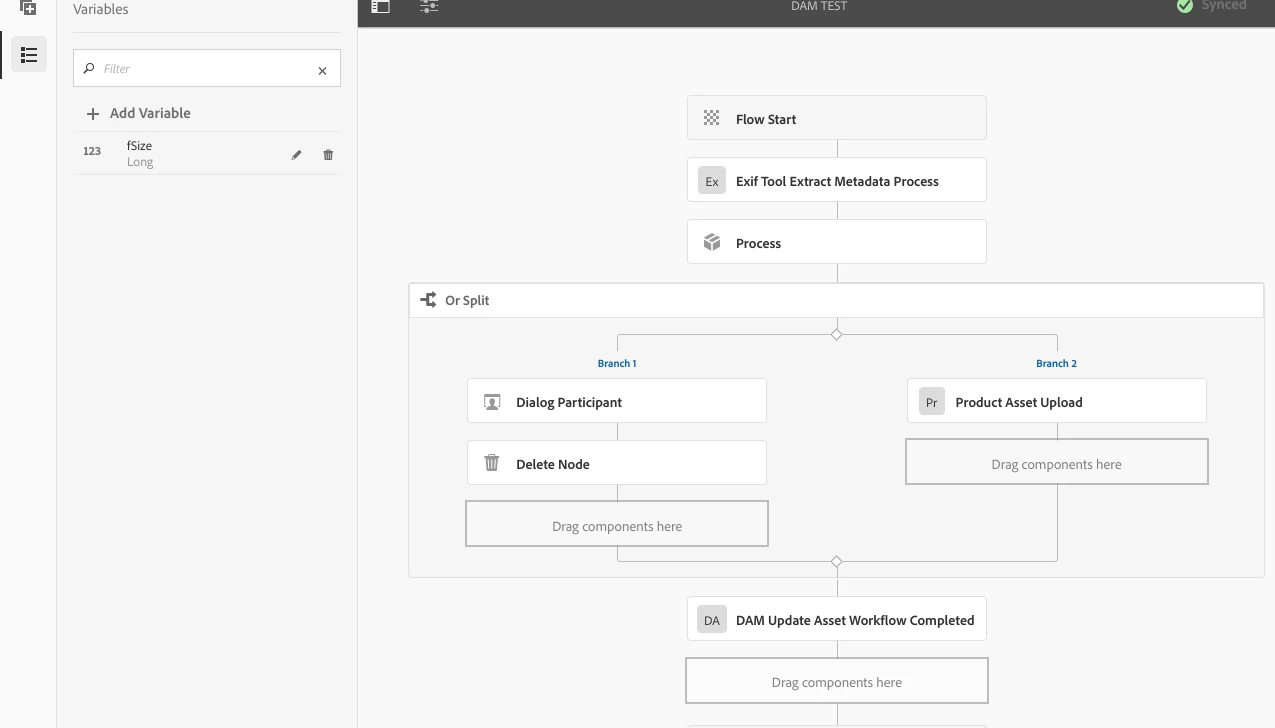
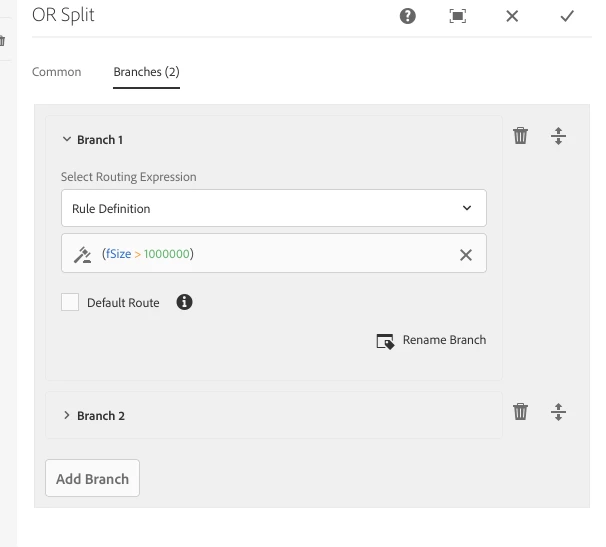
The "fSize" variable is added in the UI (initialized to 0). The script above is called in the "Process" step. I am attempting to use "fSize" in the "OR" branch; specifically if "fSize" is greater than a particular value, the first branch should be executed.


However, the first branch never executes, which leads me to suspect that the change made in the ECMA script is not being persisted. I confirmed via logging that the "fSize" key in the MetaDataMap has the expected value at the end of the ECMA script. I tried updating the meta data of both the workItem and workFlow but without success. I am following the documentation here: https://experienceleague.adobe.com/docs/experience-manager-65/developing/extending-aem/extending-workflows/using-variables-in-aem-workflows.html?lang=en#workflow-steps-without-support-for-variables


What am I missing? Any help would be appreciated!

 

This post is no longer active and is closed to new replies. Need help? Start a new post to ask your question.
Best answer by EstebanBustamante

Are you saving (persisting) your changes? Try to add workflowSession.getSession().save() after you update the metadata

See here for more context https://experienceleaguecommunities.adobe.com/t5/adobe-experience-manager/add-property-to-dam-asset-metadata-using-custom-workflow/td-p/308780

2 replies

EstebanBustamante
Community Advisor and Adobe Champion
EstebanBustamanteCommunity Advisor and Adobe ChampionAccepted solution
Community Advisor and Adobe Champion
May 19, 2023

Are you saving (persisting) your changes? Try to add workflowSession.getSession().save() after you update the metadata

See here for more context https://experienceleaguecommunities.adobe.com/t5/adobe-experience-manager/add-property-to-dam-asset-metadata-using-custom-workflow/td-p/308780

Esteban Bustamante
KMarchewaAuthor
May 19, 2023

Thanks for the replay. I tried adding that but it still is not working.

KMarchewaAuthor
May 20, 2023

Never mind - user error on my part (had Branch 2 marked as default). Adding the "save()" call fixed it.

Shiv_Prakash_Patel
Community Advisor
Community Advisor
May 19, 2023

Hi @kmarchewa ,

First Use Case : If you are selecting ECMA Script in OR Split, then you have to write check function which will return true or false at the basis of condition. In which branch it returns true that branch will be executed. (But only one branch will be execute). In your case check function will be on the basis of fSize.

For more details please check below references.

https://lhotsetechnologies.com/blog/or-split-in-workflow/ 

https://experienceleaguecommunities.adobe.com/t5/adobe-experience-manager/understanding-how-or-split-in-workflow-works/m-p/243131 

Second Use Case : When you are updating the MetaDataMap then you must have to save the sesson as below.

// Update the property value
metadataMap.put("propertyName", "newValue");

// Save the Workflow Session
workflowSession.getSession().save();

Regards,

Shiv


Shiv Prakash