Unlocking a page with system user | Community
Skip to main content
February 8, 2019
Solved

Unlocking a page with system user

  • February 8, 2019
  • 25 replies
  • 11395 views

Hi,

While coding a WorkflowProcess implementation, I need to create a "system user" who can unlock pages.

Pages are locked through a WorkflowSession on a previous workflow step.

How can I give the "system user" the permissions to unlock pages?

Obviously I don't what to use an admin session, and I'm wondering how can I grant unlock permissions in AEM Security Permissions tab!

Thank you,

Lir

This post is no longer active and is closed to new replies. Need help? Start a new post to ask your question.
Best answer by Gaurav-Behl

I'd read a thread somewhere which I'll try to find again & post here. It mentioned that 'page.canUnlock()' won't work but 'page.unlock()' will.

25 replies

Gaurav-Behl
February 11, 2019

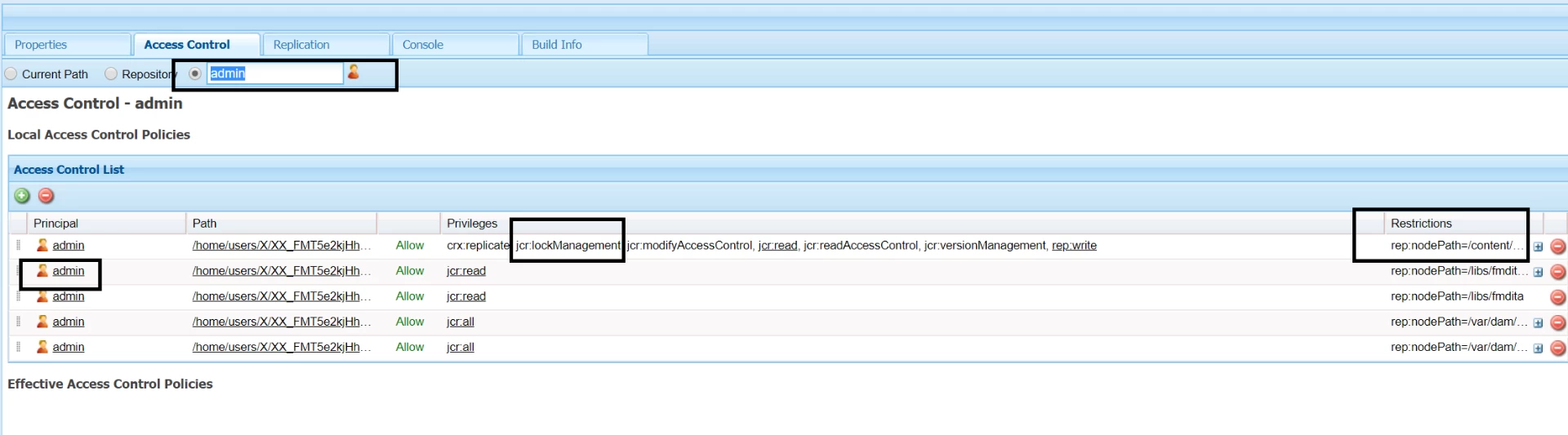
You could add that system user to the "admin" group or otherwise grant "jcr:lockManagement" and potentially, "jcr:versionManagement", "jcr:modifyAccessControl" ACLs to that system-user on that specific content path. That ways the system user would behave as "admin" for that content path. Follow "admin" user's ACLs and provide the same to system user in a restricted way.

smacdonald2008
February 11, 2019

Interesting - in my test - I used the same system used to lock and unlock. Never really thought about using 2 different system users.

Look at Gaurav's suggestion.

lirAuthor
February 11, 2019

I will, try but not quite optimistic because as a stated earlier:

- before asking the question in this forum, I made a quick attempt using the deprecated getAdministrativeResourceResolver(null); to get an admin session (who according to documentation should be able to unlock everything), but unlocking failed because page.canUnlock() returned false. Even under admin session!!?

Gaurav-Behl
February 11, 2019

If you follow ACLs on "admin" user, you can clearly notice that it has "jcr:lockManagement"  that's why admin user can unlock any other user's locks.

I doubt that the custom system user has that kind of granular access to each path in repo. Debug and you would find it out.  I assume that would work with getAdministrativeResourceResolver("admin, "admin, <path>); and not with getAdministrativeResourceResolver(null);

lirAuthor
February 13, 2019

Where can I grant "jcr:lockManagement" to my system user and on my specific content path?

I see no way of doing it in /useradmin Permissions tab of my user.

Thanks again

Gaurav-Behl
February 13, 2019

You do it via /crx/de. add the user/group and then assign appropriate permissions.

check - User, Group and Access Rights Administration

lirAuthor
February 13, 2019

Hi,

I checked: my system user already has "jcr:lockManagement" privileges.

I even gave him "jcr:all" but still he could not unlock the page.

Then for the sake of "proof of concept" I tried unlocking by making use of "admin" user via the deprecated :

getAdministrativeResourceResolver(adminAuthenticationInfo)

as Gaurav hinted.

Even the admin user could not unlock!

Can someone please try unlocking via a "system user" or admin (through code) in 6.2.

On the other hand, me and my colleagues have noticed that even unlocking through the UI (as admin) is sometimes a hit and miss. You have to log out, login again or wait for a while etc.

Is there a problem with unlocking in 6.2, do we have to wait till we upgrade to 6.4?

Thank you!

Gaurav-Behl
February 14, 2019

I don't have a 6.2 setup for now.

If you've setup the system user properly and given all ACLs then probably the next thing to try would be impersonation or other take the jcr properties/node route.

I would recommend you to go through JCR specs that explain more about lock tokens and other aspects, that would definitely throw other options to try out - JCR 2.0: 17 Locking (Content Repository for Java Technology API v2.0)

Additionally, the content repository may give permission to some sessions to remove locks for which they are not the owner. ...

In order to use the lock token as a key, it must be added to the session, thus permitting that session to alter the nodes to which the lock applies or to remove the lock. When a lock token is attached to a Session, the session becomes an owner of the lock.

I found a couple of links, check if these help -

lirAuthor
February 14, 2019

I can easily use the same "system user" to lock and then later unlock the page without even the need of impersonation, but that would not satisfy this requirement:

- The workflow initiator should be able to manually unlock the page at any time, no matter the state of the workflow. (he can't, unless my workflow code locks the page under his session)

I expected that AEM had a clear straightforward implementation of the page locking mechanism, so that developers did not need to dig into the inner workings of jcr locking.

It will take some time for me, as I'm new to AEM and JCR.

Thank you for the prompt responses, very appreciated.

lirAuthor
February 14, 2019

In any case the question remains:

Shouldn't the code below always work on an admin session?

According to AEM docs it should, but it does not!

Resource pageResource = adminResourceResolver.getResource(pagePath);

Page page = pageResource.adaptTo(Page.class);

if (page.canUnlock()) { // should always return true on admin session

    page.unlock();

}