Unable to Sign in to the local AEM 6.5 Publish Instance | Community
Skip to main content
Level 2
October 13, 2020
Solved

Unable to Sign in to the local AEM 6.5 Publish Instance

  • October 13, 2020
  • 8 replies
  • 21580 views

Hi,


I am not able to Sign in to AEM 6.5 Publish Instance. I cleared up the cache and cookies and still not able to login. 
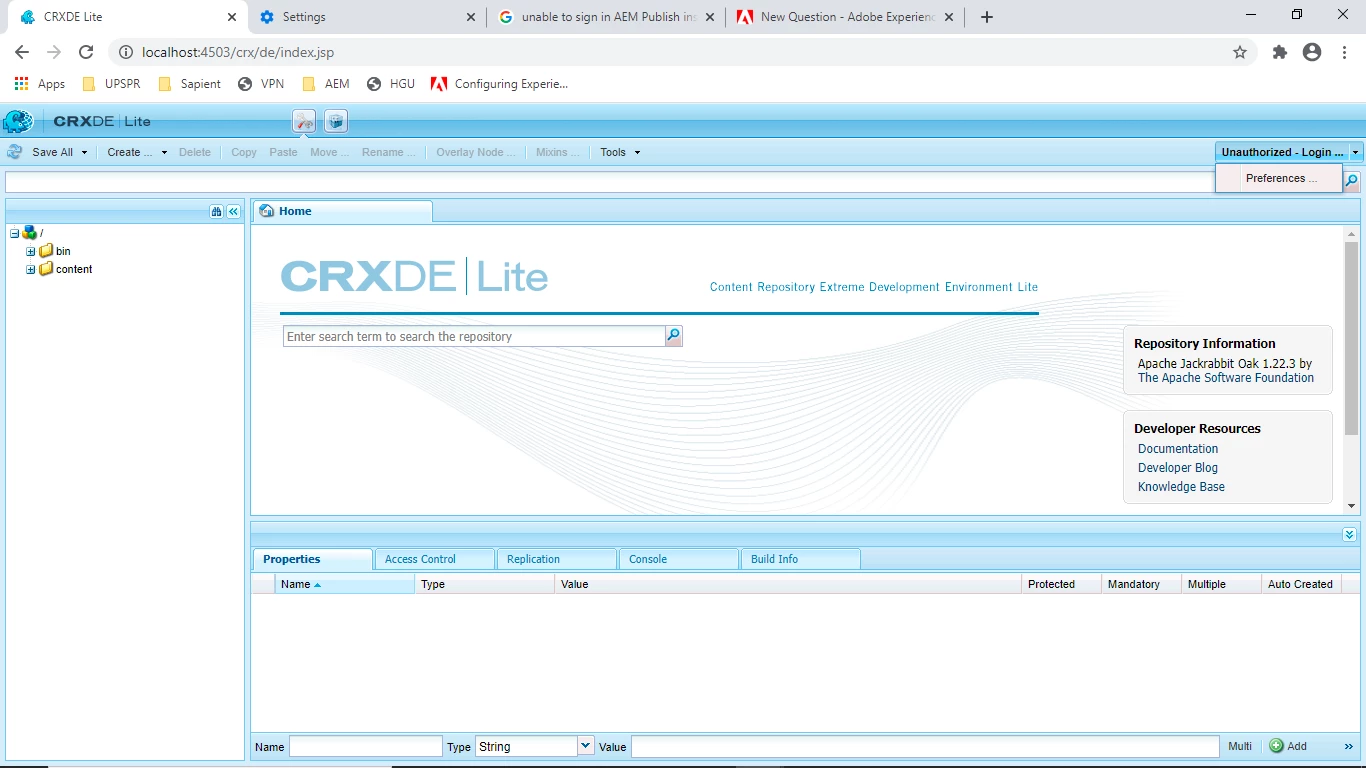
I have signed in from the machine and with the same set up earlier as well. When I click on the login button I only get to see the 'Preference'. 
Please suggest what could be the issue here.
 

This post is no longer active and is closed to new replies. Need help? Start a new post to ask your question.
Best answer by stelmad

@zameer_abbas do you have this issue an a vanilla AEM 6.5 instance? I have the  similar one after Service Pack 6  installation. I haven't found the root cause yet. Meanwhile, you should be able to use /libs/granite/core/content/login.html as a workaround at the moment I guess.

8 replies

santhosh_kumark
Level 6
October 13, 2020

Hi @zameer_abbas ,


1. Are you able to access http://localhost:4503 for publish which will redirect to http://localhost:4503/content/we-retail/us/en.html by default. If not there might be an issue with configuring publish instance setup.

2. Can you try running the same publish instance on other port number and check it(Ex:8080).


Links: https://helpx.adobe.com/in/experience-manager/6-3/sites/deploying/using/deploy.html

          http://aemconcepts.blogspot.com/2016/08/setting-up-author-and-publish-instance.html


Regards,

Santosh

Level 2
October 13, 2020
Hi Santosh, I am able to access http://localhost:4503/content/we-retail/us/en.html but I can't see any changes I am publishing from the author environment. When I tried to sign in into the CRX, I couldn't.
Nikhil-Kumar
Community Advisor
Community Advisor
October 13, 2020

@zameer_abbas  - Which version of AEM are you using ? 
Can you try restarting the server or try any other browser also check for any errors in console.

@vanegi @arunpatidar  Any suggestions on this ?

Level 2
October 13, 2020
I am using AEM Service Pack 6.5.5.0
Nirmal_Jose
Adobe Employee
Adobe Employee
October 13, 2020

Are you able to login into system console. If so,

1. Do you see any bundles not in active state. If so, please make them active

2. Open http://localhost:4502/system/console/configMgr/org.apache.sling.jcr.webdav.impl.servlets.SimpleWebDavServlet and ensure rooth path is /crx/repository

Level 2
October 13, 2020
All bundles are in active state as well. root path is also as expected. It's /crx/repository
vanegi
Adobe Employee
Adobe Employee
October 13, 2020

To debug and investigate the use case, please check the following:

I. Validate the user name, password, and that the user exists:
If the issue only happens with one or a few users, then it could be that the wrong user names or passwords are being used or the users don't exist in AEM.


Check the password:
Use Chrome browser and open Developer Tools => Network tab in the browser, then, attempt to log in again.
Select the POST request ending with j_security_check in the URL.
In the lower-right panel of the Headers tab, scroll to the bottom.
Validate that under Form Data, the password being sent in the j_password parameter is correct.


VALIDATE THAT THE USER EXISTS AND RESET THE PASSWORD:
Log in as admin user.
Go to the user administration screen.
Verify that the users exist.
Create the user if it doesn't exist or reset the password if it does.


II. Analyze broken authentication handling
If none of the above solves the problem, then:

Log in to the AEM server's OS.
Tail or view the error.log file.
View the updates to the log while attempting to log in to AEM.
If any errors or warnings are logged, then analyze those warnings. If nothing is logged, then enable a debug log with these settings:

Log Level: Debug
Log File: auth-debug.log
Loggers:
org.apache.sling.auth
com.adobe.granite.auth
com.day.crx.security.token


Also, can you try restarting the instance? If you end up needing to reset the password you could try to package the admin user account from another instance (/home/users/whatever), then put that package in a /crx-quickstart/install folder on the local filesystem. The instance will pick it up and install it automatically. 


stelmadAccepted solution
Level 2
October 13, 2020

@zameer_abbas do you have this issue an a vanilla AEM 6.5 instance? I have the  similar one after Service Pack 6  installation. I haven't found the root cause yet. Meanwhile, you should be able to use /libs/granite/core/content/login.html as a workaround at the moment I guess.

Level 2
October 13, 2020
@76529_stemakh Yes it is an vanilla AEM 6.5 instance. This work around worked for me. Thank you so much. However, I still don't understand what exactly is the issue here. Regards.
Adobe Employee
October 13, 2020

As part of a recent Service Pack the login/logout functionality has been removed from CRX/DE Lite.

April 9, 2021

Is this for only Publish instance or for Author as well ?
As for author, crx/de redirects to the default login page but for publish it doesn't.

July 11, 2022

Hi Alex, I just wanted to send you a quick text to introduce myself as your health insurance advisor. I can shop with all of the carriers to find a plan that suits your needs and budget. When is a good time to talk so that I can get all of your information to run quotes? I look forward to helping you! My Best, Allyson Bruce with USHAdvisors Reply 1 for quote OR end to opt-out.