Unable to set pipeline.type while migrating from SCR to OSGi DS annotation | Community
Skip to main content
bilal_ahmad
Level 5
May 10, 2020
Solved

Unable to set pipeline.type while migrating from SCR to OSGi DS annotation

  • May 10, 2020
  • 3 replies
  • 8715 views

Dear community members,

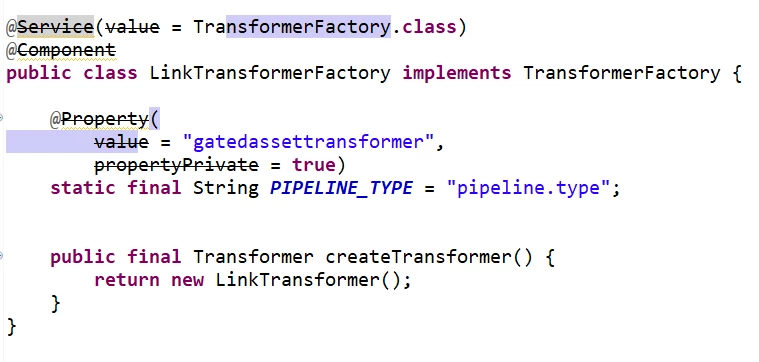
I am migrating my codebase from using SCR annotations to DS annotations. While the previous implementation sets the 'pipeline.type' property this way and it's working:


And I just tried this way to migrate it:


 but it couldn't set the property somehow. It threw:


Valuable thoughts?

Thanks in advance, Bilal.


This post is no longer active and is closed to new replies. Need help? Start a new post to ask your question.
Best answer by ArpitVarshney

Hi @bilal_ahmad 

You are doing it wrong.

Refer this blog https://medium.com/adobetech/aem-6-4-creating-a-scheduler-using-osgi-r6-annotations-4ad0b8c6fce7

Unlike with SCR annotations, it is very clean and simple to create OSGi configurations using R6 annotations by simply using @AttributeDefinition.


If you want to create your OCD in same class then you can refer below code:


package aem.core.service;

import org.apache.sling.rewriter.Transformer;
import org.apache.sling.rewriter.TransformerFactory;
import org.osgi.service.component.annotations.Activate;
import org.osgi.service.component.annotations.Component;
import org.osgi.service.component.annotations.Modified;
import org.osgi.service.metatype.annotations.AttributeDefinition;
import org.osgi.service.metatype.annotations.Designate;
import org.osgi.service.metatype.annotations.ObjectClassDefinition;


@Component(service = TransformerFactory.class, immediate = true)
@Designate(ocd = LinkTransformerFactory.Config.class)
public class LinkTransformerFactory implements TransformerFactory {

@ObjectClassDefinition(name = "LinkTransformerFactory Service", description = "LinkTransformerFactory Configuration")
public @interface Config {

@AttributeDefinition(name = "Pipeline Type", required = true)
String getPipelineType() default "gatedassettransformer";
}

@Activate
@Modified
protected void activate(final Config config) {
String pipelineType = config.getPipelineType();
}

@Override
public Transformer createTransformer() {
return null;
}
}

 

3 replies

ArpitVarshney
Community Advisor
ArpitVarshneyCommunity AdvisorAccepted solution
Community Advisor
May 10, 2020

Hi @bilal_ahmad 

You are doing it wrong.

Refer this blog https://medium.com/adobetech/aem-6-4-creating-a-scheduler-using-osgi-r6-annotations-4ad0b8c6fce7

Unlike with SCR annotations, it is very clean and simple to create OSGi configurations using R6 annotations by simply using @AttributeDefinition.


If you want to create your OCD in same class then you can refer below code:


package aem.core.service;

import org.apache.sling.rewriter.Transformer;
import org.apache.sling.rewriter.TransformerFactory;
import org.osgi.service.component.annotations.Activate;
import org.osgi.service.component.annotations.Component;
import org.osgi.service.component.annotations.Modified;
import org.osgi.service.metatype.annotations.AttributeDefinition;
import org.osgi.service.metatype.annotations.Designate;
import org.osgi.service.metatype.annotations.ObjectClassDefinition;


@Component(service = TransformerFactory.class, immediate = true)
@Designate(ocd = LinkTransformerFactory.Config.class)
public class LinkTransformerFactory implements TransformerFactory {

@ObjectClassDefinition(name = "LinkTransformerFactory Service", description = "LinkTransformerFactory Configuration")
public @interface Config {

@AttributeDefinition(name = "Pipeline Type", required = true)
String getPipelineType() default "gatedassettransformer";
}

@Activate
@Modified
protected void activate(final Config config) {
String pipelineType = config.getPipelineType();
}

@Override
public Transformer createTransformer() {
return null;
}
}
 

ArpitVarshney
Community Advisor
Community Advisor
May 10, 2020

Hi @bilal_ahmad 


I've tried the same code in my AEM instance and it is working fine for me. I am able to log the updated pipeline type which is correctly reflected.

However, if the shared code is somehow not working for you, please go through the blog link that I've shared.


Regards,

Arpit Varshney

arunpatidar
Community Advisor
Community Advisor
May 10, 2020
bilal_ahmad
Level 5
May 10, 2020
Thank you @arunpatidar, really appreciate your help. I tried this, even then i get the same error 😄 looks like I need to try this on someone else's instance or create a fresh instance and try it. Cause I don't think that it' that complicated and just refusing to set one property! Any way, thank you so much. I will keep this area updated with my findings. Thanks, Bilal.
bilal_ahmad
Level 5
May 13, 2020

Dear @arunpatidar and @arpitvarshney, Thank you very much for your valuable time and attention. While I was worried about why it wasn't working, turned out that I messed up with maven-bundle-plugin version in my project pom.xml(I was using 2.5.3 and changed it to 4.1.0 but somehow it got changed back to 2.5.3). Once i fixed that, I was being able to set the property the way I was trying without any changes in my java class:

