
Unable to get content value using ajax call to json servlet end point | Community
Skip to main content
Nandheswara
Level 4
August 4, 2023
Solved

Unable to get content value using ajax call to json servlet end point

  • August 4, 2023
  • 2 replies
  • 959 views

Hi all,


I'm getting the content using custom servlet end point and making the ajax call getting the values of the json content, I able to get the first array value as "fragmentName" mention in the below screenshot but i'm unable get the inner json array values like textField, textArea, NumberField, etc, Can any one tell how to get the values of those fields please.


JS I used for making ajax call

function loadDoc() { var xhttp = new XMLHttpRequest(); xhttp.onreadystatechange = function () { if (xhttp.readyState == 4) { // Javascript function JSON.parse to parse JSON data var jsonObj = JSON.parse(xhttp.responseText); // jsonObj variable now contains the data structure document.getElementById("fragmentname").innerHTML = jsonObj.result[0].fragmentName; document.getElementById("textfield").innerHTML = jsonObj.result[0].content-exporter-one[0].textField; } } var url = "/bin/exporter"; xhttp.open("GET", url, true); xhttp.send(); } function myFunction(xhttp) { document.getElementById("demo").innerHTML = xhttp.responseText; }

HTML Code

<div> <sly data-sly-use.clientlib="/libs/granite/sightly/templates/clientlib.html" data-sly-call="${clientlib.js @ categories='ajaxservlet.clientlib'}" /> <div id="demo"> <h3>Fragment Name : <h3 id="fragmentname"></h3> </h3> <h3>Text Name : <h3 id="textfield"></h3> </h3> <button type="button" onclick="loadDoc(myFunction)">Get Content </button> </div> </div>

JSON Servlet End Point
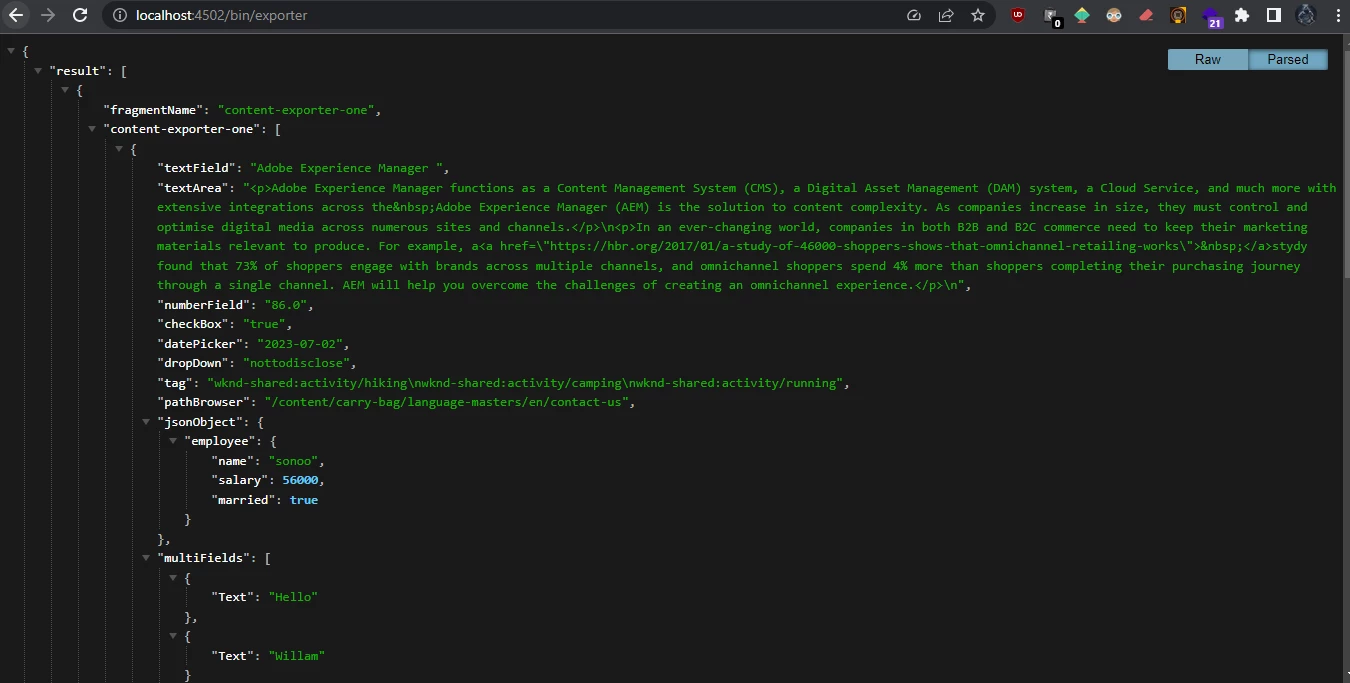
 

Thanks

Nandheswara

This post is no longer active and is closed to new replies. Need help? Start a new post to ask your question.
Best answer by Mahedi_Sabuj

Hi @nandheswara, Hyphens are not allowed in JavaScript variable or Object property names. Variables/Properties cannot contain - (hyphen) because that is read as the subtract operator.

To fetch property with hyphen, need to use bracket notation instead of dot notation. In your case, you need to update textField section as below:

document.getElementById("textfield").innerHTML = jsonObj.result[0]["content-exporter-one"][0].textField;

2 replies

Mahedi_Sabuj
Community Advisor
Mahedi_SabujCommunity AdvisorAccepted solution
Community Advisor
August 4, 2023

Hi @nandheswara, Hyphens are not allowed in JavaScript variable or Object property names. Variables/Properties cannot contain - (hyphen) because that is read as the subtract operator.

To fetch property with hyphen, need to use bracket notation instead of dot notation. In your case, you need to update textField section as below:

document.getElementById("textfield").innerHTML = jsonObj.result[0]["content-exporter-one"][0].textField;

Mahedi Sabuj
AsifChowdhury
Community Advisor
Community Advisor
August 4, 2023

Hi @nandheswara 

You can't call a property with hyphens with .(dot) from JSON.

try in this way jsonObj.result[0]['content-exporter-one'][0].textField;


In JavaScript, when accessing object properties using dot notation, property names must follow the rules for valid JavaScript identifiers. Identifiers cannot contain hyphens ("-"). Instead, they should consist of letters (both uppercase and lowercase), digits, underscores, and dollar signs.

For property names that contain hyphens or other special characters, you cannot use dot notation. Instead, you must use square bracket notation.