
Unable to delete multifield items in Content Fragments | Community
Skip to main content
mgustavocoder
Level 2
October 31, 2019
Solved

Unable to delete multifield items in Content Fragments

  • October 31, 2019
  • 1 reply
  • 1814 views

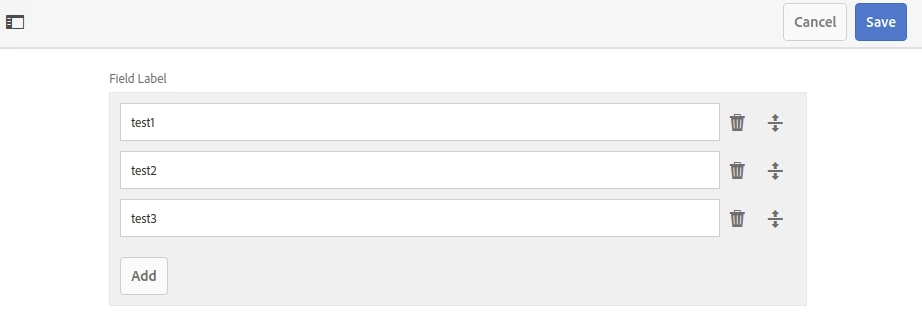
I can't delete the multifield items in the content fragment;

Adobe Experience Manager (6.4.5.0)

Steps:

- Create a new fragment with a multifield

- Add some items

- Save the fragment

- Open the fragment and see the items are in the list

- Delete the items

- Save

Result:

- Open the fragment and see the items have not been deleted

Expected Result:

- Open the fragment and see the items deleted
This post is no longer active and is closed to new replies. Need help? Start a new post to ask your question.
Best answer by Umesh_Sondhi

Please make sure the component doesn't have any default values or You can try deleting it from the content folder:

  • Open /crx/de
  • Go to /content/YOUR_APP_NAME/YOUR_PAGE_NAME/jcr:content/root
  • Find the multifield component you are using and delete fields present in the node

Check if it still showing the values or not

1 reply

Umesh_Sondhi
Umesh_SondhiAccepted solution
Level 4
November 14, 2019

Please make sure the component doesn't have any default values or You can try deleting it from the content folder:

  • Open /crx/de
  • Go to /content/YOUR_APP_NAME/YOUR_PAGE_NAME/jcr:content/root
  • Find the multifield component you are using and delete fields present in the node

Check if it still showing the values or not