Unable to create a workflow launcher in 6.5 | Community
Skip to main content
Level 4
September 24, 2020
Solved

Unable to create a workflow launcher in 6.5

  • September 24, 2020
  • 4 replies
  • 3430 views

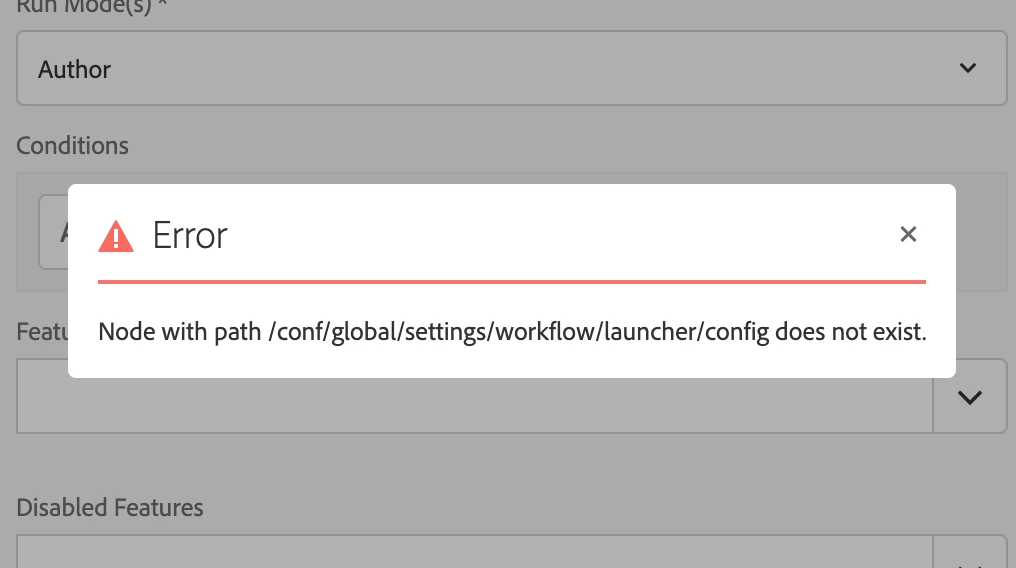
I am currently using AEM 6.5 and trying to create a new launcher by navigating to tools>workflows>launcher>create>add launcher . When i enter all the required data i see an error dialog with (Node with path /conf/global/settings/workflow/launcher/config does not exist.) 

This post is no longer active and is closed to new replies. Need help? Start a new post to ask your question.
Best answer by BrianKasingli

@aemnewbie

I can definitely replicate your situation.
The resolution here is simple, to make sure the sling:Folder structure exists under /conf/global/settings/workflow/launcher/config (illustrated below):
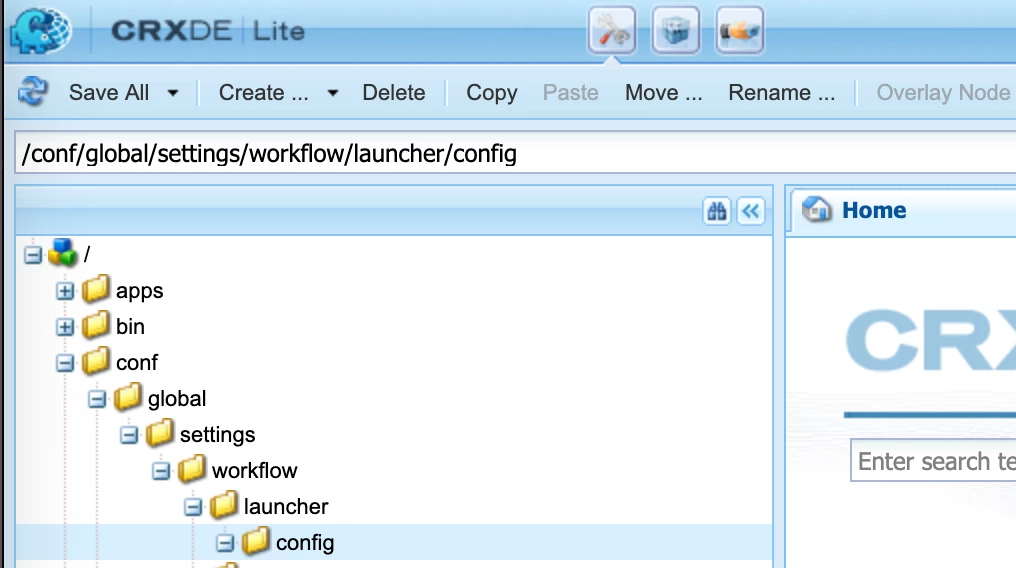
A simple fix is to create the exact structure above, as you see in the screenshot. In case if you've completely deleted the /conf/global folder, I've created a content package that you can download & install which has the exact setup as in the screenshot above; if you would like to re-setup the structure, you can go straight to http://localhost:4502/libs/granite/configurations/content/view.html/conf, to create the initial structure off /conf/global, but you must go into crx/de to complete the structure, by creating more sling:Folder nodes.

Good luck!

4 replies

Varun_Shakya
Community Advisor
Community Advisor
September 24, 2020
  • Did the user have access to create Workflow launchers, check the permissions of the User.
  • Try creating the launcher in Vanilla AEM instance.

This seems the permission issue, if permissions are fine check the logs get more details and provide it here.

AEMnewbieAuthor
Level 4
September 24, 2020

Hello @varun_shakya I am logged in as admin.  And i checked the error logs.. I dont see any logging for this .. I checked the network tab i see that it is trying to make this call http://localhost:4504/libs/cq/workflow/launcher and failing with 500 error and this is the response.. And if it helps i am using SP 6.5.4


<html>
<head>
<title>Node with path /conf/global/settings/workflow/launcher/config does not exist.</title>
</head>
<body>
<h1>Node with path /conf/global/settings/workflow/launcher/config does not exist.</h1>
<table>
<tbody>
<tr>
<td>Status</td>
<td><div id="Status">500</div></td>
</tr>
<tr>
<td>Message</td>
<td><div id="Message">Node with path /conf/global/settings/workflow/launcher/config does not exist.</div></td>
</tr>
<tr>
<td>Location</td>
<td><a href="" id="Location"></a></td>
</tr>
<tr>
<td>Parent Location</td>
<td><a href="" id="ParentLocation"></a></td>
</tr>
<tr>
<td>Path</td>
<td><div id="Path"></div></td>
</tr>
<tr>
<td>Referer</td>
<td><a href="" id="Referer"></a></td>
</tr>
<tr>
<td>ChangeLog</td>
<td><div id="ChangeLog">&lt;pre&gt;&lt;/pre&gt;</div></td>
</tr>
</tbody>
</table>
<p><a href="">Go Back</a></p>
<p><a href="">Modified Resource</a></p>
<p><a href="">Parent of Modified Resource</a></p>
</body>
</html>

arunpatidar
Community Advisor
Community Advisor
September 24, 2020

Could you please try creating nodes(sling:Folder) at conf /conf/global/settings/workflow/launcher/config

It may be required before creating launchers.

Anyways you have to deploy this launcher vai code so nodes needs to be created. so no harm to create manually.


Arun Patidar
AEMnewbieAuthor
Level 4
September 24, 2020


Hello @arunpatidar ..I tried that but it still fails to create it. Now when i try to create the launcher i see 

Caused by: org.apache.jackrabbit.oak.api.CommitFailedException: OakConstraint0001: /conf/global/settings/workflow/launcher/config[[nt:folder]]: No matching definition found for child node -237933618 with effective type [cq:WorkflowLauncher]


Vijayalakshmi_S
Level 10
September 24, 2020

Hi @aemnewbie,

Can you try the below

  • Create a package with filter - /conf/global/settings/workflow/launcher/config (where there is no child nodes under config - Like empty launcher config filter)from one of your local instance
  • In your problematic instance,
    • Create a backup with same filter
    • Install the empty launcher config package built from other instance (the one from step 1)
    • Navigate to Workflow -> Launchers console -> Try creating one -> See if POST call to /libs/cq/workflow/launcher is 200
AEMnewbieAuthor
Level 4
September 25, 2020
@vijayalakshmi_s Nah!! All the instances that i have access to , they all have the same issue
BrianKasingli
Community Advisor and Adobe Champion
BrianKasingliCommunity Advisor and Adobe ChampionAccepted solution
Community Advisor and Adobe Champion
September 24, 2020

@aemnewbie

I can definitely replicate your situation.

The resolution here is simple, to make sure the sling:Folder structure exists under /conf/global/settings/workflow/launcher/config (illustrated below):

A simple fix is to create the exact structure above, as you see in the screenshot. In case if you've completely deleted the /conf/global folder, I've created a content package that you can download & install which has the exact setup as in the screenshot above; if you would like to re-setup the structure, you can go straight to http://localhost:4502/libs/granite/configurations/content/view.html/conf, to create the initial structure off /conf/global, but you must go into crx/de to complete the structure, by creating more sling:Folder nodes.

Good luck!

AEMnewbieAuthor
Level 4
September 25, 2020

@briankasingli..I created the launcher and the config folder at the same location but that still gives me an error ..When i used the package that was shared ..It works.. Trying to find out what exactly is missing in my setting. I want to try it without using the package ..


Steps i tried


This path was already existing  /conf/global/settings/workflow in my instance

I went ahead and created the launcher folder and then a config folder under it .. But that doesn't work