Unable to build the blueprint template | Adobe Higher Education
Skip to main content
Level 2
April 24, 2023

Unable to build the blueprint template

  • April 24, 2023
  • 8 の返信
  • 5839 ビュー

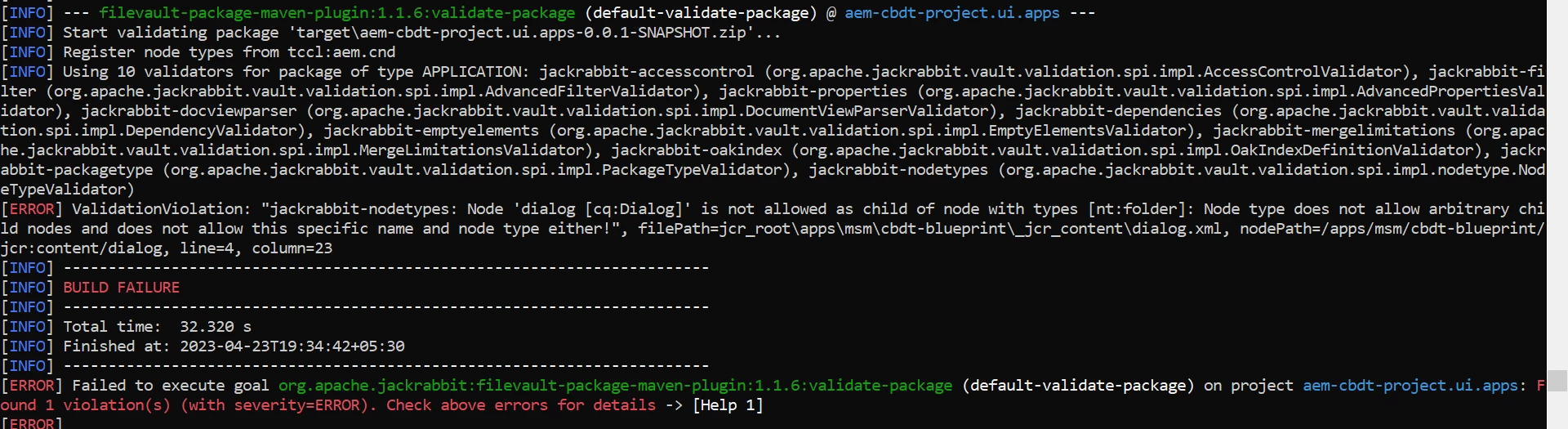
When I try to build the blueprint template, I get the following error. I have included the msm folder under apps and have also added the path in filter.xml. Am I missing something?
 

このトピックへの返信は締め切られました。

8 の返信

Tanika02
Level 7
April 24, 2023

Hello @sethia_varsha - 


Looking at the console error which you have attached above, It seems : 

  • That while creating the MSM blueprint you were trying to add the cq:dialog node as a child of the the parent node nt:folder which is not permissible.
  • However, if you would try creating a cq:dialog node under a nt:folder from CRXDE it would give a warning and not let you create a cq:dialog node under a nt:folder. 


Please validate the MSM folder structure under apps.

Please try to create Blueprint from the sites console : 


Thanks,

Tanika

sethia_varsha作成者
Level 2
April 24, 2023

Hi Tanika, 


I have created the blueprint using the sites console. It is also working as expected. I am getting the above console error when I am deploying this template to higher environments.

Tanika02
Level 7
April 24, 2023

Hello @sethia_varsha - 


But I see the code build is failed.

Because as I mentioned it seems : 

  • That while creating the MSM blueprint you were trying to add the cq:dialog node as a child of the the parent node nt:folder which is not permissible.
  • However, if you would try creating a cq:dialog node under a nt:folder from CRXDE it would give a warning and not let you create a cq:dialog node under a nt:folder. 

Can you share the .xml (content/dialog) from the ui.apps folder for the MSM blueprint that you might have added in your codebase.

Adobe Employee
April 24, 2023

Hi @sethia_varsha ,


As per your screenshot , you are creating cbdt-blueprint as nt-folder, it needs to be jcr:primaryType="nt:unstructured".


Please update the same and then it should work.


Thanks

Bimmi Soi

sethia_varsha作成者
Level 2
April 28, 2023

Hi @bimmiso,

Updating the version of 'filevault-package-maven-plugin' in pom resolved the issue. Thanks for your help 🙂


sethia_varsha作成者
Level 2
April 24, 2023

Hi @bimmiso ,


I have created the node as jcr:primaryType="nt:unstructured". But when I create a package for it and try building, then it takes the folder type as nt:folder. Also manually adding the .content xml file with jcr:primaryType="sling:Folder" is resolving the issue. But I see that in wknd site it works without the xml file, therefore it should work in my case too but somehow, it's not being able to take the correct file type.

Adobe Employee
April 24, 2023

Could you please paste here whats in the content.xml  of cbdt-blueprint?

sethia_varsha作成者
Level 2
April 24, 2023

Hi @bimmiso,


<?xml version="1.0" encoding="UTF-8"?>
<jcr:root xmlns:jcr="http://www.jcp.org/jcr/1.0" xmlns:nt="http://www.jcp.org/jcr/nt/1.0" xmlns:cq="http://www.day.com/jcr/cq/1.0" xmlns:sling="http://sling.apache.org/jcr/sling/1.0"
jcr:primaryType="cq:Page">
<jcr:content
cq:lastModified="{Date}2023-04-21T12:59:05.071+05:30"
cq:lastModifiedBy="admin"
cq:template="/libs/wcm/msm/templates/blueprint"
jcr:primaryType="nt:unstructured"
jcr:title="CBDT Blueprint"
sling:resourceType="wcm/msm/components/blueprint"
sitePath="/content/cbdt/language-masters">
<dialog/>
</jcr:content>
</jcr:root>

Adobe Employee
April 24, 2023

And I believe the filter.xml has 

<filter root="/apps/msm/cbdt-blueprint" mode="merge"/>

sethia_varsha作成者
Level 2
April 24, 2023

Yes @bimmiso 

Level 2
November 17, 2023

The following version of plugin should resolve the issue


<groupId>org.apache.jackrabbit</groupId> <artifactId>filevault-package-maven-plugin</artifactId> <extensions>true</extensions> <version>1.3.4</version>