Unable to add variable to the workflow | Community
Skip to main content
ngọc_duyn633459
May 26, 2025
Solved

Unable to add variable to the workflow

  • May 26, 2025
  • 3 replies
  • 659 views

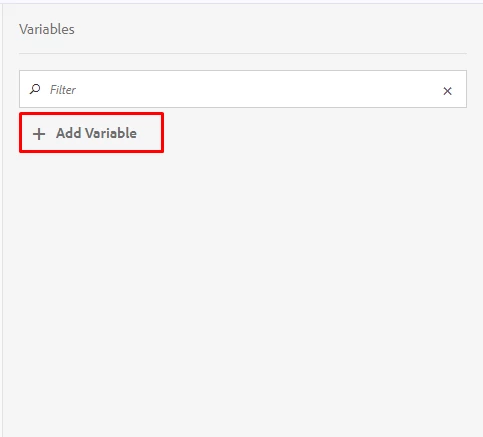
I am experiencing an issue in AEM (version 6.5.9.0) when I click the Add Variable button in the Workflow, no dialog appears at all. The UI does not respond or show any window for adding variables.

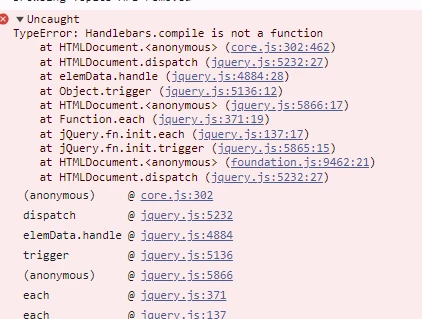
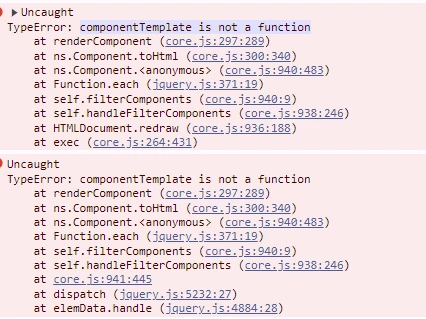
I checked the browser console and found the following two errors:

  • Handlebars.compile is not a function

  • componentTemplate is not a function

Please can you advise if you know how to resolve this?

Thank you for your time.

This post is no longer active and is closed to new replies. Need help? Start a new post to ask your question.
Best answer by K_M_K_Srikanth

Option 1: Use Clientlib Dependencies (Recommended in AEM)

Ensure your clientlibs are set up with proper dependencies:

// In /apps/your-project/clientlibs/your-script/.content.xml
<cq:ClientLibraryFolder
    jcr:primaryType="cq:ClientLibraryFolder"
    categories="[your.project.script]"
    dependencies="[your.project.handlebars]" />

Folder structure:

clientlibs/
├── handlebars/
│   └── js/
│       └── handlebars.min.js
├── your-script/
    └── js/
        └── yourcode.js (uses Handlebars)

Option 2: Load Handlebars Before Your Script (Static HTML)

Manually ensure script order (somewhere in head.html):

<!-- Correct load order -->
<script src="/etc.clientlibs/your-project/handlebars.js"></script>
<script src="/etc.clientlibs/your-project/dependent-script.js"></script>

Option 3: Wait for DOM and Check if Handlebars is Ready

Use a runtime check to ensure Handlebars is available:

document.addEventListener('DOMContentLoaded', function () {
    if (typeof Handlebars !== 'undefined') {
        const template = Handlebars.compile("<p>Hello, {{name}}!</p>");
        const html = template({ name: "World" });
        document.getElementById("output").innerHTML = html;
    } else {
        console.error("Handlebars not loaded!");
    }
});
3 replies

K_M_K_Srikanth
Level 2
May 26, 2025

Hi @ngọc_duyn633459 ,


Can you confirm by running the below snippet in browser console

typeof Handlebars // should return "function" or "object"

If typeof Handlebars returns "function" or "object", it means the Handlebars library is being loaded, but it's likely loading after the error occurs — indicating a script order issue.

If it returns "undefined", then Handlebars is not loaded at all, and you’ll need to explicitly include handlebars.js either via a <script> tag or through an AEM clientlib.

Fixing this issue will likely resolve the componentTemplate is not a function error as well, since that error depends on Handlebars being available and compiled correctly.


ngọc_duyn633459
May 26, 2025

Hi,

I checked and typeof Handlebars returns "object", so the library is loaded.

I’m new to AEM and unsure of the next steps to fix this issue.

Could you please explain simply what I should do next to solve the problem?

Thank you very much for your time and help!

K_M_K_Srikanth
K_M_K_SrikanthAccepted solution
Level 2
May 26, 2025

Option 1: Use Clientlib Dependencies (Recommended in AEM)

Ensure your clientlibs are set up with proper dependencies:

// In /apps/your-project/clientlibs/your-script/.content.xml
<cq:ClientLibraryFolder
    jcr:primaryType="cq:ClientLibraryFolder"
    categories="[your.project.script]"
    dependencies="[your.project.handlebars]" />

Folder structure:

clientlibs/
├── handlebars/
│   └── js/
│       └── handlebars.min.js
├── your-script/
    └── js/
        └── yourcode.js (uses Handlebars)

Option 2: Load Handlebars Before Your Script (Static HTML)

Manually ensure script order (somewhere in head.html):

<!-- Correct load order -->
<script src="/etc.clientlibs/your-project/handlebars.js"></script>
<script src="/etc.clientlibs/your-project/dependent-script.js"></script>

Option 3: Wait for DOM and Check if Handlebars is Ready

Use a runtime check to ensure Handlebars is available:

document.addEventListener('DOMContentLoaded', function () {
    if (typeof Handlebars !== 'undefined') {
        const template = Handlebars.compile("<p>Hello, {{name}}!</p>");
        const html = template({ name: "World" });
        document.getElementById("output").innerHTML = html;
    } else {
        console.error("Handlebars not loaded!");
    }
});
SreenivasBr
Level 4
May 26, 2025

Any custom client libraries being implemented? Does this happen in a vanilla instance of AEM 6.5.9?

ngọc_duyn633459
May 27, 2025

Hi there, thanks for asking

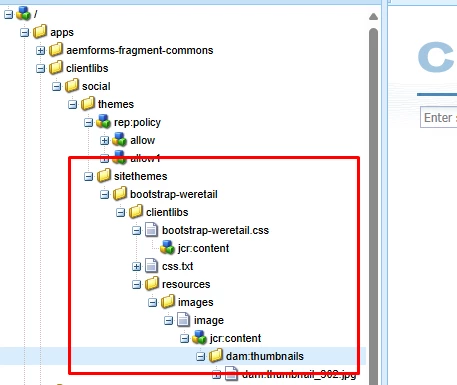
This is the only client libraries that I can find. But seems like this is not the root cause.

kautuk_sahni
Community Manager
Community Manager
July 2, 2025

@ngọc_duyn633459 Just checking in — were you able to resolve your issue?
We’d love to hear how things worked out. If the suggestions above helped, marking a response as correct can guide others with similar questions. And if you found another solution, feel free to share it — your insights could really benefit the community. Thanks again for being part of the conversation!

Kautuk Sahni