Unable to add external github repository to Cloud Manager | Community
Skip to main content
This post is no longer active and is closed to new replies. Need help? Start a new post to ask your question.
Best answer by AnkurAhlawat-1

Hi @mothersky ,


Requesting you to please raise Adobe support ticket, As per me your configuration looks correct. Either they need to allow this URL from backend or this bug occurred in latest cloud manager release.

Please post here if , this is fixed by Adobe support team.


regards,

Ankur

2 replies

giuseppebaglio
Level 10
May 12, 2025

Cloud Manager supports GitHub (including GitHub Enterprise), GitLab, and Bitbucket repositoriesThe repository must be accessible via HTTPS and must not require interactive authentication at the time of registration (access tokens will be configured later if needed).

Please review the official guide to identify any problems: https://experienceleague.adobe.com/en/docs/experience-manager-cloud-manager/content/managing-code/external-repositories 

 
MotherSkyAuthor
May 12, 2025

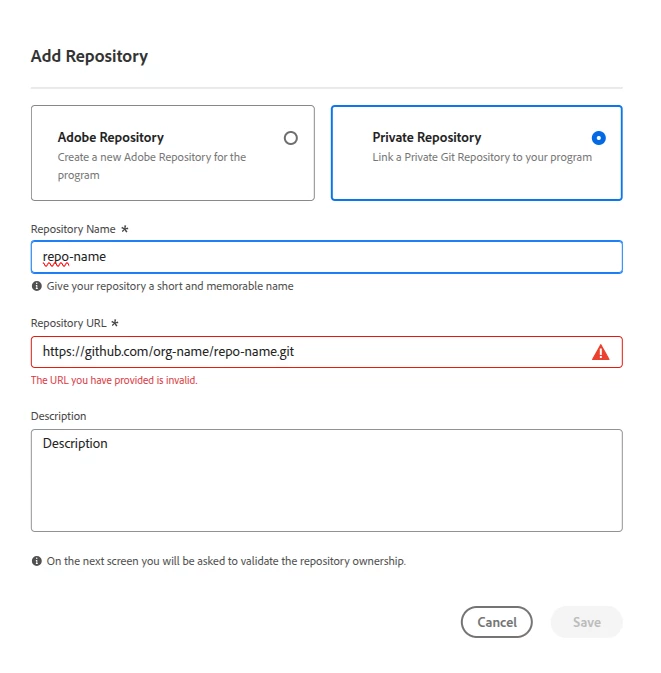
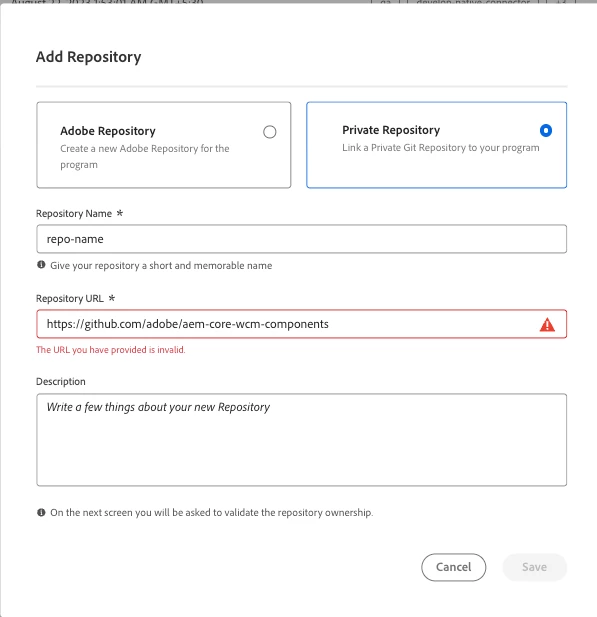
Thank you for your reply, The repository is active and accessible via HTTPS. The problem is that any URL I try (Tried different repos as well) is considered invalid as seen in the screenshot.

AmitVishwakarma
Community Advisor
Community Advisor
May 12, 2025

Hi @mothersky ,

This is a known validation issue that typically arises due to one or more of the following:

1. Correct URL Format

You must not include .git at the end of the repository URL.

Incorrect:

https://github.com/org-name/repo-name.git

Correct

https://github.com/org-name/repo-name

Remove the .git suffix from the URL and try again.


2. Publicly Reachable or Access via Token

Cloud Manager needs to validate the repository without interactive login. You can link private repos, but you’ll be prompted to validate via OAuth or token afterward.

  - Ensure the repo exists and is accessible (private is fine, as long as you authenticate it later).

  - No 2FA prompt must be required at this stage.

3. Use GitHub.com (not SSH, not enterprise self-hosted unless supported)

If you're using GitHub Enterprise, ensure it's hosted on a publicly accessible domain.

4. Use Only Supported Hosts

Only these Git services are supported:

  - GitHub

  - GitHub Enterprise (cloud or accessible on the internet)

  - GitLab

  - Bitbucket

  - Others (like Azure DevOps) are not supported.


5. No Extra Characters or Typos

Double-check:

  - No trailing spaces

  - No hidden characters or carriage returns if you copy-paste


Example of a Working URL Format

https://github.com/adobe/aem-core-wcm-components


Regards,
Amit


AnkurAhlawat-1
AnkurAhlawat-1Accepted solution
Level 6
May 13, 2025

Hi @mothersky ,


Requesting you to please raise Adobe support ticket, As per me your configuration looks correct. Either they need to allow this URL from backend or this bug occurred in latest cloud manager release.

Please post here if , this is fixed by Adobe support team.


regards,

Ankur

MotherSkyAuthor
May 13, 2025

Hi @ankurahlawat-1.


Thank you for your reply. I will raise a support ticket as it seems that no link can bypass their validation. I will keep you updated when resolved.

Supriya_Savre
Level 4
June 10, 2025

Hi @mothersky,

Were you able to get the issue resolved with Adobe Support? Please let us know if you did, this would help others with similar issue find the solution more easily.