Turning off minification of js files | Community
Skip to main content
Level 2
September 2, 2025
Solved

Turning off minification of js files

  • September 2, 2025
  • 4 replies
  • 553 views

Greetings,

Since a deployment we made yesterday, js files for our components are appearing minified, we were wondering if we could turn it off.

I understand is better for our security, but our project has strict SLAs and we relied heavily on browser overrides for the most common support tickets and basic developments, so we were wondering if turning it off is an option in AEMAACS.


Thanks in Advance!

Best Regards
Best answer by DanielMa63

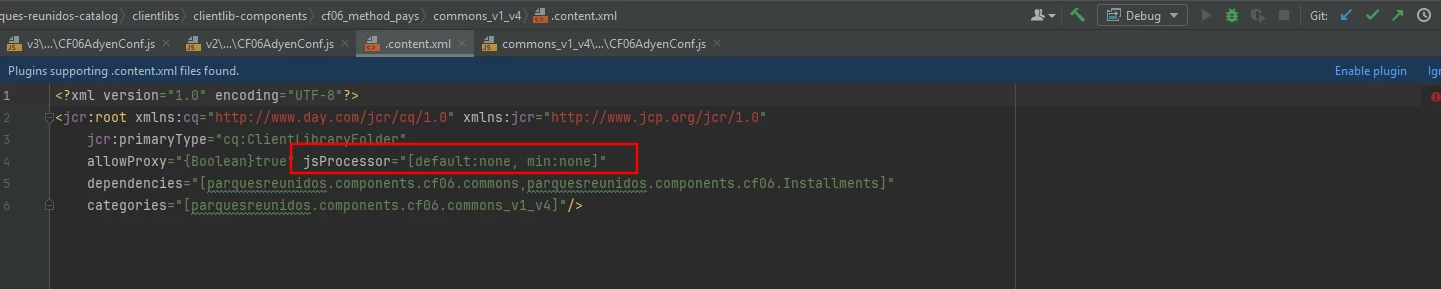
In case anyone is struggling with this issue still, Adobe support helped us out and informed us that while minification is on by default in AEMAACS, you can turn it off per component adding this jsProcessor property in the content.xml for each components clientlib


Best Regards

4 replies

anupampat
Community Advisor
Community Advisor
September 2, 2025

Hi @danielma63 ,

Please check if this helps - https://experienceleaguecommunities.adobe.com/t5/adobe-experience-manager/js-minify-in-aem-6-5/m-p/579443  ?  minify should be false ofcourse.

Regards,

Anupam

Level 2
September 2, 2025

Hello @anupampat we have tried including this config with these values in our project


com.adobe.granite.ui.clientlibs.impl.HtmlLibraryManagerImpl.cfg.json

 {
  "minify": false, 
  "debug": true, 
  "gzip": true
}

But it does not seem to be working so far


Best Regards

September 2, 2025

have you tried to use debugClientlibs=true request parameter? Not sure if it sill works with ACS though.


https://experienceleague.adobe.com/en/docs/experience-cloud-kcs/kbarticles/ka-16935

Level 2
September 3, 2025

Yes, that is one thing we tried after opening a ticket to support this was their response
Upon verification, I would like to inform you that there is a change in Clientlibs Minification in AEM as a Cloud Service.
Please find the details below
• Historically, minification in AEM was controlled via the HTML Library Manager OSGi config, either globally or per-clientlib.
• AEM as a Cloud Service now minifies JS files automatically at build time (via FACT tool). • This is due to a recent product update/feature toggle, so code is minified by default—even without code changes on your end. Possible solutions/workarounds: • Global/off for all clientlibs is not possible; global OSGi config is ignored in Cloud Service.
• However it is possible per clientlib: you can disable minification for individual clientlibs by adding this property: jsProcessor: [ "default:none", "min:none" ]

Could you please try the same and provide your feedback?

So far in our testing adding that property in the context.xml of the clientlib has not worked.


It seems minification is the default now for AEMAACS

DanielMa63AuthorAccepted solution
Level 2
November 18, 2025

In case anyone is struggling with this issue still, Adobe support helped us out and informed us that while minification is on by default in AEMAACS, you can turn it off per component adding this jsProcessor property in the content.xml for each components clientlib


Best Regards

VishalKa5
Level 5
November 20, 2025

HI @danielma63 ,

In AEMaaCS you cannot fully turn off minification for clientlibs because the cloud build pipeline automatically minifies and bundles JS/CSS as part of the Adobe-managed optimization process. This behavior is not configurable like on-prem.

If you need non-minified JS for debugging, the only options are:

Use local SDK (AEM as a Cloud Service local environment), where minification is off.

Use source maps in your clientlibs so you can debug readable code.

Use browser devtools “Pretty Print”.

AEMaaCS minification cannot be disabled; use source maps or local SDK for readable JS.