Translation connector - implementation for scope requests | Community
Skip to main content
hmuralt
June 30, 2017
Solved

Translation connector - implementation for scope requests

  • June 30, 2017
  • 6 replies
  • 3337 views

We are currently developing a translation connector based on the example implementation (https://github.com/Adobe-Marketing-Cloud/aem-translation-framework-bootstrap-connector) and using the translation API documentation (https://docs.adobe.com/docs/en/aem/6-2/develop/ref/javadoc/com/adobe/granite/translation/api/package-summary.html) as a help.

We are using AEM 6.2 and struggling with implementing the optional scoping request path as shown in this diagram:

https://files.acrobat.com/a/preview/32824bd9-6cc6-41b4-bc7b-8e7c4d2c7d65

Our problem is that the “createTranslationJob” method on the TranslationService Interface (com.adobe.granite.translation.api) is called twice for the same translation job project. The first time when the user clicks on “Request scope”.  The second time when he clicks on “Start” after scoping is complete. Moreover, the translation objects are only uploaded to the first job and not the second one.

We would have expected that AEM calls “createTranslationJob” only once for a translation project and updates the status of the translation job  from SCOPE_COMPLETE to COMMITED_FOR_TRANSLATION by calling “updateTranslationJobState”.

Why is “createTranslationJob” called twice?

Is there any way to figure out that createTranslationJob is called the second time for the same translation project? And what the returned job id of the first call is?

Thanks for the help.
This post is no longer active and is closed to new replies. Need help? Start a new post to ask your question.
Best answer by hmuralt

No the code is not on a public git server.

But I found out that the same happens with the bootstrap connector.

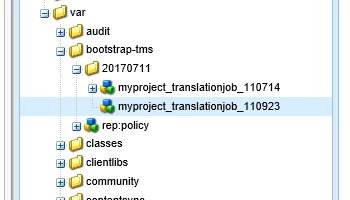
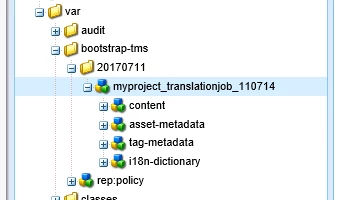
Clicking on "Request scope" will set the job status to SCOPE_REQUESTED and create a translation job with the content to translate:

So far so good. Setting the job status to SCOPE_COMPLETE and then clicking on "start" will create a new translation job:

Without any content to translate though (which results in errors later in the workflow)

Seems to me to be a bug in the AEM translation API. Or the bootstrap example is also not able to handle multiple "createTranslationJob" calls for the same project.

6 replies

kautuk_sahni
Community Manager
Community Manager
July 3, 2017

Veena_07bsloki​ Any help here ?

~kautuk

Kautuk Sahni
navinkaushal
January 26, 2021
@Kautul I have the same issue.
VeenaVikraman
Community Advisor
Community Advisor
July 5, 2017

Hi Kautuk

      Apologies. I have not worked with translation api. But I would still try to implement this in my local and check the requirement mentioned here

Thanks

Veena

hmuralt
hmuraltAuthor
July 10, 2017

Hi Veena

Thanks for having a look at this.

viveksachdeva
Community Advisor
Community Advisor
July 10, 2017

Do you happen to have sample code on github in which you are facing issue?

hmuralt
hmuraltAuthorAccepted solution
July 11, 2017

No the code is not on a public git server.

But I found out that the same happens with the bootstrap connector.

Clicking on "Request scope" will set the job status to SCOPE_REQUESTED and create a translation job with the content to translate:

So far so good. Setting the job status to SCOPE_COMPLETE and then clicking on "start" will create a new translation job:

Without any content to translate though (which results in errors later in the workflow)

Seems to me to be a bug in the AEM translation API. Or the bootstrap example is also not able to handle multiple "createTranslationJob" calls for the same project.

November 7, 2017

I am not even able to compile the translation code provide here GitHub - Adobe-Marketing-Cloud/aem-translation-framework-bootstrap-connector: Bootstrap Translation connector using the …

I am trying to follow these steps.. Adobe Experience Manager Help | Getting Started with the Translation Bootstrap Connector

However, first, Archiva servlet this link does not work. I had to download the jar from some other website and install it using AEM package manager. Second. after downloading build fails on https://repo.adobe.com/nexus/content/groups/public/com/adobe/granite/com.adobe.granite.translation.api/1.2.0/  version 1.2.0 does not exist. I changed it to 1.1.18 and it still fails to connect. I have set my settings.xml as per Adobe Experience Manager Help | Getting Started with the Translation Bootstrap Connector  but it still fails to build.

Any suggestion on how to install bootstrap connector will be very helpful.. Thanks in advance..