Touch ui Tool tip broken when field description is big | Community
Skip to main content
srinivas_chann1
Level 7
July 30, 2019
Solved

Touch ui Tool tip broken when field description is big

  • July 30, 2019
  • 6 replies
  • 5190 views

Hi,

In Touch ui When field description is big the tool tip details cannot be seen properly .How could be solved. Any inputs

Thanks
This post is no longer active and is closed to new replies. Need help? Start a new post to ask your question.
Best answer by AndySh4

I had a similar issue in 6.3 with long tooltip descriptions being clipped off or not fully displayed in a dialog. I solved it by putting 2 new styles in a new CSS clientlib assigned to the coralui2 and coralui3 categories. These styles allow the long tooltips to wrap to multiple lines.

/* Style to correct tooltip alignment when the tooltip is left of the icon */

.coral3-Tooltip--info.coral3-Tooltip--arrowLeft {

    left: auto !important;

    right: 25px !important;

}

/* Style to correct tooltip alignment when the tooltip is above the icon */

.coral3-Tooltip--info.coral3-Tooltip--arrowUp {

    left: auto !important;

}

6 replies

rampai
Community Advisor
Community Advisor
July 30, 2019

Hi srinivas channappa​,

Can you try using the alert resourceType instead for big text? Default info variant should do the trick.

Alert — Granite UI 1.0 documentation

The difference will be that it will be fixed and displayed all the time in the authoring UI.

Or put your dialog items inside accordion to give more room to the tooltip to expand.

It is mostly the first item in the dialog that will be affected when there is big text. Rest will work fine.

If you still want the text to be shown as a tooltip, can you attach a sample package of your dialog? Also have you made any customizations to the dialog for your application?

arunpatidar
Community Advisor
Community Advisor
July 30, 2019

Hi,

Can you please let us know more details

Which AEM version are you using?

ResourceType coral2 or Coral3?
Dailog layout?

or can you share diaiog xml?

Arun Patidar
srinivas_chann1
Level 7
July 30, 2019

Hi ,

I am using AEM6.3

Below is the touch ui dialog which is having the issue for fieldDescription and i have also pasted the dialog details.

Please provide inputs as how this could be resolved

<?xml version="1.0" encoding="UTF-8"?>

<jcr:root xmlns:sling="http://sling.apache.org/jcr/sling/1.0" xmlns:granite="http://www.adobe.com/jcr/granite/1.0" xmlns:cq="http://www.day.com/jcr/cq/1.0" xmlns:jcr="http://www.jcp.org/jcr/1.0" xmlns:nt="http://www.jcp.org/jcr/nt/1.0"

    jcr:primaryType="nt:unstructured"

    jcr:title="dialog"

sling:resourceType="cq/gui/components/authoring/dialog">

    <content

        jcr:primaryType="nt:unstructured"

        sling:resourceType="granite/ui/components/coral/foundation/container">

        <items jcr:primaryType="nt:unstructured">

            <tabs

                jcr:primaryType="nt:unstructured"

                sling:resourceType="granite/ui/components/coral/foundation/tabs"

                maximized="{Boolean}true">

                <items jcr:primaryType="nt:unstructured">

                    <tab1

                        jcr:primaryType="nt:unstructured"

                        jcr:title="dialog"

                        sling:resourceType="granite/ui/components/coral/foundation/fixedcolumns"

                        margin="{Boolean}true">

                        <items jcr:primaryType="nt:unstructured">

                            <Configuration

                                jcr:primaryType="nt:unstructured"

                                sling:resourceType="granite/ui/components/coral/foundation/container">

                                <items jcr:primaryType="nt:unstructured">

<accordion1

                                        jcr:primaryType="nt:unstructured"

                                        sling:resourceType="granite/ui/components/coral/foundation/accordion"

                                        variant="quiet">

                                        <items jcr:primaryType="nt:unstructured">

<feedconfig

                                                jcr:primaryType="nt:unstructured"

                                                jcr:title="Tags "

                                                sling:resourceType="granite/ui/components/coral/foundation/container"

                                                maximized="{Boolean}true">

                                                <items jcr:primaryType="nt:unstructured">

<taga

jcr:primaryType="nt:unstructured"

sling:resourceType="granite/ui/components/coral/foundation/form/autocomplete"

fieldDescription="These tags will show up on data for  various Landing page in  sample filter dropdown"

fieldLabel="Taga"

multiple="{Boolean}true"

name="./tagsRegion"

mode="contains">

<datasource

jcr:primaryType="nt:unstructured"

sling:resourceType="cq/gui/components/common/datasources/tags"/>

<options

jcr:primaryType="nt:unstructured"

sling:resourceType="granite/ui/components/coral/foundation/form/autocomplete/list"/>

<values

jcr:primaryType="nt:unstructured"

sling:resourceType="granite/ui/components/coral/foundation/form/autocomplete/tags"/>

</tagb>

                                            </feedconfig>

     </items>

                                    </accordion1>

    </items>

                            </Configuration>

                        </items>

                    </tab1>

                </items>

            </tabs>

        </items>

    </content>

</jcr:root>

arunpatidar
Community Advisor
Community Advisor
July 30, 2019

Hi,

It's like known issue with coral3 fields in 6.3

you can create a clientlibs of category cq.authoring.dialog and use below css to fix this

.cq-dialog-content .coral3-Tooltip{

   left : 50px !important;       

}

Arun Patidar
AndySh4Accepted solution
Level 3
July 30, 2019

I had a similar issue in 6.3 with long tooltip descriptions being clipped off or not fully displayed in a dialog. I solved it by putting 2 new styles in a new CSS clientlib assigned to the coralui2 and coralui3 categories. These styles allow the long tooltips to wrap to multiple lines.

/* Style to correct tooltip alignment when the tooltip is left of the icon */

.coral3-Tooltip--info.coral3-Tooltip--arrowLeft {

    left: auto !important;

    right: 25px !important;

}

/* Style to correct tooltip alignment when the tooltip is above the icon */

.coral3-Tooltip--info.coral3-Tooltip--arrowUp {

    left: auto !important;

}

srinivas_chann1
Level 7
July 31, 2019

Thanks All for the help

airnavin30
Level 2
September 21, 2021

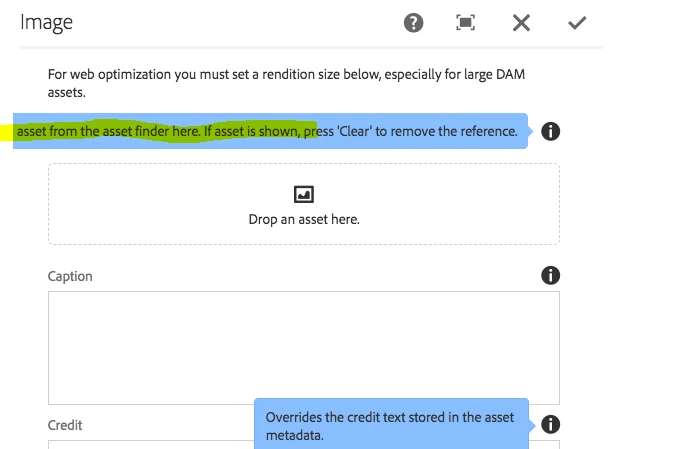
In the Image component design dialog, few of the tooltips are having the same issues, even in sample projects like we-retail and WKND tutorials.


Tried the above solution but while hovering tooltip appeared to be getting stuck.


So tried an alternate way to go to the parent of coral-panel-content, That is at least making the tooltip visible through longer texts are on the left side :


/* Style to correct tooltip alignment when the tooltip is left of the icon */
coral-panelstack[maximized] > coral-panel > coral-panel-content {
overflow: visible !important;
}

/* Style to correct tooltip alignment when the tooltip is above the icon */

.coral3-Tooltip--info.coral3-Tooltip--arrowUp {

left: auto !important;

}