Touch UI RTE removing data attributes | Community
Skip to main content
September 14, 2018

Touch UI RTE removing data attributes

  • September 14, 2018
  • 3 replies
  • 11775 views

Hi,

I have extended the link plugin for the RTE that adds some data attributes to the link.

The problem is that when opening the inline editor, everything loads ok, but when opening with a in-dialog RTE it strips all data attributes from the links.

I have:

Disabled link checking just in case even though this is not an href probelm

Override the xssconfig to allow for the specific data attributes

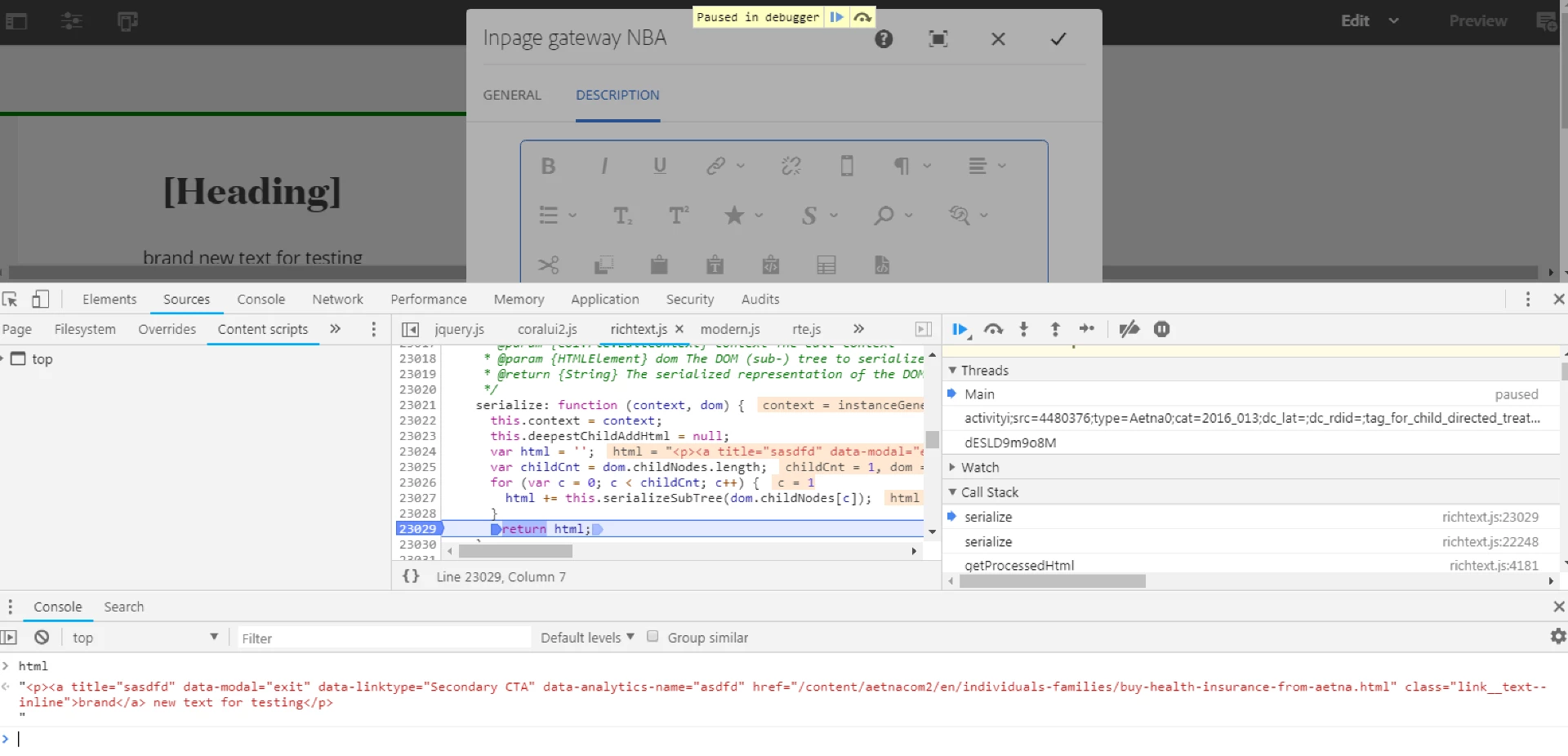
Debug the RTE but can't find where the value gets stripped. the "change" event when clicking the ok button returns the proper markup. Markup is properly loaded in HTL, but when reopening, attributes are stripped when loaded into the text editor of the RTE.

Any ideas?

This post is no longer active and is closed to new replies. Need help? Start a new post to ask your question.

3 replies

Himanshu_Singhal
Community Advisor
Community Advisor
September 14, 2018

Hi,

Could you please share the RTE package?

Regards,
Himanshu

arunpatidar
Community Advisor
Community Advisor
September 14, 2018

Hi,

Could you please check similar thread where link plugin is extended to add 'rel' attribute

Experiencing Adobe Experience Manager - Day CQ: AEM 62 - Touch UI Extend Rich Text Link Dialog, Add Rel Attribute Select

You can check /libs/clientlibs/granite/richtext/core/js/HtmlSerializer.js file for debugging, to see where value is getting stripped.

Arun Patidar
September 14, 2018

I checked the serializer and its returning the HTML Ok. Attached screenshot of an example link after serialize function ended.

I also checked the data on JCR and looks like its being saved properly, which led me to believe this is an HTL context problem. I have it set to 'html'. Setting it to unsafe does render the data attributes fine. Where do I include the rules to allow these data attributes in the html context?

arunpatidar
Community Advisor
Community Advisor
September 14, 2018
Arun Patidar
September 18, 2018

So, for anyone who has the same issue, the RTE editor strips the data attributes because the xssFiltering is enabled at dialog level. I used the xssDisableFiltering in my text node of my dialog and that did the trick.

arunpatidar
Community Advisor
Community Advisor
September 18, 2018

Thanks for sharing. Could you please tell what value you added for xssDisableFiltering in property. Screenshots will be helpful.

Arun Patidar
September 18, 2018

Sure.

So steps I took to solve this issue:

1. Override libs/cq/xssprotection/config.xml to include my data attributes: This will allow context html to render them.

2. To avoid RTE editor to strip them, I have disabled xss filtering for both dialog and inplace editor by adding the property to the text node and the config node of the cq:inplaceEditing node using the disableXSSFiltering property of the RTE.

Images attached:

Now, my plugin and my markup both have the data attributes from my custom plugin.