Touch UI RTE configuration | Community
Skip to main content
May 13, 2019
Solved

Touch UI RTE configuration

  • May 13, 2019
  • 2 replies
  • 3967 views

Hello,

If there are RTE fields being used in multiple components and they all need to have the same plugin configuration, do you have to define all the rteplugin nodes for each of them or is there a way to define the plugin nodes in one place and reuse them in all the other places where rte dialog fields are used? So that duplicate nodes can be avoided.

Sort of like the slingscriptinclude xtype used for rte in classic UI - Dynamic RTE Configuration

Thanks.
This post is no longer active and is closed to new replies. Need help? Start a new post to ask your question.
Best answer by Prince_Shivhare

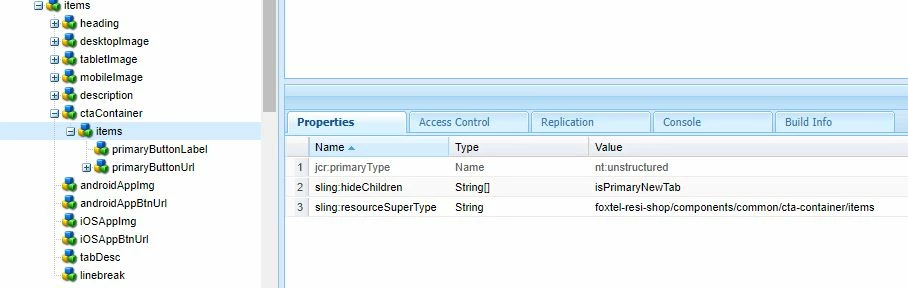
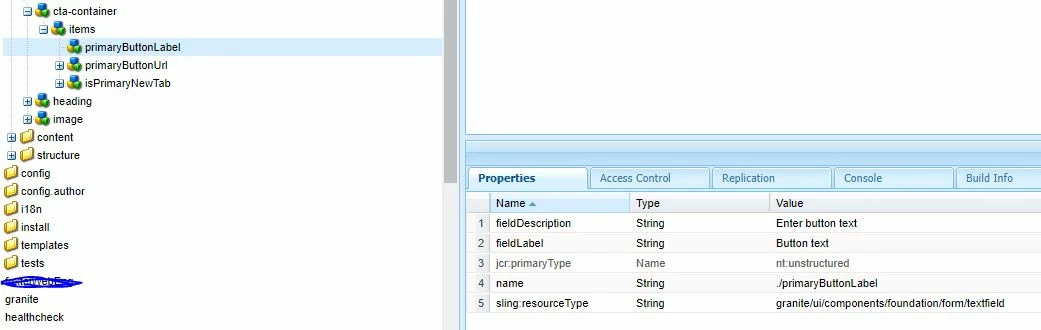
Here you can create a one generic component and include the RTE in it.

so whenever you will be using the RTE you can give reference of it.

below is the example of button or CTA.

~ Prince

2 replies

smacdonald2008
May 14, 2019

Typically each component has its own RTE configured - see:

Configuring Experience Manager Rich Text Editor Plugins in a Touch UI Component Dialog

Prince_Shivhare
Community Advisor
Prince_ShivhareCommunity AdvisorAccepted solution
Community Advisor
May 15, 2019

Here you can create a one generic component and include the RTE in it.

so whenever you will be using the RTE you can give reference of it.

below is the example of button or CTA.

~ Prince