Touch UI CSS class | Community
Skip to main content
ashishkhadpe
August 27, 2020
Solved

Touch UI CSS class

  • August 27, 2020
  • 4 replies
  • 2136 views

Hi All,


We have few mark up defined in our CSS library as below in CQ edit mode : 


.cq-wcm-edit .formBuilder .section.hiddenField, .cq-wcm-edit .formBuilder .section.hiddenFieldMulti { display: block; }


I assume that .cq-wcm-edit only works with AEM classic UI. Any help on how we can migrate this to touch UI or any similar class we can use to define.


Thanks in advance. 

This post is no longer active and is closed to new replies. Need help? Start a new post to ask your question.
Best answer by Varun_Shakya

I would say first you check the purpose of this CSS class why they have added in classic UI. 

And then to implement the same for Touch UI dialog.

There could be a case where you might not need this in touch UI dialog or there could be a different way to serve the purpose. 


4 replies

Varun_Shakya
Community Advisor
Varun_ShakyaCommunity AdvisorAccepted solution
Community Advisor
August 27, 2020

I would say first you check the purpose of this CSS class why they have added in classic UI. 

And then to implement the same for Touch UI dialog.

There could be a case where you might not need this in touch UI dialog or there could be a different way to serve the purpose. 


ashishkhadpe
August 27, 2020
As I can see that they are trying to hide some components being shown on page except edit mode. I understand that this is not a correct implementation but we are reluctant to modify the component. We are looking for a CSS solution to tackle this.
Nupur_Jain
Adobe Employee
Adobe Employee
August 27, 2020

Hi @ashishkhadpe 


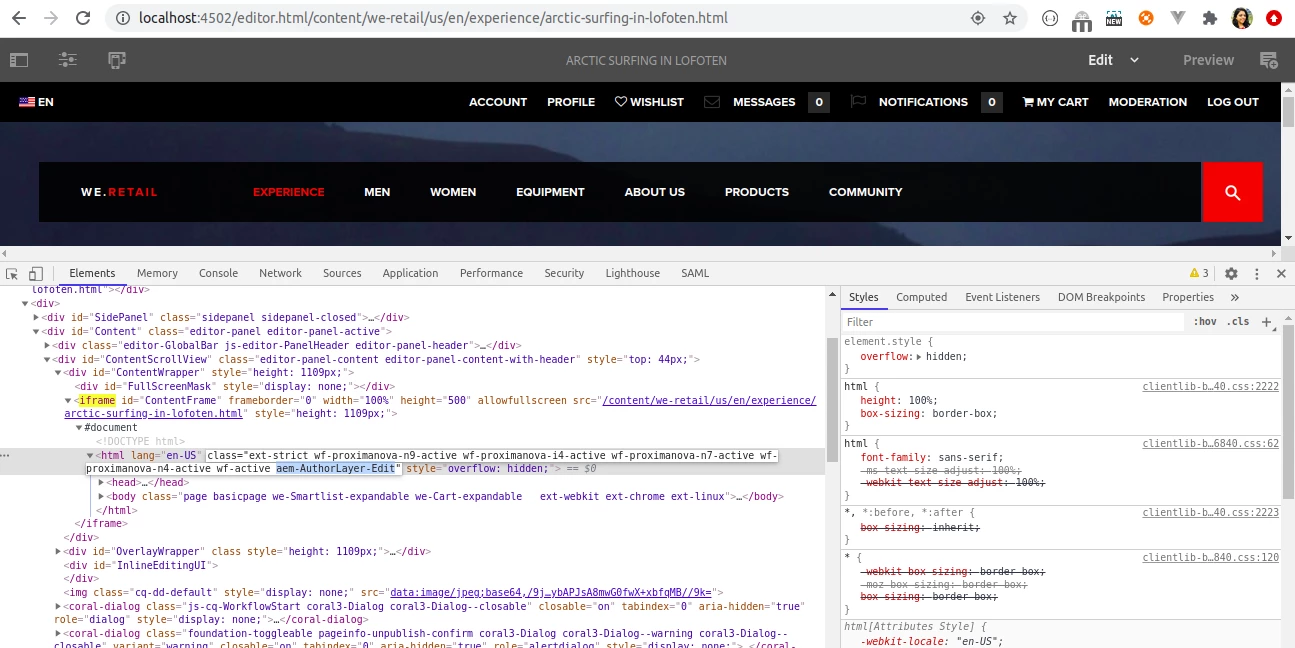
Just like .cq-wcm-edit, there is a class ". aem-AuthorLayer-Edit" added to <html> node of the page added in iframe in Touch UI mode.


You can easily use this class to replace classic based css.


Hope it helps!

Thanks!

Nupur

ashishkhadpe
August 27, 2020
Hi Nupur_Jain Thank you so much. It worked. Will you be able to look at : https://experienceleaguecommunities.adobe.com/t5/adobe-experience-manager/dialog-not-appearing-in-touch-ui/qaq-p/376726 as well. I guess that also requires similar solution.
Vijayalakshmi_S
August 27, 2020

Hi @ashishkhadpe,

In touch UI, WCM mode is known as layers and the same is saved in cookies in the name "wcmmode". We should listen to the event named - cq-layer-activated -> get the cookie value -> write CSS via jQuery targeting specific layer (In this case, it is Edit)

Sample script for reference:

$(document).on("cq-layer-activated", function(){ var wcmmodeVal = $.cookie("wcmmode"); console.log("WCM Mode = "+wcmmodeVal); if(wcmmodeVal == "edit"){ $(".cq-droptarget").css("border", "2px solid red"); // Target your desired class and write CSS accordingly } });


ashishkhadpe
August 27, 2020

Make use of : 

aem-AuthorLayer-Edit