hi @udhayaprakash
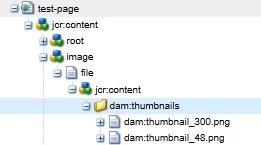
You can use curl scripts to create this structure, also if the above option did not work, then please check the below option as well
1. Create a Sling Model
Path: core/src/main/java/com/yourproject/core/models/PageStatusThumbnailModel.java
package com.yourproject.core.models;

import com.day.cq.replication.ReplicationStatus;
import com.day.cq.wcm.api.Page;
import org.apache.sling.api.resource.Resource;
import org.apache.sling.models.annotations.DefaultInjectionStrategy;
import org.apache.sling.models.annotations.Model;
import org.apache.sling.models.annotations.injectorspecific.ScriptVariable;
import javax.inject.Inject;

@Model(adaptables = Resource.class, defaultInjectionStrategy = DefaultInjectionStrategy.OPTIONAL)
public class PageStatusThumbnailModel {

    @ScriptVariable
    private Page currentPage;

    public String getThumbnailPath() {
        if (currentPage != null) {
            ReplicationStatus status = currentPage.adaptTo(ReplicationStatus.class);
            if (status != null && status.isActivated()) {
                return "/content/dam/project/thumbnails/published.png";
            } else {
                return "/content/dam/project/thumbnails/unpublished.png";
            }
        }
        return "/content/dam/project/thumbnails/default.png";
    }
}
2. Update the Page Properties Dialog
Path: /apps/yourproject/components/page/cq:dialog/content/items/tabs/items/basic/items/thumbnailImage
Add a new image field (read-only display, optional):
<thumbnailImage
    jcr:primaryType="nt:unstructured"
    sling:resourceType="granite/ui/components/foundation/image"
    src="${request.resource.path @ context='uri'}/jcr:content.thumbnailPath.json"
    alt="Page Thumbnail"
    title="Page Status Thumbnail"
    height="100"
    width="100"/>
🔁 src will be served by a JSON servlet or directly from the model if bound properly.
3. Create a Servlet (if needed) to expose thumbnail path
(Optional if model can't be bound directly to UI)
Path: core/src/main/java/com/yourproject/core/servlets/ThumbnailServlet.java
package com.yourproject.core.servlets;

import com.day.cq.wcm.api.Page;
import com.day.cq.replication.ReplicationStatus;
import org.apache.sling.api.SlingHttpServletRequest;
import org.apache.sling.api.SlingHttpServletResponse;
import org.apache.sling.api.resource.Resource;
import org.apache.sling.api.resource.ResourceResolver;
import org.apache.sling.api.servlets.SlingAllMethodsServlet;
import org.osgi.service.component.annotations.Component;
import javax.servlet.Servlet;
import javax.servlet.ServletException;
import java.io.IOException;

@Component(service = Servlet.class,
        property = {
                "sling.servlet.paths=/bin/thumbnailstatus",
                "sling.servlet.methods=GET"
        })
public class ThumbnailServlet extends SlingAllMethodsServlet {

    @Override
    protected void doGet(SlingHttpServletRequest request, SlingHttpServletResponse response)
            throws ServletException, IOException {

        ResourceResolver resolver = request.getResourceResolver();
        Resource resource = request.getResource();
        Page page = resource.adaptTo(Page.class);
        String thumbnail = "/content/dam/project/thumbnails/default.png";

        if (page != null) {
            ReplicationStatus status = page.adaptTo(ReplicationStatus.class);
            if (status != null && status.isActivated()) {
                thumbnail = "/content/dam/project/thumbnails/published.png";
            } else {
                thumbnail = "/content/dam/project/thumbnails/unpublished.png";
            }
        }

        response.setContentType("application/json");
        response.getWriter().write("{\"thumbnailPath\":\"" + thumbnail + "\"}");
    }
}
Then update the src in dialog to:
src="/bin/thumbnailstatus${request.suffix}"
4. Deploy and Test