The value of GraphQL Service URL is not appearing on configMgr console in AEM version 6.5 | Community
Skip to main content
Level 3
October 14, 2020
Solved

The value of GraphQL Service URL is not appearing on configMgr console in AEM version 6.5

  • October 14, 2020
  • 1 reply
  • 2691 views

Hi,


I'm trying to create AEM CIF project using the CIF Project archetype to integrate Magento with AEM but the value of GraphQL Service URL is not appearing on http://localhost:4502/system/console/configMgr console (other parameter are appearing). For reference please find attached screenshot.


Please suggest,


Thank you.
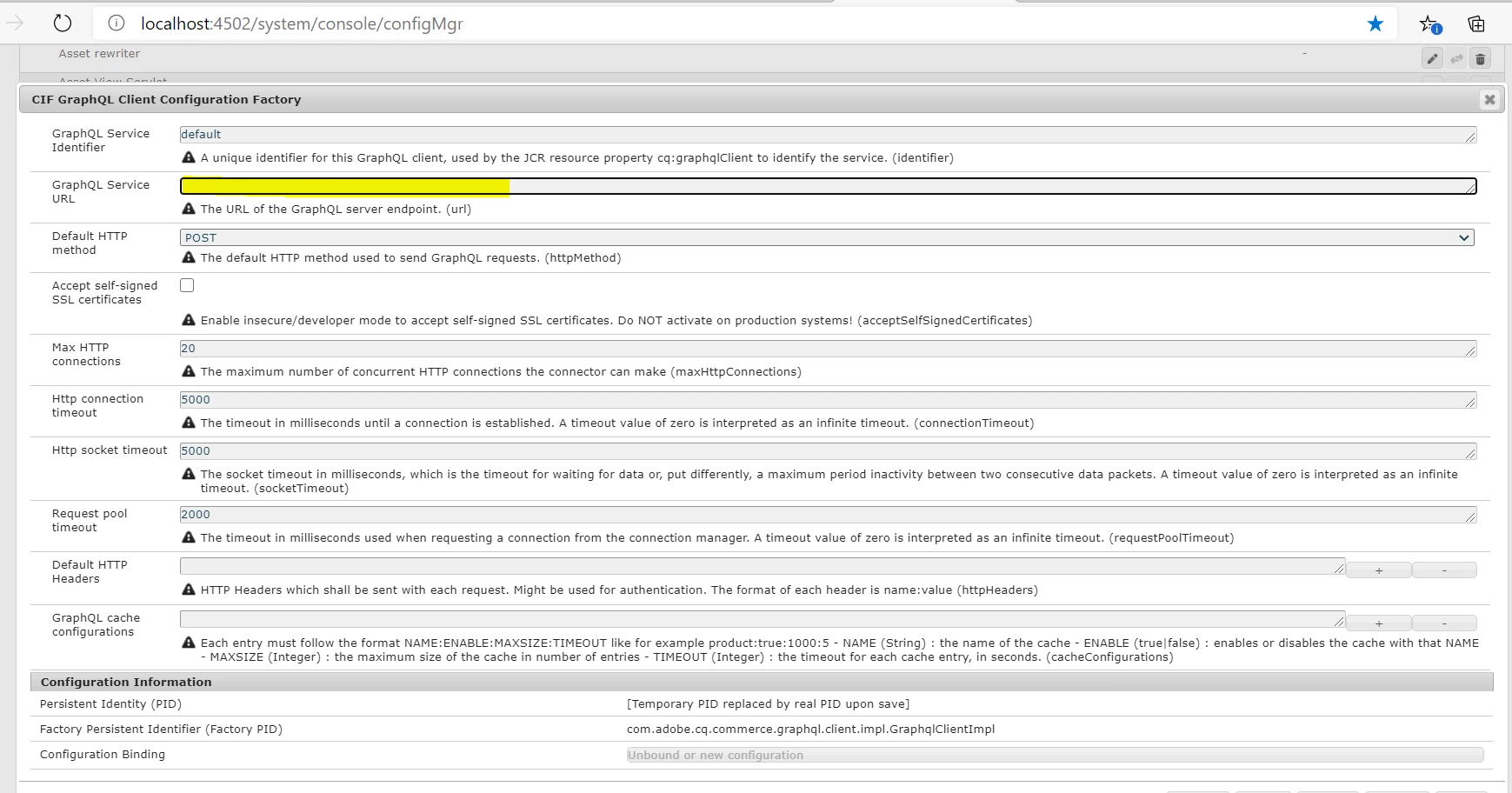


Thank you,
Nitin.


This post is no longer active and is closed to new replies. Need help? Start a new post to ask your question.
Best answer by santhosh_kumark

Hi @jadhavni3 ,


The CIF Magento GraphQL AEM commerce connector has to be configured to access your Magento instance and bind the catalog data. Follow the steps below to configure the bundle:

  1. Configure the generic GraphQL instance

    • Go to http://localhost:4502/system/console/configMgr
    • Look for CIF GraphQL Client Configuration Factory
    • Create a child configuration
      • Keep the default service identifier or set something custom. Make sure to use the same value in step 2) below.
      • For GraphQL Service URL enter the URL of your Magento GraphQL endpoint (usually https://hostname/graphql)
      • With Default HTTP method you can define whether the underlying HTTP client will send GET or POST requests. Starting with version 2.3.2, Magento supports and can cache some GraphQL queries when using GET.
  2. Configuration of the connector

    • Go to http://localhost:4502/system/console/configMgr
    • Look for CIF Catalog Magento GraphQL Configuration Factory
    • Create a child configuration
      • For Magento GraphQL Service Identifier enter the ID of the GraphQL client you already configured (see "pre-requisites")
  3. Create a cloud service configuration for Magento

    • In AEM go to Tools -> General -> Configuration Browser (or http://localhost:4502/libs/granite/configurations/content/view.html/conf)
    • Create a configuration
      • Give it any name you wish
      • Check the Cloud Configurations capability (this is essential since the connector configuration will make use of this capability)
    • Go to Tools -> Cloud Services -> CIF Configuration (or http://localhost:4502/libs/commerce/gui/content/configuration.html/conf)
    • You'll find the configuration created in the previous step there. Click on it and click 'Create configuration'
    • All the fields are required:
      • For Commerce provider choose magento-graphql
      • For Root category id enter the ID of the Magento root category you want to define as the root
      • For Magento store view enter the code of the Magento store view that you want to use
      • For Catalog identifier select the ID of the connector instance you created in the previous step
      • For Graphql client select the GraphQL client you created at step 1
  4. Binding of product catalog to AEM resource tree

  5. AEM content editor product drag & drop


Regards,

Santosh

1 reply

santhosh_kumark
santhosh_kumarkAccepted solution
Level 6
October 14, 2020

Hi @jadhavni3 ,


The CIF Magento GraphQL AEM commerce connector has to be configured to access your Magento instance and bind the catalog data. Follow the steps below to configure the bundle:

  1. Configure the generic GraphQL instance

    • Go to http://localhost:4502/system/console/configMgr
    • Look for CIF GraphQL Client Configuration Factory
    • Create a child configuration
      • Keep the default service identifier or set something custom. Make sure to use the same value in step 2) below.
      • For GraphQL Service URL enter the URL of your Magento GraphQL endpoint (usually https://hostname/graphql)
      • With Default HTTP method you can define whether the underlying HTTP client will send GET or POST requests. Starting with version 2.3.2, Magento supports and can cache some GraphQL queries when using GET.
  2. Configuration of the connector

    • Go to http://localhost:4502/system/console/configMgr
    • Look for CIF Catalog Magento GraphQL Configuration Factory
    • Create a child configuration
      • For Magento GraphQL Service Identifier enter the ID of the GraphQL client you already configured (see "pre-requisites")
  3. Create a cloud service configuration for Magento

    • In AEM go to Tools -> General -> Configuration Browser (or http://localhost:4502/libs/granite/configurations/content/view.html/conf)
    • Create a configuration
      • Give it any name you wish
      • Check the Cloud Configurations capability (this is essential since the connector configuration will make use of this capability)
    • Go to Tools -> Cloud Services -> CIF Configuration (or http://localhost:4502/libs/commerce/gui/content/configuration.html/conf)
    • You'll find the configuration created in the previous step there. Click on it and click 'Create configuration'
    • All the fields are required:
      • For Commerce provider choose magento-graphql
      • For Root category id enter the ID of the Magento root category you want to define as the root
      • For Magento store view enter the code of the Magento store view that you want to use
      • For Catalog identifier select the ID of the connector instance you created in the previous step
      • For Graphql client select the GraphQL client you created at step 1
  4. Binding of product catalog to AEM resource tree

  5. AEM content editor product drag & drop


Regards,

Santosh

jadhavni3Author
Level 3
October 14, 2020

Hi @santhosh_kumark,


Yes, it's worked but getting error while Integrating AEM with Magento in the AEM Products Console: http://localhost:4502/aem/products.html/var/commerce/products

we are getting below error message.


And where I can find GraphQL Proxy Path


Please suggest.


Thank you.
Nitin.