Tagfield but only level parent dont show child tags | Community
Skip to main content
Level 2
May 17, 2022

Tagfield but only level parent dont show child tags

  • May 17, 2022
  • 1 reply
  • 977 views

<category
cq:showOnCreate="{Boolean}true"
granite:class="page-tagging-inheritance"
jcr:primaryType="nt:unstructured"
fieldLabel="page.category.label"
fieldDescription="page.category.label.desc"
sling:resourceType="cq/gui/components/coral/common/form/tagfield"
autocreateTag="{Boolean}false"
emptyText="page.tag.singleSelect.emptyText"
name="./pagetagging/category"
required="{Boolean}true"
rootPath="/content/cq:tags/com/careers/category/">
<granite:data
jcr:primaryType="nt:unstructured"
cq-msm-lockable="pagetagging/category"
category-field=""/>
</category>

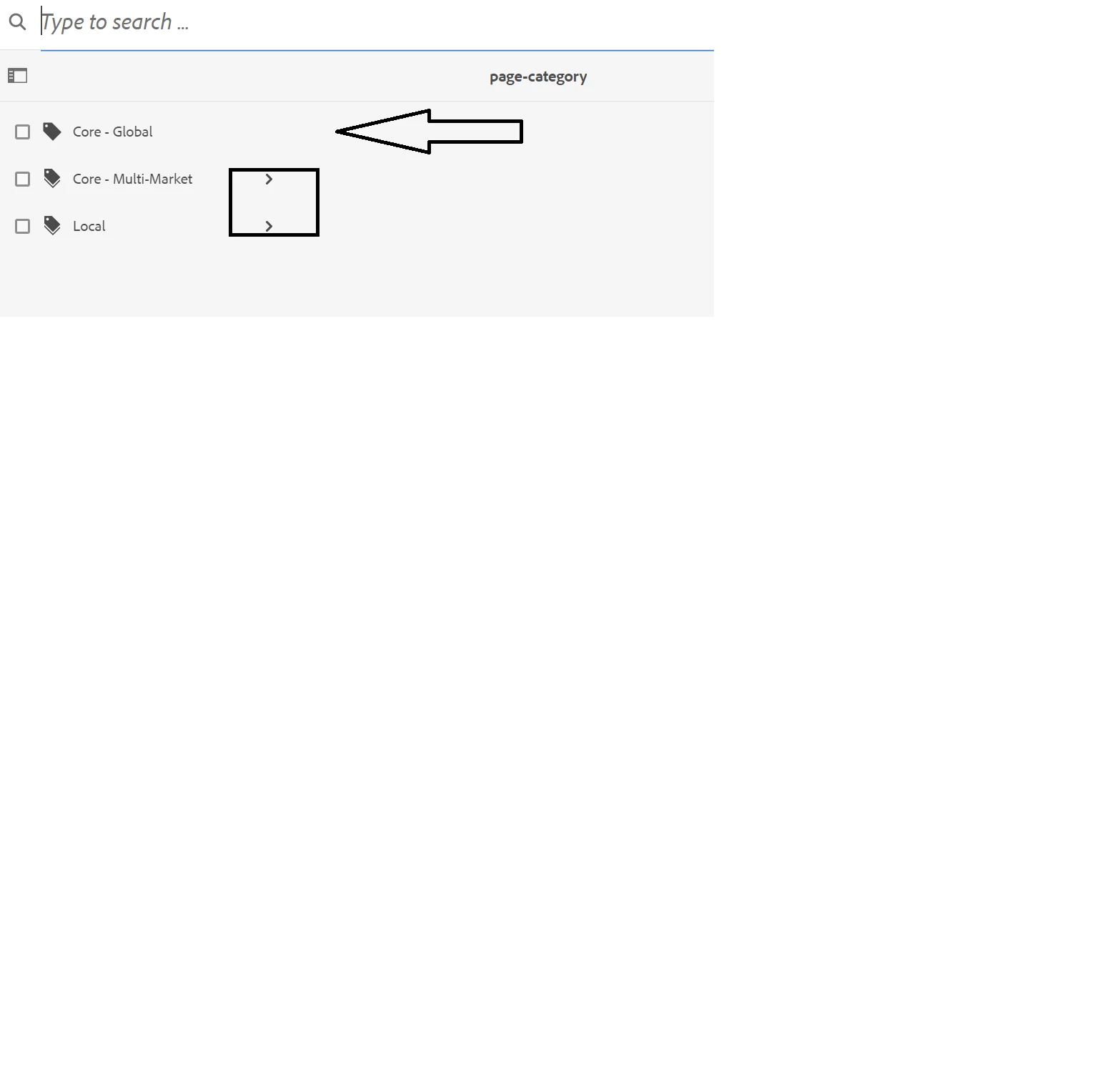
I have the above and it is getting the correct tags because I used rootPath to have a specific tags to use. Now I want to only show the parent tags and not the child tags .

Is this possible ? I tried using datasource but the data in datasource is not use for the tags.
I want to show only the parent like the first tag and remove the child tag for the 2nd and third tags.
This post is no longer active and is closed to new replies. Need help? Start a new post to ask your question.

1 reply

arunpatidar
Community Advisor
Community Advisor
May 17, 2022

Hi,

You can create a custom datasource to returm only first child tag label and values and use dropdown insteadof tagpicker, if that helps

https://github.com/arunpatidar02/aem63app-repo/blob/master/java/DemoDailogDropdown.java

Arun Patidar
gdguradioAuthor
Level 2
May 18, 2022

Hi,


I create something like this ,


<tags
jcr:primaryType="nt:unstructured"
sling:resourceType="granite/ui/components/foundation/form/autocomplete"
fieldLabel="Tags"
mode="contains"
name="./cq:tags">
<datasource
jcr:primaryType="nt:unstructured"
sling:resourceType="cq/gui/components/common/datasources/tags"/>
<values
jcr:primaryType="nt:unstructured"
sling:resourceType="granite/ui/components/foundation/form/autocomplete/tags"/>
<options
jcr:primaryType="nt:unstructured"
sling:resourceType="granite/ui/components/foundation/form/autocomplete/list"/>
</tags>


and then in the crx/de i found a jsp file in the path "/libs/cq/gui/components/common/datasources/tags" which i duplicated to create my own datasource ... I just have one more question in the source code I could use somthing like 

java.util.Iterator<Tag> listChildren(Filter<Tag> filter)   

 from Filter (The Adobe AEM Quickstart and Web Application.) the only problem I have is that I am not sure how to create the Filter<Tag> filter part .. I am still looking for sample implementation but if you could point me to the right path or give an example that could help alot.

thank you

arunpatidar
Community Advisor
Community Advisor
May 18, 2022

Hi,

You can check this to do it without filter

https://aemlab.blogspot.com/2018/08/searchfilter-touch-ui-dialog-dropdown.html

with filter you can try creating custom filter by extending/implementing or by adding a methode e.g.PageFilter 

https://tostring.me/aem-using-pagefilter-to-filter-children-of-a-page/ 


Arun Patidar