Structuring Data in AEM JCR for a Shopping Mall Website | Community
Skip to main content
touseefk2181136
Level 3
May 12, 2024
Solved

Structuring Data in AEM JCR for a Shopping Mall Website

  • May 12, 2024
  • 2 replies
  • 1772 views

I am currently working on a project where I need to create a website using Adobe Experience Manager (AEM). The website is designed to represent multiple malls, with each mall housing numerous stores. Additionally, these stores will be providing various offers.

The client’s requirement is to store all the data related to the malls, stores, and offers in the AEM Java Content Repository (JCR). They have specifically requested not to use SQL, MySQL, or any other external data storage systems.

Given this scenario, I am seeking advice on the best way to structure this data in the JCR. Is it appropriate and efficient to store such hierarchical data in the JCR? If so, could you provide some guidance or best practices on how to achieve this?


Is the following way or organizing this data in JCR is proper way ? 
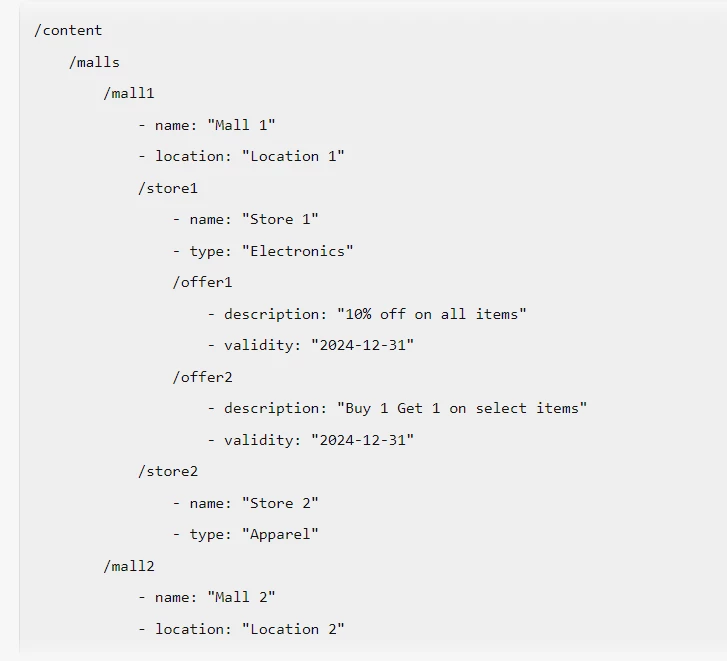


Any insights or suggestions would be greatly appreciated.


This post is no longer active and is closed to new replies. Need help? Start a new post to ask your question.
Best answer by Madhur-Madan

Hi @touseefk2181136 ,

JCR is designed to handle hierarchical data, and your structure aligns well with this model.

Here are some best practices you might consider:

  1. Use meaningful node names: Node names should be descriptive and meaningful. In your case, using the mall name, store name, and offer name as node names is a good approach.

  2. Leverage properties: Use properties to store data about nodes. For example, you can store the name, location, and type of a store as properties of the store node.

  3. Avoid deep hierarchies: While JCR can handle deep hierarchies, it’s generally a good practice to avoid overly deep structures as they can impact performance and complicate queries.

  4. Use node types: Node types allow you to define the structure and constraints of a node. You can define a node type for malls, stores, and offers, specifying what child nodes and properties they can have.

  5. Indexing: Make sure to set up proper indexing. This will greatly improve the performance of your queries.

Your structure would look something like this in terms of JCR nodes and properties:


/content /malls /mall1 - jcr:title = "Mall 1" - location = "Location 1" /stores /store1 - jcr:title = "Store 1" - type = "Electronic" /offers /offer1 - jcr:title = "10% off"


In this structure, jcr:title is a commonly used property to store the display name of a node. Each mall, store, and offer is a node with properties. The stores and offers are intermediate nodes to group stores and offers respectively.

Thanks,
Madhur

2 replies

Madhur-Madan
Community Advisor
Madhur-MadanCommunity AdvisorAccepted solution
Community Advisor
May 13, 2024

Hi @touseefk2181136 ,

JCR is designed to handle hierarchical data, and your structure aligns well with this model.

Here are some best practices you might consider:

  1. Use meaningful node names: Node names should be descriptive and meaningful. In your case, using the mall name, store name, and offer name as node names is a good approach.

  2. Leverage properties: Use properties to store data about nodes. For example, you can store the name, location, and type of a store as properties of the store node.

  3. Avoid deep hierarchies: While JCR can handle deep hierarchies, it’s generally a good practice to avoid overly deep structures as they can impact performance and complicate queries.

  4. Use node types: Node types allow you to define the structure and constraints of a node. You can define a node type for malls, stores, and offers, specifying what child nodes and properties they can have.

  5. Indexing: Make sure to set up proper indexing. This will greatly improve the performance of your queries.

Your structure would look something like this in terms of JCR nodes and properties:


/content /malls /mall1 - jcr:title = "Mall 1" - location = "Location 1" /stores /store1 - jcr:title = "Store 1" - type = "Electronic" /offers /offer1 - jcr:title = "10% off"


In this structure, jcr:title is a commonly used property to store the display name of a node. Each mall, store, and offer is a node with properties. The stores and offers are intermediate nodes to group stores and offers respectively.

Thanks,
Madhur

touseefk2181136
Level 3
May 13, 2024

Hi @madhur-madan thanks for you reply. I have few question, can please take a look


  1. Will each hierarchical data will be with their page as show in the following pic ?


  2. Or it can something like as shown in the following pic ?


  3. I have malls, stores and offers data in CSV file. How can I import it in JCR and create corresponding nodes? Do I need to create any utility or I can do it through some groovy script or some other tool ?

    Thank you.
Madhur-Madan
Community Advisor
Community Advisor
May 13, 2024

@madhur-madan for explaining comprehensively. I have another requirement. I have a list(hyperlinks) of stores on a page (a store component on page). The requirement is when user clicks on any specific store, a page for that store should be dynamically created and it should redirect user to that page and fetch the information for that store and show its information on that dynamically created page (store detail). Is it possible or I will have to create a separate page for each store. 


Hi @touseefk2181136 ,
The dynamic page creation is very much possible but keep in mind the dispatcher configs if you want the dynamic pages to be cached.
I will list down two approaches which you can use to fulfill the requirement. You can either use vanilla Js or you can use Sling Resource resolution approach.

1. Vanilla Js

  •  Create a store component in AEM that represents each store on the page. This component should include fields for the store name, description, and a button or link to view more details.


<!-- Store Component (/apps/myproject/components/store/store.html) --> <div class="store"> <h2 class="store-name">${properties.storeName}</h2> <p class="store-description">${properties.storeDescription}</p> <a href="#" class="view-details">View Details</a> </div>


  • Attach a client-side JavaScript event handler to the "View Details" link in the store component. This event handler will trigger the dynamic page creation and redirection process


// Store Component JavaScript (/apps/myproject/components/store/clientlibs/store.js) $(document).ready(function() { $('.view-details').on('click', function(e) { e.preventDefault(); // Prevent default link behavior var storeName = $(this).closest('.store').find('.store-name').text(); // Check if the page already exists for the selected store $.ajax({ url: '/content/myproject/stores/' + encodeURIComponent(storeName) + '.html', type: 'HEAD', success: function() { // Page already exists, redirect to it window.location.href = '/content/myproject/stores/' + encodeURIComponent(storeName) + '.html'; }, error: function() { // Page doesn't exist, create it dynamically createStorePage(storeName); } }); }); }); // Function to create store page dynamically function createStorePage(storeName) { // Sample Java code for dynamic page creation Resource parentPage = resourceResolver.getResource("/content/myproject/stores"); PageManager pageManager = resourceResolver.adaptTo(PageManager.class); // Create a new page for the store Page storePage = pageManager.create(parentPage, storeName, "/apps/myproject/templates/store-detail.html", storeName); // Redirect to the newly created store detail page window.location.href = '/content/myproject/stores/' + encodeURIComponent(storeName) + '.html'; }


  • Create a template in AEM for the store detail pages. This template will define the structure and layout of the store detail pages.


<!-- Store Detail Template (/apps/myproject/templates/store-detail.html) --> <sly data-sly-use.page="com.adobe.cq.wcm.core.components.models.Page"> <h1>${page.properties.storeName}</h1> <p>${page.properties.storeDescription}</p> <!-- Additional components or placeholders for displaying store information --> </sly>


  • When a user clicks on a store in the store component, dynamically create a new page for the selected store using AEM's page creation API or workflow capabilities. This can be done server-side in response to the click event.


// Sample Java code for dynamic page creation Resource parentPage = resourceResolver.getResource("/content/myproject/stores"); PageManager pageManager = resourceResolver.adaptTo(PageManager.class); // Create a new page for the store Page storePage = pageManager.create(parentPage, storeName, "/apps/myproject/templates/store-detail.html", storeName);


  • After dynamically creating the store detail page, redirect the user to the newly created page using AEM's redirection capabilities or client-side JavaScript
  • On the store detail page (/content/myproject/stores/store-name.html), fetch and display store-specific information using AEM's component logic or server-side scripts.


<!-- Store Detail Page (/content/myproject/stores/store-name.html) --> <sly data-sly-use.page="com.adobe.cq.wcm.core.components.models.Page"> <h1>${page.properties.storeName}</h1> <p>${page.properties.storeDescription}</p> <!-- Additional components or placeholders for displaying store information --> </sly>


2. Sling Resource Resolution

  • In AEM, navigate to the Vanity URL configuration (e.g., /etc/map) and create a new mapping for the store detail page template or component.
  • Define a Vanity URL pattern that will be used to access store detail pages. For example, /stores/{storeName}.
  • Implement a request filter or servlet in AEM to intercept requests to the Vanity URL pattern for store detail pages.
  • Extract the store name or identifier from the request URL parameters or path (e.g., using SlingHttpServletRequest). Check if a store detail page already exists for the extracted store name.
  • If a store detail page doesn't exist for the extracted store name, use AEM's page creation API or workflow capabilities to dynamically create the page.
  • Set up the created page to use the store detail page template or component.
  • After dynamically creating the store detail page, redirect the user to the Vanity URL for the newly created page.
  • This ensures that subsequent requests to the Vanity URL are directed to the dynamically created store detail page.


import org.apache.sling.api.SlingHttpServletRequest; import org.apache.sling.api.resource.ResourceResolver; import org.apache.sling.api.servlets.HttpConstants; import org.apache.sling.api.servlets.ServletResolverConstants; import org.apache.sling.api.servlets.Servlet; import org.osgi.service.component.annotations.Component; import org.osgi.framework.Constants; import org.osgi.service.component.annotations.Reference; import org.apache.sling.servlets.annotations.ServletResourceTypes; import org.apache.sling.servlets.annotations.SlingServletResourceTypes; @Component(service = Servlet.class, property = { Constants.SERVICE_DESCRIPTION + "=Dynamic Store Page Creation Servlet", ServletResolverConstants.SLING_SERVLET_PATHS + "=/bin/createStorePage" }) @SlingServletResourceTypes(resourceTypes = "sling/servlet/default", methods = HttpConstants.METHOD_GET) public class CreateStorePageServlet extends SlingAllMethodsServlet { @Reference private ResourceResolver resourceResolver; @Override protected void doGet(SlingHttpServletRequest request, SlingHttpServletResponse response) { String storeName = request.getParameter("storeName"); if (storeName != null) { // Check if page already exists for the store name if (!pageExistsForStore(storeName)) { // Page doesn't exist, dynamically create it createPageForStore(storeName); } } } private boolean pageExistsForStore(String storeName) { // Logic to check if page exists for the given store name // Implement your own logic to check if a page exists } private void createPageForStore(String storeName) { // Logic to dynamically create the store detail page // Use AEM's page creation API or workflow capabilities Resource parentPage = resourceResolver.getResource("/content/myproject/stores"); PageManager pageManager = resourceResolver.adaptTo(PageManager.class); Page storePage = pageManager.create(parentPage, storeName, "/apps/myproject/templates/store-detail.html", storeName); } }


I hope it helps

Thanks,
Madhur

joerghoh
Adobe Employee
Adobe Employee
May 13, 2024

At first sight I would agree to your structure. But there are several unknowns, which can influence this. A few thoughts:


  • ACLs?
  • Content reuse (same offer over stores of multiple brands), you might think about using CF/XFs for it. Also about asset reuse.
  • Do you plan to use the MSM or the language copy feature? 
touseefk2181136
Level 3
May 13, 2024

@joerghoh Thank you. It will be a public website.  Yes we plan to use MSM or language copy feature.

joerghoh
Adobe Employee
Adobe Employee
May 13, 2024

In that case you should think how you want to use the MSM relations, and how the MSM rollouts will be done. Also about local changes, which are overriding MSM inheritance.

(You should also do the math and think about if the MSM is the right tool here. Rollouts can be costly/performance-intense, and if you are just duplicating content without ever overriding it locally you should thinking about replacing duplicated content with a reference.)

Also think about how you want to structure your content processes. You might want to do a paper-and-pencil exercise with your future authoring users to see if that content creation workflow is okay.