Sling Jobs in Critical State | Community
Skip to main content
ravir73578276
Level 3
September 25, 2021
Solved

Sling Jobs in Critical State

  • September 25, 2021
  • 3 replies
  • 3418 views

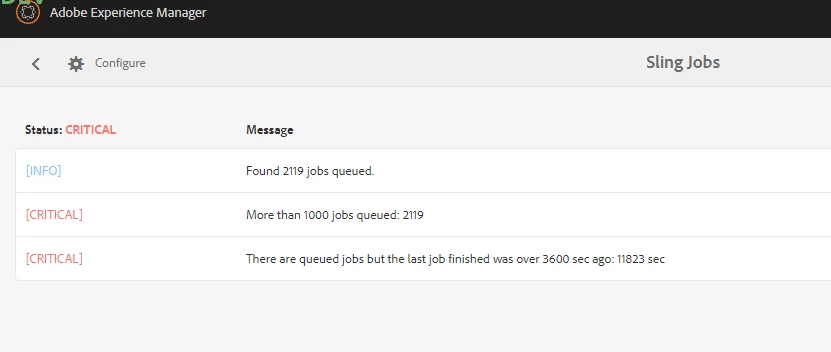
My AEM author Instance has alot of sling jobs in queue which is making it to be in critical state and causing slowness of my AEM Instance. How to remove all those slingjobs from the queue?
 

This post is no longer active and is closed to new replies. Need help? Start a new post to ask your question.
Best answer by Raja-Karuppsamy

Hi - Please follow the below steps:


  1. Go to http://aem-host:port/crx/explorer/index.jsp and log in as admin
  2. Open Content Explorer
  3. Browse to /var/eventing/jobs
  4. See which jobs are piled up under /var/eventing/jobs/assigned/{sling id}
  5. Right click a sub-folder there that you don't need to preserve and select Delete Recursively
  6. Enable Disable Preliminary Scan option
  7. Click Delete

Refer this : https://helpx.adobe.com/uk/experience-manager/kb/AEM-restart-takes-a-long-time-due-to-sling-jobs-AEM.html

3 replies

Anny0505
Community Advisor
Community Advisor
September 25, 2021

@ravir73578276,

You can delete all job from Crx/de as a admin user. Please go to /var/eventing/jobs folder in and delete stick jobs.


hope this helps you!!


Regards,

Aruna


Raja-Karuppsamy
Community Advisor
Raja-KaruppsamyCommunity AdvisorAccepted solution
Community Advisor
September 26, 2021

Hi - Please follow the below steps:


  1. Go to http://aem-host:port/crx/explorer/index.jsp and log in as admin
  2. Open Content Explorer
  3. Browse to /var/eventing/jobs
  4. See which jobs are piled up under /var/eventing/jobs/assigned/{sling id}
  5. Right click a sub-folder there that you don't need to preserve and select Delete Recursively
  6. Enable Disable Preliminary Scan option
  7. Click Delete

Refer this : https://helpx.adobe.com/uk/experience-manager/kb/AEM-restart-takes-a-long-time-due-to-sling-jobs-AEM.html

Sanjay_Bangar
Community Advisor
Community Advisor
September 26, 2021

Hi @ravir73578276 ,

Please go to the localhost:4502/crx/de and go to the path /var/eventing/jobs folder in and delete stick jobs.


Kr,

Sanjay

Adobe Employee
October 1, 2024

@raja-karuppsamy @sanjay_bangar 

For AEM Cloud since crxDE access is not provided, May I know how can we purge sling jobs? 

Do we have any configuration available?