Short URLs in Multi-domain setup with Dispatcher | Adobe Higher Education
Skip to main content
Level 2
January 16, 2019
Répondu

Short URLs in Multi-domain setup with Dispatcher

Hello

I'm fairly new to AEM, so bear with me if I'm not using the right terminology.

Using Dispatcher with Multiple Domains

I followed the steps outlined in the link referenced above. I used Approach-1, where AEM rewrites the URLs rather than setting up apache rewrites. Lot of the stuff works. I do see pages being cached, etc. What I'm struggling with are the resource maps that need to be setup for URL shorterning.

I'm kind of lost on what exactly needs to be done in /etc/map/http. I tried several things but nothing seems to work completely. My dispatcher renderer is pointing to hostname - "127.0.0.1" & port - "4503".

All of the documentation points to creating the maps based on domain name. It is not clear to me how the domain name is passed to the publish instance. The dispatcher is always going to request using the localhost based on the configuration I have above..

I'm missing something basic here. Am I supposed to change the hostname in the dispatcher renderer to whatever host I'm targeting?

Here is some more information about my setup.

Publish Instance URL: localhost:4503

Content Path: /content/wknd/en.html

Domain Name: dev.wknd.com

What resource maps do I need to create to shorten the urls with this setup?

thanks

-kamal
Ce sujet a été fermé aux réponses.
Meilleure réponse par Gaurav-Behl

When http://branda.com/en.html is requested from dispatcher, it sends the request to publish server which would get resolved if the domain- "branda.com" is configured in /etc/map.publish/http (for publish server)

The hostname in renderer section of dispatcher.any file relates to hosts file (WIN - C:\WINDOWS\system32\drivers\etc\hosts  or LINUX - /etc/hosts). This resolves the host name/ip address where AEM publish server is running.

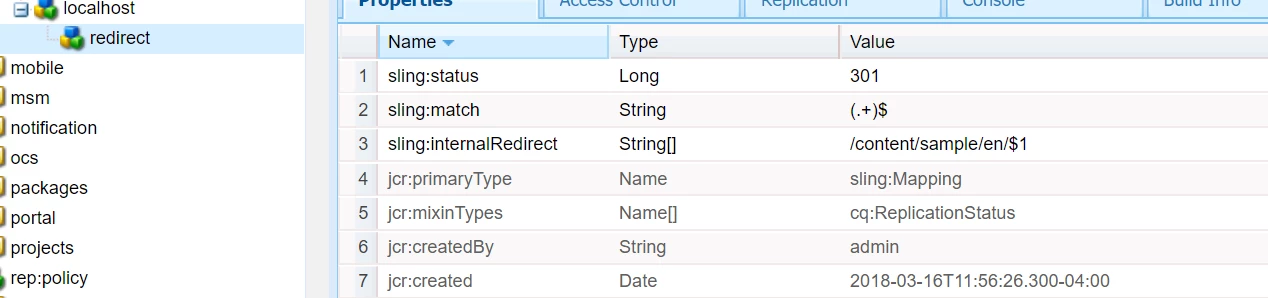
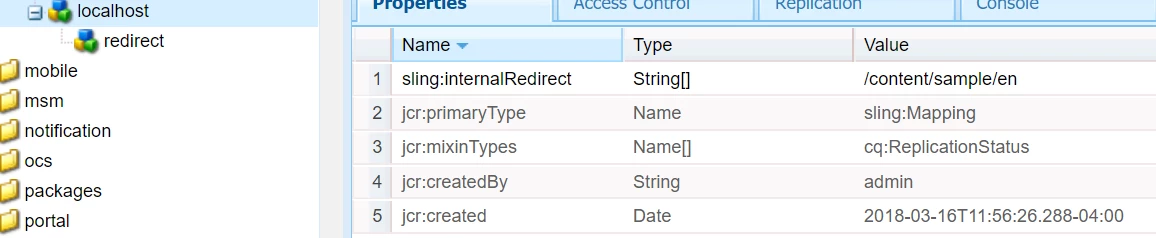
  1. Create a node as 'dev.wknd.com' under http with type as sling:Mapping - Refer to screenshot below - change the name localhost to 'dev.wknd.com'  The property sling:internalRedirect should be /content/wknd/en which would resolve http://dev.wknd.com to /content/wknd/en.html
  2. Create other nodes as mentioned in the article for /etc, libs, /dam
  3. Create 'redirect' node under 'dev.wknd.com' for children pages under 'dev.wknd.com'. This would resolve http://dev.wknd.com/art.html to /content/wknd/en/art.html etc.

Links -

Resource Mapping

Apache Sling :: Mappings for Resource Resolution

/etc/map

      +-- http

           +-- example.com.80

           |    +-- sling:redirect = "http://www.example.com/"

           +-- www.example.com.80

           |    +-- sling:internalRedirect = "/example"

           +-- any_example.com.80

           |    +-- sling:match = ".+\.example\.com\.80"

           |    +-- sling:redirect = "http://www.example.com/"

           +-- localhost_any

           |    +-- sling:match = "localhost\.\d*"

           |    +-- sling:internalRedirect = "/content"

           |    +-- cgi-bin

           |    |    +-- sling:internalRedirect = "/scripts"

           |    +-- gateway

           |    |    +-- sling:internalRedirect = "http://gbiv.com"

           |    +-- (stories)

           |         +-- sling:internalRedirect = "/anecdotes/$1"

           +-- regexmap

                +-- sling:match = "$1.example.com/$2"

                +-- sling:internalRedirect = "/content/([^/]+)/(.*)"

5 commentaires

smacdonald2008
Level 10
January 16, 2019

In your AEM site, are both sites located in sane JCR as discussed in the doc? What AEM version are you using?

Gaurav-Behl
Gaurav-BehlRéponse
Level 10
January 16, 2019

When http://branda.com/en.html is requested from dispatcher, it sends the request to publish server which would get resolved if the domain- "branda.com" is configured in /etc/map.publish/http (for publish server)

The hostname in renderer section of dispatcher.any file relates to hosts file (WIN - C:\WINDOWS\system32\drivers\etc\hosts  or LINUX - /etc/hosts). This resolves the host name/ip address where AEM publish server is running.

  1. Create a node as 'dev.wknd.com' under http with type as sling:Mapping - Refer to screenshot below - change the name localhost to 'dev.wknd.com'  The property sling:internalRedirect should be /content/wknd/en which would resolve http://dev.wknd.com to /content/wknd/en.html
  2. Create other nodes as mentioned in the article for /etc, libs, /dam
  3. Create 'redirect' node under 'dev.wknd.com' for children pages under 'dev.wknd.com'. This would resolve http://dev.wknd.com/art.html to /content/wknd/en/art.html etc.

Links -

Resource Mapping

Apache Sling :: Mappings for Resource Resolution

/etc/map

      +-- http

           +-- example.com.80

           |    +-- sling:redirect = "http://www.example.com/"

           +-- www.example.com.80

           |    +-- sling:internalRedirect = "/example"

           +-- any_example.com.80

           |    +-- sling:match = ".+\.example\.com\.80"

           |    +-- sling:redirect = "http://www.example.com/"

           +-- localhost_any

           |    +-- sling:match = "localhost\.\d*"

           |    +-- sling:internalRedirect = "/content"

           |    +-- cgi-bin

           |    |    +-- sling:internalRedirect = "/scripts"

           |    +-- gateway

           |    |    +-- sling:internalRedirect = "http://gbiv.com"

           |    +-- (stories)

           |         +-- sling:internalRedirect = "/anecdotes/$1"

           +-- regexmap

                +-- sling:match = "$1.example.com/$2"

                +-- sling:internalRedirect = "/content/([^/]+)/(.*)"

joerghoh
Adobe Employee
Adobe Employee
January 16, 2019

First you need to understand the handling of the domain name; in a multi-domain setup you need to have multiple names pointing to the same IP address. While in an real-world setup this is done by setting up DNS records, in your local environment you can do this via setting up entries (e.g. for dev.wknd.com) in either /etc/map or c:\WIndows\system32\Drivers\etc\hosts, all pointing to "127.0.0.1".

Then request to "dev.wknd.com" is sent to the IP address "127.0.0.1" but is using the domain name "dev.wknd.com" (you can check with the dev tools in the browser). When you have configured your webserver to handle requests to dev.wknd.com and forward them to AEM, then you can define the mapping in AEM to do the redirects there.

Jörg

kamalcAuteur
Level 2
January 17, 2019

Thanks for your help so far. To answer some of your questions, I'm using apache on CentOS and AEM 6.4.3. I have all of my virtual hosts configured as required, configured dispatcher, etc. Everything is working as expected. My question is only about URL shortening using resource maps in /etc/map/http.

Somehow the hundreds of blog posts on the topic including the one suggested above don't seem to work for me. It took me a while to figure out that outbound URLs are rewritten based on first match in etc/map rather than the domain being used. Anyway, I have most of it working now with the setup in the screenshot. All of the URLs are being shortened to /sports.html, /art.html, etc. The only URL that is not being shortened with this configuration is the Homepage. Homepage still points to /content/wknd/en.html.

I did setup a rewrite in apache to send dev.wknd.com -> /content/wknd/en.html.

In other words, the homepage is now accessible at both dev.wknd.com and dev.wknd.com/content/wknd/en.html which is not ideal.

Can someone let me know how to shorten the homepage url and output just '/' for the homepage link on all pages? What can I update/add to the resource map in the screenshot below to accomplish this?

Gaurav-Behl
Level 10
January 18, 2019

If dev.wknd.com and dev.wknd.com/content/wknd/en.html both resolve to same content then you would need to redirect /content/wknd/en.html to / logically speaking. This redirect should happen before the request reaches AEM publish which means either in apache or load balancer.

My recommendation would be not to mix & match apache rules and /etc/map rules, use either of them unless there is no workaround or have feasibility issues. Think of end-to-end design, request/response lifecycle including caching and flushing of the generated cache for entire site.

To shorten the homepage url and output just '/' for the homepage link on all pages, you could use Externalizer code/configurations to rewrite the urls per requirement. The resolution would happen with /etc/map or /etc/map.publish OOB.