Share link option is not working in Assets page | Community
Skip to main content
This post is no longer active and is closed to new replies. Need help? Start a new post to ask your question.
Best answer by Sanket_Kumbharkhane

Hi @vijitha ,


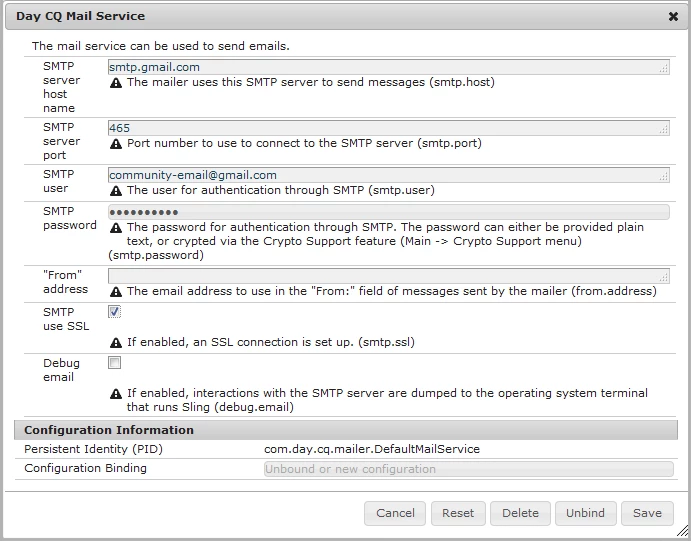
Example using Gmail : 

SMTP Server Host Namesmtp.gmail.com
SMTP Server Port465
SMTP User<gmail address>
SMTP Password<gmail password>
“From” address<gmail address>
SMTP use SSLCheck this
SMTP use StartTLSDon’t check
Debug emailDon’t check


Reference link :


https://adobeexplorers.com/tag/day-cq-mail-service/

https://helpx.adobe.com/in/experience-manager/6-3/sites/administering/using/notification.html

https://experienceleague.adobe.com/docs/experience-manager-64/communities/administer/email.html?lang=en#default-mail-service-configuration


2 replies

Sanket_Kumbharkhane
Sanket_KumbharkhaneAccepted solution
Level 4
February 8, 2021

Hi @vijitha ,


Example using Gmail : 

SMTP Server Host Namesmtp.gmail.com
SMTP Server Port465
SMTP User<gmail address>
SMTP Password<gmail password>
“From” address<gmail address>
SMTP use SSLCheck this
SMTP use StartTLSDon’t check
Debug emailDon’t check


Reference link :


https://adobeexplorers.com/tag/day-cq-mail-service/

https://helpx.adobe.com/in/experience-manager/6-3/sites/administering/using/notification.html

https://experienceleague.adobe.com/docs/experience-manager-64/communities/administer/email.html?lang=en#default-mail-service-configuration


Sanket_Kumbharkhane
Level 4
February 8, 2021

Hi @vijitha ,

you can use your personal email-id and password to test functionality on your local environment but on higher & shared environments

like Dev, Stage, Prod, use company credentials.


Also, For production, I would suggest you get more information from higher management about which SMPT service is subscribed by the company/project/client.

Here is the link to the top SMTP provider:

https://optinmonster.com/smtp-services/ ,

https://www.wpbeginner.com/showcase/best-smtp-service-providers-with-high-email-deliverability/

Kiran_Vedantam
Community Advisor
Community Advisor
February 8, 2021

Hi @vijitha,


Please use the below properties mentioned by @sanket_kumbharkhane. In addition to it, if you are using your company laptop, check with your firewall setting which will not allow you to send the email [This is in addition to enabling the secured apps option]


Hope this helps.


Thanks,

Kiran Vedantam.