Seeking JavaScript assistance on AEM Form date picker | Community
Skip to main content
February 20, 2024
Solved

Seeking JavaScript assistance on AEM Form date picker

  • February 20, 2024
  • 1 reply
  • 1701 views

Hi Community,


I am seeking help on writing a piece of JavaScript to limit date picker and only allow selection from today + 7 days, as I am told the only way is putting code in rule editor.


Without the IT knowledge and resource, I turned to ChatGPT for help, but it didn't work.


Therefore, I want to find out what's wrong with the JavaScript ChatGPT gave me. Pasting them below


(I clicked copy selector and got this, then replaced ".datepicker" with it: #guideContainer-rootPanel-guidedatepicker__)


First try:
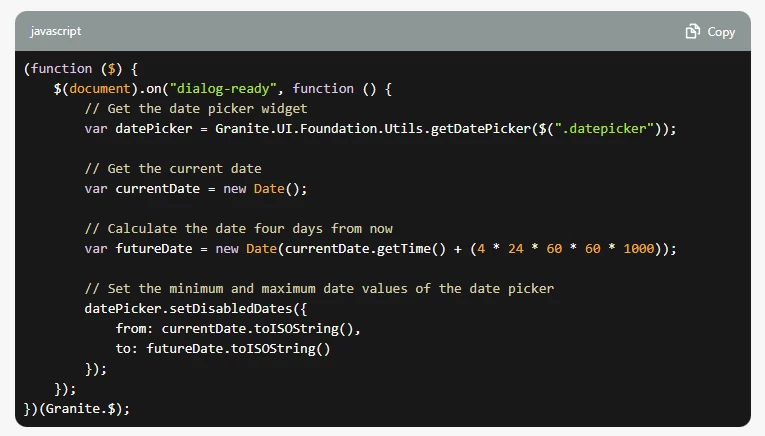
(function ($) {
    $(document).on("dialog-ready", function () {
        // Get the date picker widget
        var datePicker = Granite.UI.Foundation.Utils.getDatePicker($("#guideContainer-rootPanel-guidedatepicker__"));

        // Get the current date
        var currentDate = new Date();

        // Calculate the date four days from now
        var futureDate = new Date(currentDate.getTime() + (4 * 24 * 60 * 60 * 1000));

        // Set the minimum and maximum date values of the date picker
        datePicker.setDisabledDates({
            from: currentDate.toISOString(),
            to: futureDate.toISOString()
        });
    });
})(Granite.$);

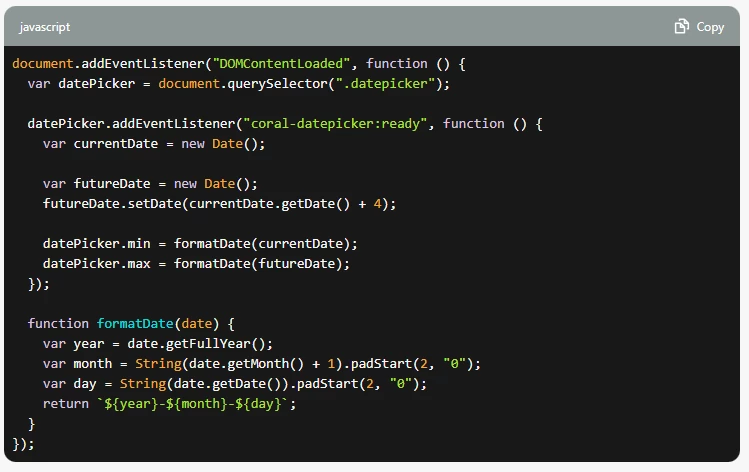
Second try:

document.addEventListener("DOMContentLoaded", function () {
  var datePicker = document.querySelector("#guideContainer-rootPanel-guidedatepicker__");

  datePicker.addEventListener("coral-datepicker:ready", function () {
    var currentDate = new Date();

    var futureDate = new Date();
    futureDate.setDate(currentDate.getDate() + 4);

    datePicker.min = formatDate(currentDate);
    datePicker.max = formatDate(futureDate);
  });

  function formatDate(date) {
    var year = date.getFullYear();
    var month = String(date.getMonth() + 1).padStart(2, "0");
    var day = String(date.getDate()).padStart(2, "0");
    return `${year}-${month}-${day}`;
  }
});


I also don't understand this error


Thanks so much in advance!



This post is no longer active and is closed to new replies. Need help? Start a new post to ask your question.
Best answer by Imran__Khan

Can you please try to use var in place of let as es6 not working for you

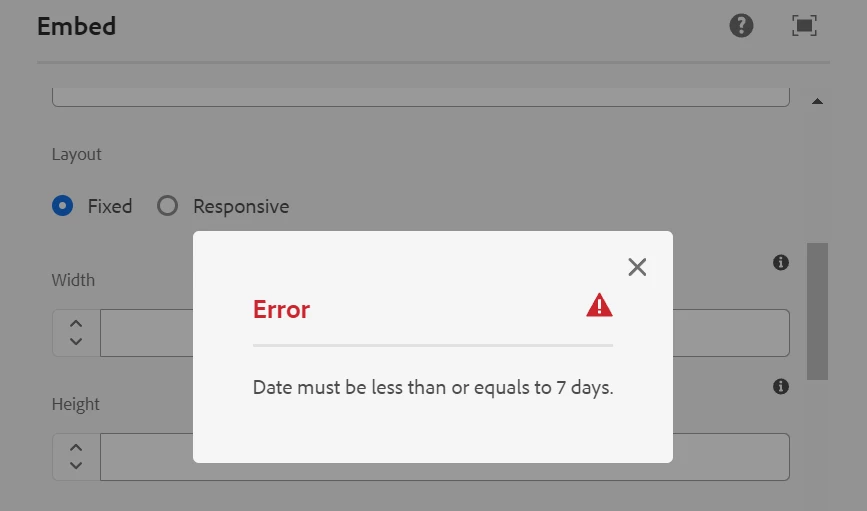
(function (document, $) { $(document).on("click", ".cq-dialog-submit", function(e) { var currentDate = new Date(); var selectedDate = new Date($("[name='./date']").val()); // Calculate date difference var timeDifference = selectedDate.getTime() - currentDate.getTime(); // Calculating the no. of days between // two dates var numberOfDays =Math.round(timeDifference / (1000 * 3600 * 24)); // To display the final no. of days (result) console.log("Number of days - " + numberOfDays); if (numberOfDays > 7) { var ui = $(window).adaptTo("foundation-ui"); ui.alert("Error", "Date must be less than or equals to 7 days.", "error"); return false; } }); })(document, Granite.$);

1 reply

Imran__Khan
Community Advisor
Community Advisor
February 20, 2024

We can add tooltip and try for below code also to show error on dialog submit to have 7 days


(function (document, $) { $(document).on("click", ".cq-dialog-submit", function(e) { let currentDate = new Date(); let selectedDate = new Date($("[name='./date']").val()); // Calculate date difference let timeDifference = selectedDate.getTime() - currentDate.getTime(); // Calculating the no. of days between // two dates let numberOfDays =Math.round(timeDifference / (1000 * 3600 * 24)); // To display the final no. of days (result) console.log("Number of days - " + numberOfDays); if (numberOfDays > 7) { var ui = $(window).adaptTo("foundation-ui"); ui.alert("Error", "Date must be less than or equals to 7 days.", "error"); return false; } }); })(document, Granite.$);


February 20, 2024

Hi @imran__khan , Thank you for your advice! I think it is a great solution for my use case.


I tried it; however, I got this error.

"Let is available in ES6 (use 'esversion: 6') or Mozilla JS extension (use moz)"

Would there be a substitute of 'let'?

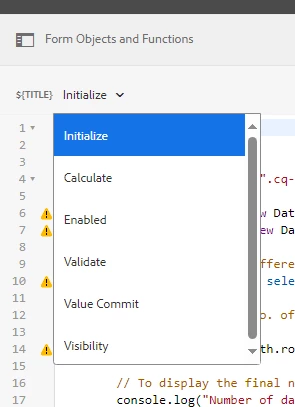
Also, may I ask what event do you choose to trigger it? I picked initialized.

Many thanks,

Brian

Imran__Khan
Community Advisor
Imran__KhanCommunity AdvisorAccepted solution
Community Advisor
February 20, 2024

Can you please try to use var in place of let as es6 not working for you

(function (document, $) { $(document).on("click", ".cq-dialog-submit", function(e) { var currentDate = new Date(); var selectedDate = new Date($("[name='./date']").val()); // Calculate date difference var timeDifference = selectedDate.getTime() - currentDate.getTime(); // Calculating the no. of days between // two dates var numberOfDays =Math.round(timeDifference / (1000 * 3600 * 24)); // To display the final no. of days (result) console.log("Number of days - " + numberOfDays); if (numberOfDays > 7) { var ui = $(window).adaptTo("foundation-ui"); ui.alert("Error", "Date must be less than or equals to 7 days.", "error"); return false; } }); })(document, Granite.$);