search for content in a content fragment that is referenced in another content fragment | Community
Skip to main content
Level 2
February 5, 2025
Solved

search for content in a content fragment that is referenced in another content fragment

  • February 5, 2025
  • 3 replies
  • 1391 views

I'm implementing a search feature with the Query Builder API. This is a headless solution in which all content is content fragments, including the site's "pages"


This is my initial query and the query works when I search directly in content fragments of type "page"

type=dam:Asset
path=/content/dam/tap/master/pt/pages
property=jcr:content/data/cq:model
property.value=/conf/tap/settings/dam/cfm/models/page
fulltext=dummy test


My problem is when the word I'm looking for is in a content fragment that is being referenced

Example: 
If I search for the word holidays


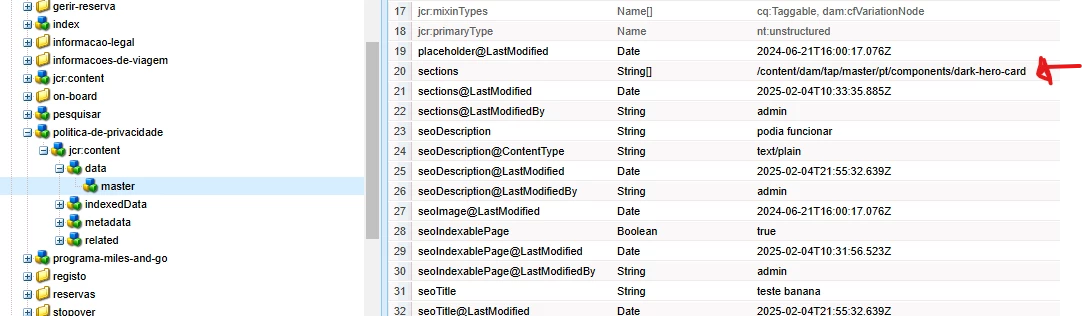
It should have this path (/content/dam/tap/master/pt/pages/politica-de-privacidade/jcr:content/data/master) as a result because the word "holidays" exists within the content fragment (/content/dam/tap/master/pt/components/dark-hero-card) that is being referenced in the properties (ex: sections: ) of the content fragment (/content/dam/tap/master/pt/pages/politica-de-privacidade/jcr:content/data/master)

You can see the structure in the image


What are the possible solutions?


Best answer by JoelSo2

I tried the index solution but it didn't work and then I implemented two queries, but depending on the word I was looking for sometimes it took 15 seconds to get an answer.

The only solution I found was to create a listener that looks for referenced content fragments within the main content fragment and then creates a "customIndexedData" field that stores all the information of the referenced content fragments.

So when I do fulltext search, it's fast and always finds the correct fragments

3 replies

anupampat
Community Advisor
Community Advisor
February 5, 2025

Hi @joelso2 ,

This will probably not be resolved via the Query Builder API alone, if you know that there could be search keywords present in the 'section' path, you would want to include another query on the value of 'section' combine both results and then return the result.


So First Query- to find the keyword under /content/dam/tap/master/pt and get the path of 'section'

and add the result of first query to

second query - fire on the value of 'section' path i.e. /content/dam/tap.


Regards,

Anupam Patra

JoelSo2Author
Level 2
February 5, 2025

Is it possible to resolve this by creating a custom oak:index?

JoelSo2Author
Level 2
February 6, 2025

Can you pls try below

Create an Oak index for the sections property (or any other property that holds references to other content fragments) in the parent content fragment. This index should be set to nodeScopeIndex and propertyIndex. Example Oak Index:

<indexRules jcr:primaryType="nt:unstructured"> <dam:Asset jcr:primaryType="nt:unstructured"> <properties jcr:primaryType="nt:unstructured"> <sections jcr:primaryType="nt:unstructured" name="jcr:content/data/master/sections" nodeScopeIndex="{Boolean}true" propertyIndex="{Boolean}true" analyzed="{Boolean}true" /> </properties> </dam:Asset> </indexRules>

Query to search for a specific term (holidays) inside a referenced fragment:

type=dam:Asset path=/content/dam/tap/master/pt/pages property=jcr:content/data/master/sections property.value=/content/dam/tap/master/pt/components/dark-hero-card fulltext=holidays

Expected Result: The query should return the parent content fragment (e.g., /content/dam/tap/master/pt/pages/politica-de-privacidade) that has a reference to the content fragment that contains the word "holidays".
If the above query isn't working, it's likely due to how the sections property stores the references. The references might be stored as a string, not directly as node paths, in which case you'd need to parse them or adjust your indexing accordingly. You may also want to ensure that the sections property is correctly indexed for searching.


This is my index:

<?xml version="1.0" encoding="UTF-8"?>
    jcr:mixinTypes="[rep:AccessControllable]"
    jcr:primaryType="oak:QueryIndexDefinition"
    async="[async,nrt]"
    compatVersion="{Long}2"
    evaluatePathRestrictions="{Boolean}true"
    includedPaths="[/content/dam/tap/master]"
    queryPaths="[/content/dam/tap/master]"
    maxFieldLength="{Long}100000"
    type="lucene"
    reindex="{Boolean}true">
    <facets
        jcr:primaryType="nt:unstructured"
        secure="statistical"
        topChildren="100"/>
    <indexRules jcr:primaryType="nt:unstructured">
        <dam:Asset jcr:primaryType="nt:unstructured">
            <properties jcr:primaryType="nt:unstructured">
                <sections
                    jcr:primaryType="nt:unstructured"
                    name="jcr:content/data/master/sections"
                    nodeScopeIndex="{Boolean}true"
                    propertyIndex="{Boolean}true"
                    analyzed="{Boolean}true" />
            </properties>
        </dam:Asset>
    </indexRules>
</jcr:root>

I tested these two queries and neither of them returned results.

type=dam:Asset
path=/content/dam/tap/master/pt/pages
property=jcr:content/data/master/sections
property.value=holidays
fulltext=holidays


type=dam:Asset
path=/content/dam/tap/master/pt/pages
property=jcr:content/data/master/sections
property.value=/content/dam/tap/master/pt/components/dark-hero-card
fulltext=holidays

and I checked that the query is using my custom index


Uppari_Ramesh
Level 5
February 7, 2025

Hi @joelso2 ,


Parent path:/content/dam/tap/master/pt/pages/politica-de-privacidade/jcr:content/data/master

Reference path:/content/dam/tap/master/pt/components/dark-hero-card


Here your requirement is to get the parent path instead of reference path but you are getting the reference path. As @anupampat mentioned, just querybuilder isn't just enough to achieve desired result. Once you get the reference path then you need to execute SQL2 query to get the parent path. The sample query would look like below

SELECT * FROM [nt:unstructured] AS node WHERE ISDESCENDANTNODE(node, '/content/path') AND CONTAINS(node.[sections], 'give reference path')

You can create the index for above query.


Thanks,

Ramesh.

kautuk_sahni
Community Manager
Community Manager
February 10, 2025

@joelso2 Did you find the suggestions helpful? Please let us know if you need more information. If a response worked, kindly mark it as correct for posterity; alternatively, if you found a solution yourself, we’d appreciate it if you could share it with the community. Thank you!

Kautuk Sahni
JoelSo2AuthorAccepted solution
Level 2
February 11, 2025

I tried the index solution but it didn't work and then I implemented two queries, but depending on the word I was looking for sometimes it took 15 seconds to get an answer.

The only solution I found was to create a listener that looks for referenced content fragments within the main content fragment and then creates a "customIndexedData" field that stores all the information of the referenced content fragments.

So when I do fulltext search, it's fast and always finds the correct fragments