
Search and Promote Results appearing as invisible blank Page | Community
Skip to main content
RajaShankar
Community Advisor
Community Advisor
February 25, 2019
Solved

Search and Promote Results appearing as invisible blank Page

  • February 25, 2019
  • 2 replies
  • 1891 views

Hi All,

I am trying to configure a SNP in my dev environment. I am using Index connector XML Feed.

Below is the step followed as per guide provided by AEM and community forums:

a) Created Cloud Configuration in Dev AEM instance using member id and account id. Connection was successfull.

b) Added Search and Promote cloud config to default Geometrix Page

c) Added default oob search,results,pagination components to a new page under Geometrix

d) Configured the XML file in Index Connector and mapped the XML file with metadata. Preview is coming fine without issue.

e) Added the index connector to URL entrypoints.

f)Checked simulator record in XML is visible

g) Checked data view record is visible

h) In my AEM Webpage in Preview mode i am getting below screen without any results visible even though it showing results 1 of 1 but no result visible.

i) No error in aem error.log
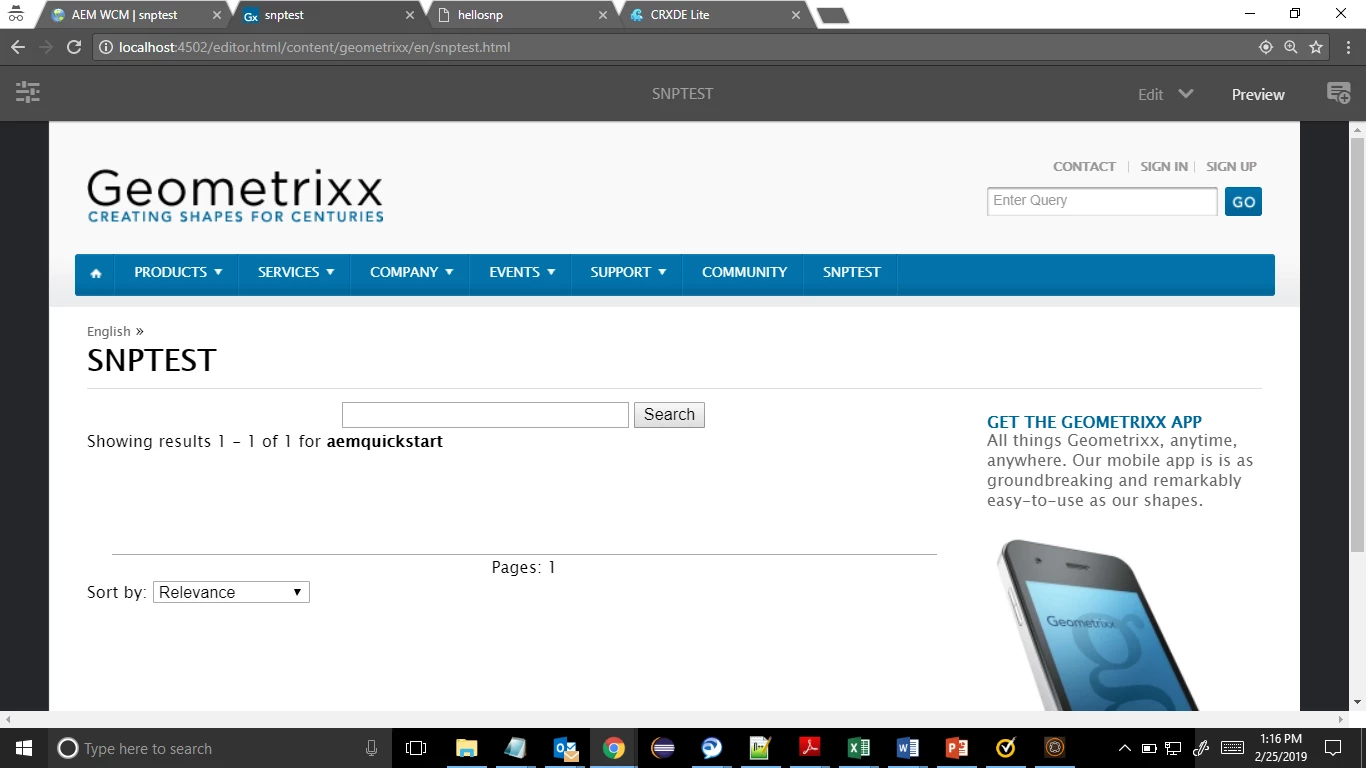
Please help not sure what is missing.

Regards,

Rajashankar.R

PS: I followed the below Blogs

Integrating with Adobe Search&Promote

https://www.aemquickstart.in/2016/08/aem-search-with-adobe-search-and-promote.html

This post is no longer active and is closed to new replies. Need help? Start a new post to ask your question.
Best answer by RajaShankar

Hi,

I had resolved the issue. Issue was with respect to template Result set. I modified the template result set to include my indexed metadata properly. Then it started appearing in result grid.

Regards,

Rajashankar.R

2 replies

Gaurav-Behl
Level 10
February 26, 2019

Couple of pointers-

-check proxy configurations, as mentioned in article - If you are using Search&Promote with a custom proxy configuration, you need to configure both HTTP Client proxy configurations as some functionalities of AEM are using the 3.x APIs and some others the 4.x APIs

- create a debug logger on 'com.day.cq.searchpromote' and look out for errors/warnings

-validate that the page root is configured with SnP configuration as mentioned in that article - Configure web pages so that they use a specific Search&Promote service. Search&Promote components automatically use the service of their host page.

Based on your AEM version, check if there is any hotfix/package to be installed before you proceed further.

RajaShankar
Community Advisor
RajaShankarCommunity AdvisorAuthorAccepted solution
Community Advisor
February 28, 2019

Hi,

I had resolved the issue. Issue was with respect to template Result set. I modified the template result set to include my indexed metadata properly. Then it started appearing in result grid.

Regards,

Rajashankar.R