Save Search in AEM 6.4 | Community
Skip to main content
Level 2
April 18, 2018
Solved

Save Search in AEM 6.4

  • April 18, 2018
  • 5 replies
  • 2864 views

Hi,

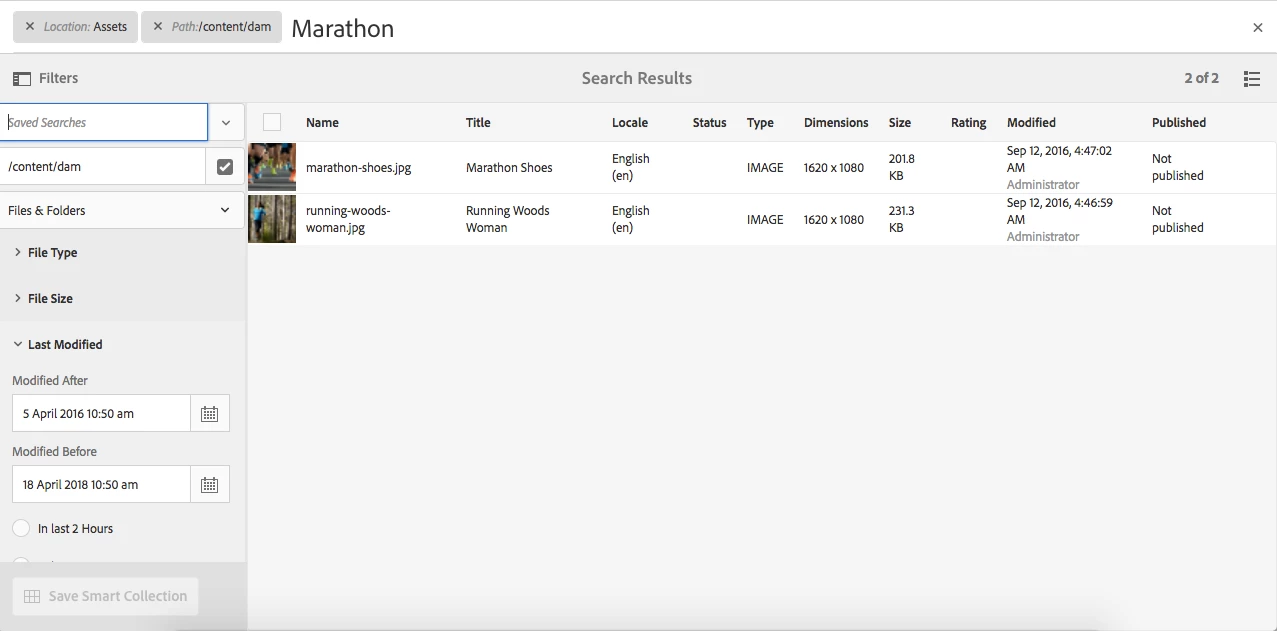
I am not able to save a search in AEM 6.4, The button Save Smart Collection is disabled. Any help is really appreciated.

Thanks,

Kishore.

This post is no longer active and is closed to new replies. Need help? Start a new post to ask your question.
Best answer by Kunwarsaluja

Kishore, open a daycare ticket if you can consistently replicate the issue on 6.4. The team can help you quickly with the next steps.

5 replies

smacdonald2008
Level 10
April 18, 2018

Are you seeing any browser or log messages. Community needs more information to help here.

Also - ensure you are following all information as specified in this doc topic -- Managing Collections

Level 2
April 19, 2018

Hi Smacdonald,

I followed the steps present under this section :

A smart collection uses a search criteria to dynamically populate assets. To create a smart collection:

Still the button is disabled. Please find the screenshots.

There are just some warnings in browser console, all warnings are same "The clientLib used here is deprecated."

I have attached the screenshot of error.log as well.

Thanks,

Kishore.

Level 2
April 24, 2018

Hi,

Can someone help on this issue.

Thanks,

Kishore.

KunwarsalujaAdobe EmployeeAccepted solution
Adobe Employee
April 25, 2018

Kishore, open a daycare ticket if you can consistently replicate the issue on 6.4. The team can help you quickly with the next steps.

Adobe Employee
October 19, 2018

Hello Kishore,

In AEM 6.4, the default "Search Context" is "Files & Folders". 'Folders' and 'Files & Folders' search contexts do not have an option for Save Smart Collection.

Please change the dropdown value to 'Files' to enable the Save Smart Collection and Edit Smart Collection options. It is also mentioned in the doc [1].

[1] https://helpx.adobe.com/experience-manager/6-4/assets/using/managing-collections-touch-ui.html#Creatingasmartcollection

Regards,

Vishu