SAP Adobe Forms - Header Information Not carrying over after page 2
Hello Adobe Experts,
I really need some help with some Adobe Forms and Adobe LiveCycle.
Background:
I have created a master form that contains a Landscape_Factsheet fragment that will be used by multiple content forms.
In the header it contains a logo, address, title and page n of m objects. It also contains three text fields: GST Number (A goods tax number), a title for either "CREDIT MEMO NUMBER" or "TAX INVOICE NUMBER" depending what type of document is used and the reference number for that credit memo or invoice as the client wants it to be shown on the top of each page when it overflows.

In the content form, I have added some scripting to access the three text fields stated above in the hidden fields contained in fromHiddenGlobalFields as a new hidden field called "txtGSTNumber":
Code snippet for the form title contained in the field "txtFormTitle" (this is the standard SAP code I haven't touched and relevant for later):
Form.frmHiddenGlobalFields.txtFormTitle::ready:layout - (FormCalc, both)
// Set the form title as the combination of title and document ID, separated by colon
//First Page (always available)
var lvDocumentID = $record.C_FinInvoiceHeaderFDPType.AccountingDocument
if( $record.C_FinInvoiceHeaderFDPType.to_ARItem.DebitCreditCode == "H" ) then
xfa.resolveNode("#pageSet[0].mst1.FirstPage.frmHeader.txtTitle") = Form.frmHiddenStaticTexts.lblFormTitleCreditMemo.rawValue;//credit memo for title
else
xfa.resolveNode("#pageSet[0].mst1.FirstPage.frmHeader.txtTitle") = Form.frmHiddenStaticTexts.lblFormTitle.rawValue;//tax invoice form title
endif
//Second Page (must only be executed if there is are subsequent pages)
var pageCount = xfa.layout.pageCount();
if (pageCount > "1")
then
xfa.resolveNode("#pageSet[0].mst2.SubsequentPage.frmHeader.txtTitle") = Form.frmHiddenStaticTexts.lblFormTitle.rawValue//Concat( Form.frmHiddenStaticTexts.lblFormTitle.rawValue, lvDocumentID );
endif
Code snippet for the three text fields contained in the field "txtGSTNumber":
Form.frmHiddenGlobalFields.txtGSTNumber::ready:layout - (FormCalc, client)
//First Page (always available)
var lvDocumentID = $record.C_FinInvoiceHeaderFDPType.AccountingDocument
if( $record.C_FinInvoiceHeaderFDPType.to_ARItem.DebitCreditCode == "H" ) then
xfa.resolveNode("#pageSet[0].mst1.frmFooter.frmFooterBlock_1.txtLine").presence = "hidden"; //hide footer
xfa.resolveNode("#pageSet[0].mst1.frmFooter.frmFooterBlock_2.txtLine").presence = "hidden"; //hide footer
xfa.resolveNode("#pageSet[0].mst1.FirstPage.frmHeader.GSTNumber.GSTNumber") = $record.C_FinInvoiceHeaderFDPType.to_CompanyCode.VATRegistration
xfa.resolveNode("#pageSet[0].mst1.FirstPage.frmHeader.GSTNumber.txtCreditMemoTitle") = Concat(Upper(Form.frmHiddenStaticTexts.lblFormTitleCreditMemo.rawValue), " NUMBER" ); //credit memo number title
xfa.resolveNode("#pageSet[0].mst1.FirstPage.frmHeader.GSTNumber.txtCreditMemoNum") = Form.frmHiddenGlobalFields.txtDocumentID.rawValue //credit memo doc number
else
//set GST number
xfa.resolveNode("#pageSet[0].mst1.FirstPage.frmHeader.GSTNumber.GSTNumber") = $record.C_FinInvoiceHeaderFDPType.to_CompanyCode.VATRegistration
xfa.resolveNode("#pageSet[0].mst1.FirstPage.frmHeader.GSTNumber.txtCreditMemoTitle") = Concat(Upper(Form.frmHiddenStaticTexts.lblFormTitle.rawValue), " NUMBER" ); //tax invoice number title
xfa.resolveNode("#pageSet[0].mst1.FirstPage.frmHeader.GSTNumber.txtCreditMemoNum") = Form.frmHiddenGlobalFields.txtDocumentID.rawValue//tax invoice doc number
endif
//Second Page (must only be executed if there is are subsequent pages)
var pageCount = xfa.layout.pageCount();
if (pageCount > "1")
then
if( $record.C_FinInvoiceHeaderFDPType.to_ARItem.DebitCreditCode == "H" ) then
xfa.resolveNode("#pageSet[0].mst2.SubsequentPage.frmHeader.txtTitle") = Form.frmHiddenStaticTexts.lblFormTitleCreditMemo.rawValue;//Credit memo Form title
xfa.resolveNode("#pageSet[0].mst2.SubsequentPage.frmFooterBlock_1.txtLine").presence = "hidden"; //hide footer
xfa.resolveNode("#pageSet[0].mst2.SubsequentPage.frmFooterBlock_2.txtLine").presence = "hidden"; //hide footer
//set GST number
xfa.resolveNode("#pageSet[0].mst2.SubsequentPage.frmHeader.GSTNumber.GSTNumber") = $record.C_FinInvoiceHeaderFDPType.to_CompanyCode.VATRegistration
xfa.resolveNode("#pageSet[0].mst2.SubsequentPage.frmHeader.GSTNumber.txtCreditMemoTitle") = Concat(Upper(Form.frmHiddenStaticTexts.lblFormTitleCreditMemo.rawValue), " NUMBER" );//credit memo number title
xfa.resolveNode("#pageSet[0].mst2.SubsequentPage.frmHeader.GSTNumber.txtCreditMemoNum") = Form.frmHiddenGlobalFields.txtDocumentID.rawValue; //credit memo doc number
else
//set GST number
xfa.resolveNode("#pageSet[0].mst2.SubsequentPage.frmHeader.GSTNumber.GSTNumber") = $record.C_FinInvoiceHeaderFDPType.to_CompanyCode.VATRegistration
xfa.resolveNode("#pageSet[0].mst2.SubsequentPage.frmHeader.GSTNumber.txtCreditMemoTitle") = Concat(Upper(Form.frmHiddenStaticTexts.lblFormTitle.rawValue), " NUMBER" ); //tax invoice number title
xfa.resolveNode("#pageSet[0].mst2.SubsequentPage.frmHeader.GSTNumber.txtCreditMemoNum") = Form.frmHiddenGlobalFields.txtDocumentID.rawValue; //tax invoice doc number
endif
endif
Problem:
When previewing the PDF, it works great with all fields populating for the first page and the second page. However, after it goes over that second page, it does not populate the SAP standard title, or the other three text fields
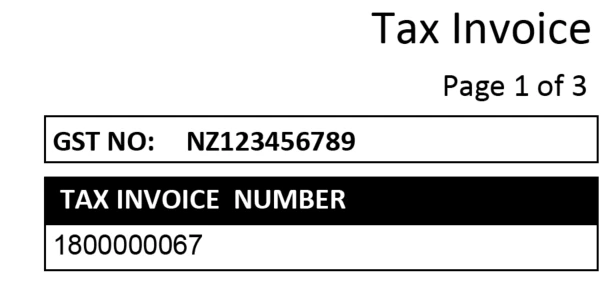
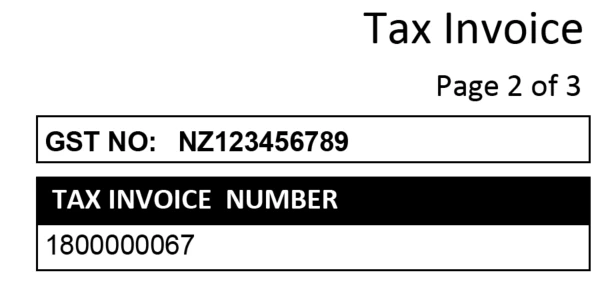
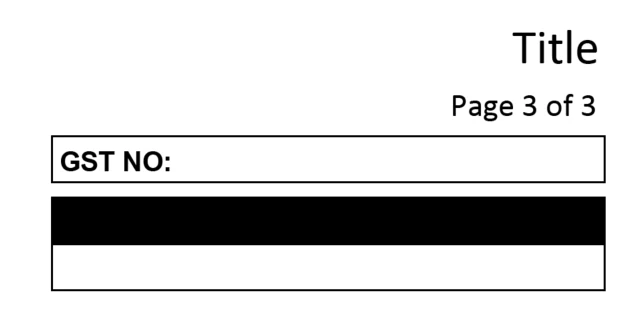
I know that SAP standard forms, the title carries over no matter how many pages the invoice is, so what is happening here? I can't work it out for love nor money.
I also notice that even though I have the correct master loaded and the correct fragment selected, it's still saying it is "(untitled SubForm) (page 1) and everything greyed out whereas in other forms it shows Landscape_Factsheet instead and some things not greyed out:
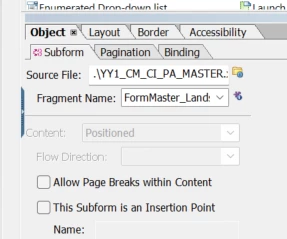
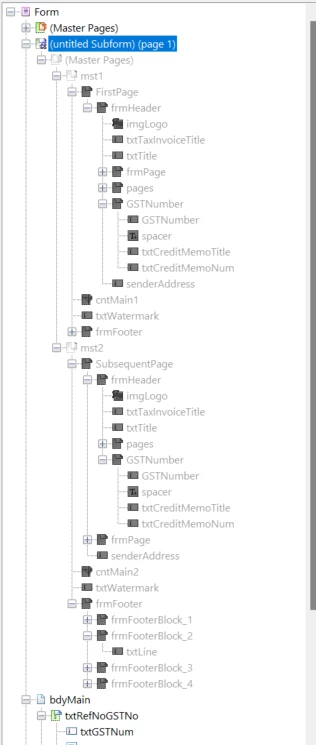
Any help here would be greatly appreciated and thanks in advance
Matt