SAML integration in AEM not working | Community
Skip to main content
Level 4
April 21, 2022

SAML integration in AEM not working

  • April 21, 2022
  • 2 replies
  • 2073 views

Hi All, 

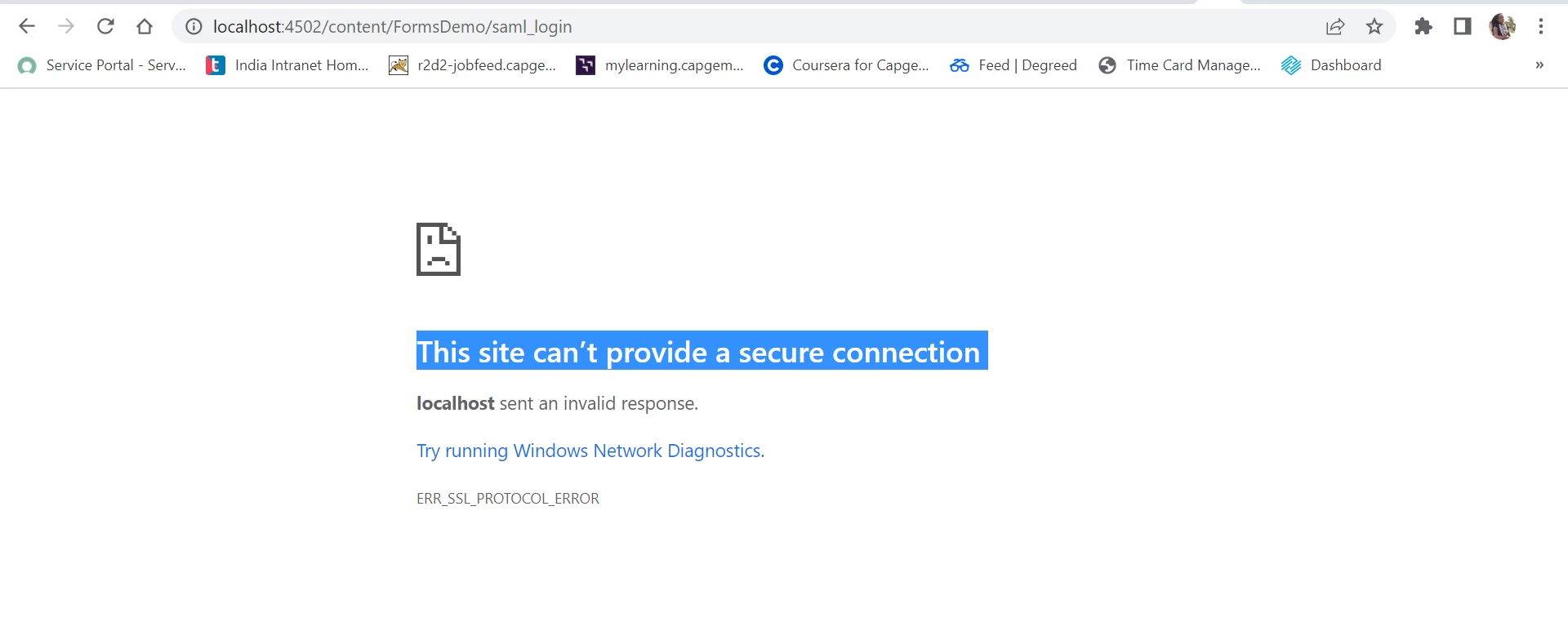
I am trying to integrate SAML to AEM for this I have followed below Azure article. I have done all the steps. When I try to test the url it throws the below error. can someone help me ??

https://medium.com/adobetech/saml-authentication-in-aem-using-microsoft-azure-active-directory-30d668338a8f


Error : 


This post is no longer active and is closed to new replies. Need help? Start a new post to ask your question.

2 replies

arunpatidar
Community Advisor
Community Advisor
April 21, 2022

you need to run AEM over https

Arun Patidar
Level 4
April 21, 2022

Thank you @arunpatidar . I have started my aem author instance and it doesn't asking me the credentials directly it took me to the aem admin console. Is this why we are using SAML integration, since I'm new to SAML.

Level 4
April 25, 2022

I am not sure which one you are using Adobe IMS or Azure. But if it is working then you can check the user id, what user is created/logged in in AEM to verify that everything is ok.


Hi @arunpatidar  I have used Azure to get the idp certificate. I'm sorry that I'm very new to this SAML integration. I have configured everything in the ConfigMgr as per the guide. But now I don't know how and where to check this saml so it's working correctly or not. As usual I'm logging into AEM author instance by admin username & pwd. Don't know where to exactly check about this feature. Can you just elaborate ? like which link i need to check aem author or azure login id ????

And when I use azure login id it says like below.  Thank you and sorry If I trouble you more.


Adobe Employee
April 25, 2022