RTE Styles Plugin issue with Lists | Community
Skip to main content
Community Advisor
August 16, 2021
Solved

RTE Styles Plugin issue with Lists

  • August 16, 2021
  • 3 replies
  • 1120 views

We have RTE configured with Styles Plugin. When we are applying styles on lists, it is getting applied only on list element's text and not on bullets or the numbers.
This is happening because styles are getting added on <span> inside <li>.
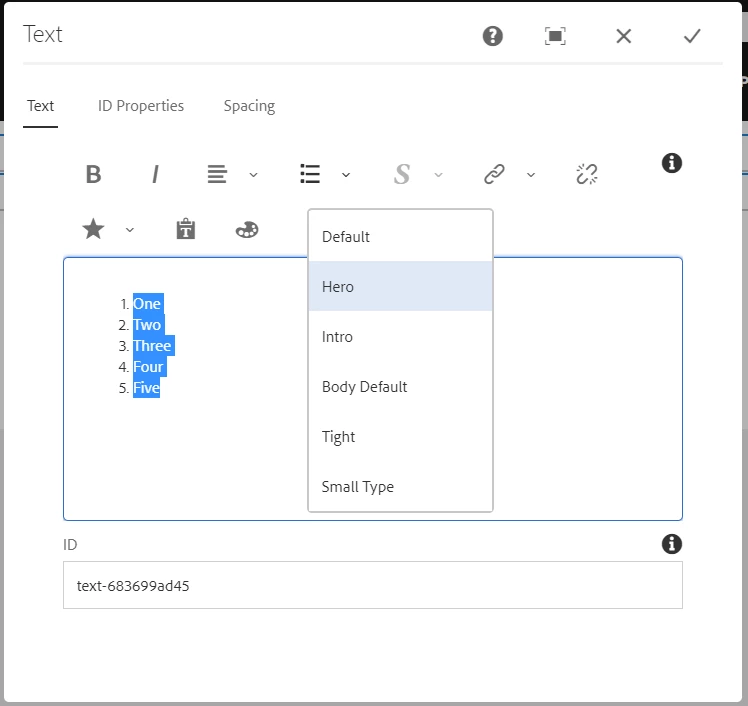
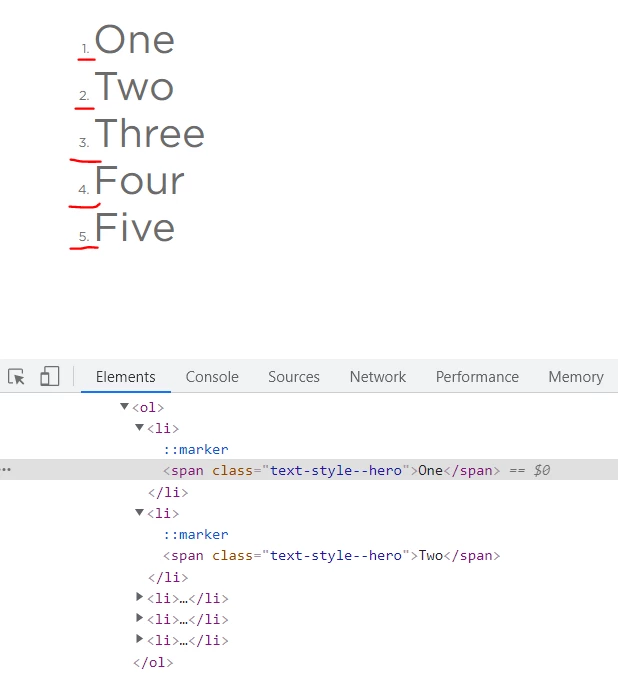
Does anyone have any clue on how to apply styles on whole list element?

This post is no longer active and is closed to new replies. Need help? Start a new post to ask your question.
Best answer by Bhuwan_B

Check below URL for the customization done for the list plugin for adding selected CSS class and use this approach to acheive your usecase:

http://experience-aem.blogspot.com/2017/05/aem-62-touch-ui-extend-rte-list-plugin-for-adding-selected-css-class.html

3 replies

Kiran_Vedantam
Community Advisor
Community Advisor
August 16, 2021

hi @salamswapnil,


Pls check the custom style plugin code, how it is applying the styles for list section.


I think you need to write custom code on the dailog load to fetch the list items and apply the styles once dailog is closed as List plugin gets loaded on the dailog on the fly in RTE

Thanks,

Kiran Vedantam.

Bhuwan_B
Community Advisor
Bhuwan_BCommunity AdvisorAccepted solution
Community Advisor
August 16, 2021

Check below URL for the customization done for the list plugin for adding selected CSS class and use this approach to acheive your usecase:

http://experience-aem.blogspot.com/2017/05/aem-62-touch-ui-extend-rte-list-plugin-for-adding-selected-css-class.html

arunpatidar
Community Advisor
Community Advisor
August 16, 2021

check the artcile shared by @bhuwan_b 

if you need a generic style plugin the check https://aemlab.blogspot.com/2019/07/aem-rte-custom-plugins-1.html

Arun Patidar