
RTE Styles plugin issue in AEM 6.3 classic UI? | Community
Skip to main content
ArpitBora
Level 3
July 31, 2017
Solved

RTE Styles plugin issue in AEM 6.3 classic UI?

  • July 31, 2017
  • 3 replies
  • 1923 views

Hello Everyone,

Classic UI RTE Styles plugin is not reflecting the options font and format style in the drop-down in AEM 6.3 as it reflects in AEM 6.0, following are image snippets:
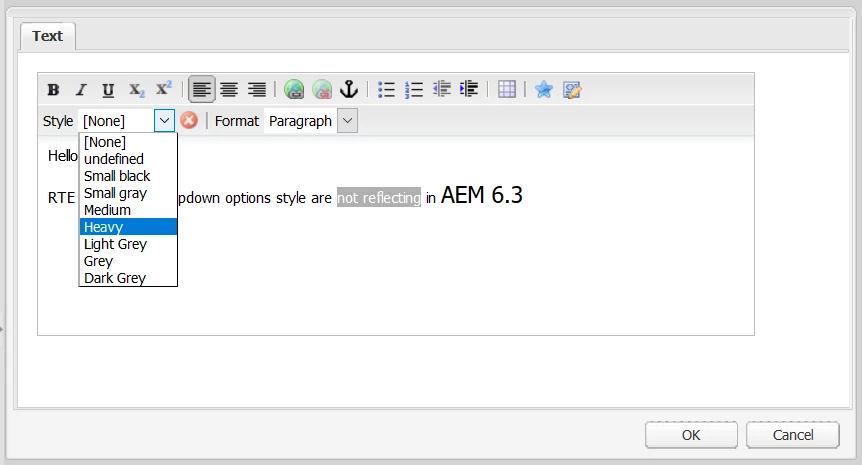
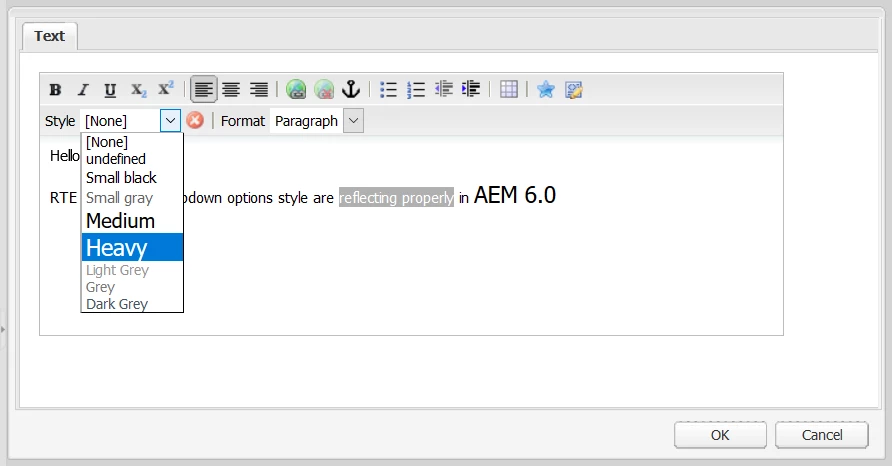
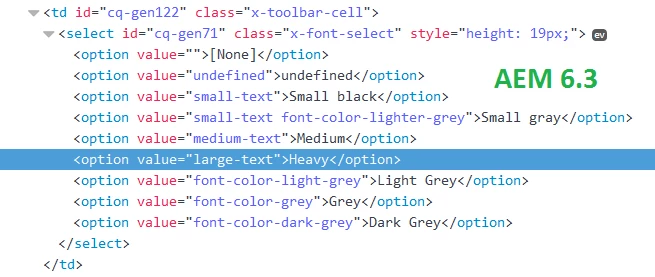
When I inspected the Style plugin drop-down option I found that in AEM 6.3 class selector is not present but in AEM 6.0 it is present, following are image snippet:
---------------------------------------------------------------------------------------------------------------------------
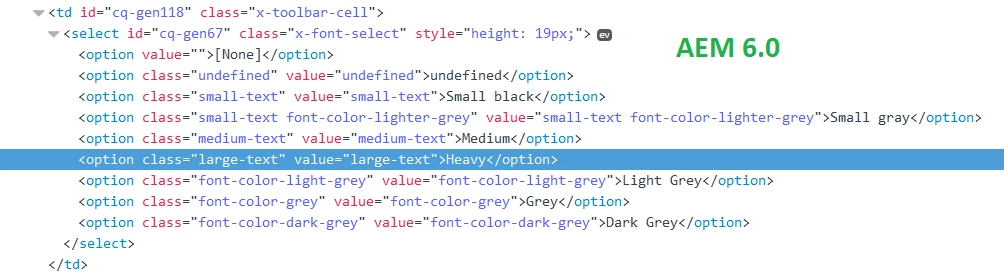
In AEM 6.0 each option reflects 'cssName' property for class and value but in AEM 6.3 it reflects for value only.

I referred following docs for RTE Style plugin:https://docs.adobe.com/docs/en/aem/6-3/administer/operations/page-authoring/rich-text-editor.html

https://docs.adobe.com/docs/en/aem/6-0/administer/operations/page-authoring/rich-text-editor.html

Is it a bug in AEM 6.3 or I need to configure anything for it in AEM 6.3.

Any suggestions would be appreciated.

Thanks,

Arpit Bora

This post is no longer active and is closed to new replies. Need help? Start a new post to ask your question.
Best answer by smacdonald2008

This certainly appears to be a bug, I would recommend opening a ticket and report this so it can be fixed by the Eng team.

3 replies

smacdonald2008
Level 10
July 31, 2017

I do not think they changed how Classic UI works as the preferred way in AEM 63 is the Touch UI. This looks like a bug. Have you noticed issues with other RTE plug-ins in Classic.

BTW - here is the Touch UI RTE discussion -- Configuring Experience Manager Rich Text Editor Plugins in a Touch UI Component Dialog

ArpitBora
ArpitBoraAuthor
Level 3
July 31, 2017

Thanks for the reply smacdonald2008
Apart from Style Plugin, I used 'paraformat, links, table, subsuperscript and misctools' RTE plugins in classic UI and I noticed no issue in them.

Could you please conform if this is a bug with the instance or any configuration missing from my end.

smacdonald2008
smacdonald2008Accepted solution
Level 10
August 1, 2017

This certainly appears to be a bug, I would recommend opening a ticket and report this so it can be fixed by the Eng team.