RTE Source Edit button only for Administrators | Community
Skip to main content
April 22, 2023
Solved

RTE Source Edit button only for Administrators

  • April 22, 2023
  • 3 replies
  • 1294 views

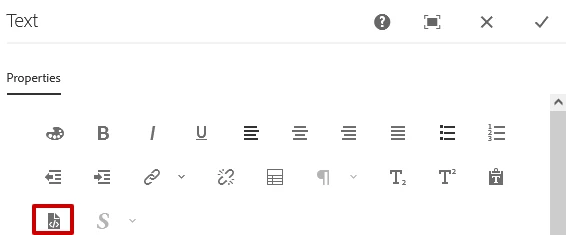
How can I only allow administrators access to the Source Edit button in the RTE? (AEM 6.5) Is there a permission I can use?

I am trying to avoid turning it on and off from the template.


This post is no longer active and is closed to new replies. Need help? Start a new post to ask your question.
Best answer by Shubham_borole

We can use the dialog submit call.


$(document).on("click", ".cq-dialog-submit", function (e) {
            //On submit this is invoked
// Ajax call to servlet here         });

An example here - Call any servlet in touchUI dialog |AEM 6.3+ – AEM Queries & Solutions (wordpress.com)


javascript - dialog-ready event does not fire when dialog opens in AEM 6.1? - Stack Overflow


Sling Servlet in AEM – AEM CQ5 Tutorials


Thanks


3 replies

Shubham_borole
Community Advisor
Community Advisor
April 28, 2023

Hello,


We can have a custom servlet that gets invoked on dialog ready and checks the logged in user against user group that should have access to view the source edit. As a response, it can just be a boolean allowed = true or false. Based on that we can show or hide the sourceedit button.


Thanks


Shubham

bb47Author
April 29, 2023

That sounds doable. Do you have any documentation you could send me to set this in place?

Shubham_borole
Community Advisor
Shubham_boroleCommunity AdvisorAccepted solution
Community Advisor
May 5, 2023

We can use the dialog submit call.


$(document).on("click", ".cq-dialog-submit", function (e) {
            //On submit this is invoked
// Ajax call to servlet here         });

An example here - Call any servlet in touchUI dialog |AEM 6.3+ – AEM Queries & Solutions (wordpress.com)


javascript - dialog-ready event does not fire when dialog opens in AEM 6.1? - Stack Overflow


Sling Servlet in AEM – AEM CQ5 Tutorials


Thanks


bilal_ahmad
April 29, 2023

Hi! you can make use of ComponentContext here. Create a sling model, check if the current user is a part of administrators group and then set the decoration true. This would make it non-editable for other users and editable for the users which are a part of administrators user group. 


thanks,

Bilal