RTE plugin menu is not visible until you click inside the RTE textarea in AEM 6.3 touch UI dialog | Community
Skip to main content
Level 2
October 3, 2017
Solved

RTE plugin menu is not visible until you click inside the RTE textarea in AEM 6.3 touch UI dialog

  • October 3, 2017
  • 10 replies
  • 6449 views

Hello Everyone,

I have added rte plugins for text area within a dialog in AEM 6.3 touch UI. I see that the rte toolbar is displayed only when you click inside the text area.

Is there a configuration which will always display the toolbar?

Following are the screenshots for your reference:

1) When the dialog is loaded
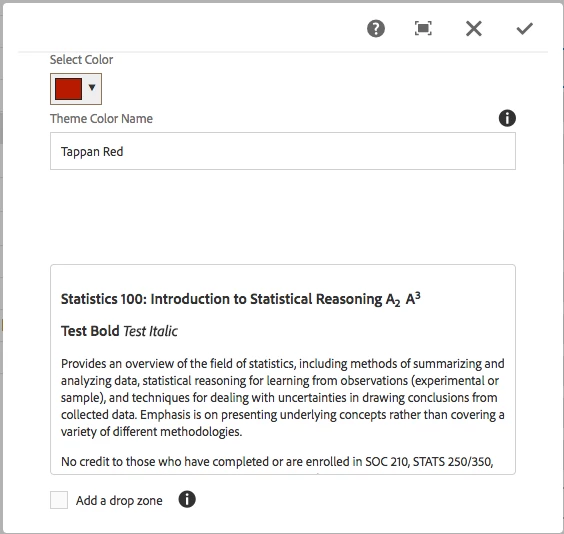
2) When I click inside the text area
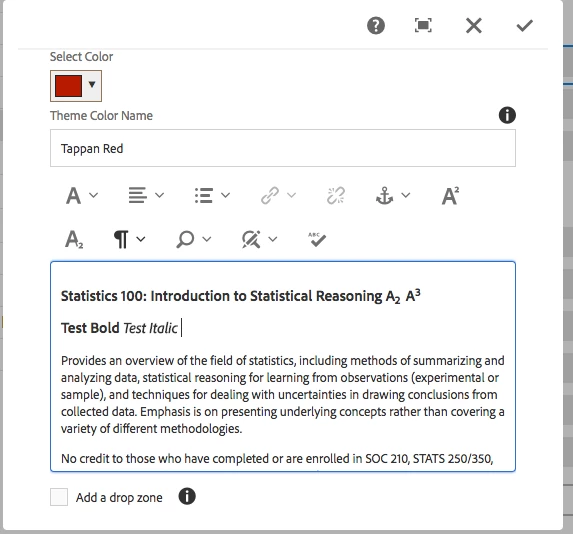
  Could someone please let me know if there is configuration to have the toolbar show up every time?

  Thanks,

  Ananta

This post is no longer active and is closed to new replies. Need help? Start a new post to ask your question.
Best answer by kautuk_sahni

This is Expected. Since, a dialog can contain multiple RTE, at a time, only one RTE's toolbar should be visible. Hence, it is decided to show on the toolbar on click inside it..

Reference:- AEM 6.3 richtext

10 replies

kautuk_sahni
Community Manager
Community Manager
October 4, 2017

I can reproduce this. I have asked Ratna to have a look at this.

seems like a bug to me.

~Kautuk

Kautuk Sahni
Ratna_Kumar
Level 10
October 4, 2017

Hi Ananta,

Yes, this is the bug in AEM 6.3. RTE toolbar will only appear when you click on Text area .

Please raise the Day care support ticket for the same.

Thanks,

Ratna.

Ratna_Kumar
Level 10
October 4, 2017

Raise the Day care ticket here: Adobe AEM CQ Support Portal - Contact

Thanks,

Ratna

ananta99Author
Level 2
October 4, 2017

Thanks. I will open a day care ticket for this issue.

smacdonald2008kautuksahni

I also noticed that there an extra blank line that is added between consecutive lines in text editor.

Please see the below image where there is a spacing between test1 and test2:

Could you please let me know if there is a configuration to remove extra blank line between lines?

Thanks,

Ananta

Ratna_Kumar
Level 10
October 4, 2017

Hi Ananta,

RTE by default if you enter text after the line the space will get generated. This is default functionality. You can also do Shift+Enter if you do not want space.

Thanks,
Ratna.

smacdonald2008
Level 10
October 4, 2017

Ratna is correct - when you enter a new line of text - the functionality is like a hard return:

ananta99Author
Level 2
October 4, 2017

Thanks Ratna Kumar​ and smacdonald2008​.

kautuk_sahni
Community Manager
kautuk_sahniCommunity ManagerAccepted solution
Community Manager
February 1, 2018

This is Expected. Since, a dialog can contain multiple RTE, at a time, only one RTE's toolbar should be visible. Hence, it is decided to show on the toolbar on click inside it..

Reference:- AEM 6.3 richtext

Kautuk Sahni
akashs51893872
Level 3
November 28, 2018

This is what works for me on AEM 6.4:

replacing siteName with your site/project name.  This is to namespace the style so that it doesn't affect other projects on the instance

form[action*="/content/siteName"] coral-panel-content div.rte-ui coral-buttongroup {

   visibility: visible !important;

}

// to hide the additional tooltip (may not be required for all projects)

form[action*="/content/siteName"] div.cq-RichText.richtext-container.coral-Form-field.coral-DecoratedTextfield + coral-tooltip{

   visibility: hidden;

}

​Good Luck...

January 15, 2019

Ratna Kumarkautuksahnismacdonald2008

Do we have any latest update on this post? Did adobe fixed this issue in any service packs for AEM 6.3 version? Please update me on this issues, we are also facing the same issue.

Thank you,

Shravan Bachu