RTE plugin full menu is not visible inside multifield | Community
Skip to main content
October 8, 2021
Solved

RTE plugin full menu is not visible inside multifield

  • October 8, 2021
  • 2 replies
  • 1462 views

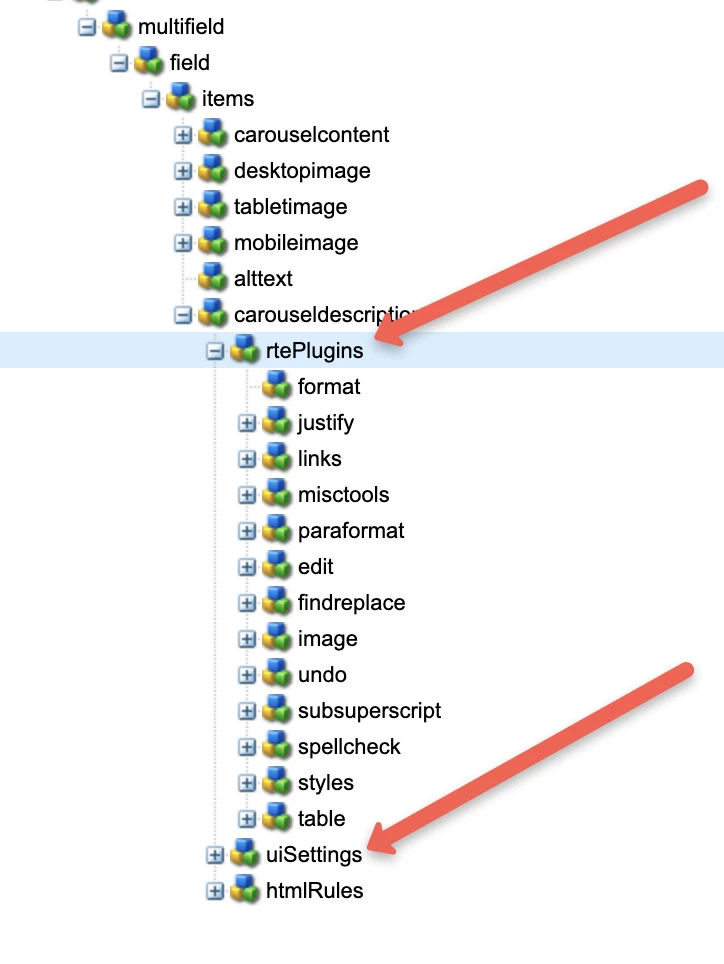
I am using a multifield which has one textfield and one RTE, i need to have full RTE plugin menu, but i can see only few even on full screen, and using the same plugin individually as a component shows me full menu.


Any pointer will be helpful


TIA

This post is no longer active and is closed to new replies. Need help? Start a new post to ask your question.
Best answer by Sanjay_Bangar

Hi @annkitaaggarwal ,

               In multifield you need to add all features individually to activate the plugins but when we used same plugins individually all features by default get activated. Please check the below link for more information.

https://experienceleague.adobe.com/docs/experience-manager-65/administering/operations/configure-rich-text-editor-plug-ins.html?lang=en

2 replies

Sanjay_Bangar
Community Advisor
Sanjay_BangarCommunity AdvisorAccepted solution
Community Advisor
October 8, 2021

Hi @annkitaaggarwal ,

               In multifield you need to add all features individually to activate the plugins but when we used same plugins individually all features by default get activated. Please check the below link for more information.

https://experienceleague.adobe.com/docs/experience-manager-65/administering/operations/configure-rich-text-editor-plug-ins.html?lang=en

October 11, 2021

Thanks, it worked


Asutosh_Jena_
Community Advisor
Community Advisor
October 10, 2021

Hi @annkitaaggarwal 


You need to activate the plugins. RTE functionalities are made available via a series of plug-ins, each with features property. You can configure the features property to enable or disable, one or more RTE features.


Please refer the link below:

https://experienceleague.adobe.com/docs/experience-manager-65/administering/operations/configure-rich-text-editor-plug-ins.html?lang=en


Thanks!