Level 1
Level 2
Sign in to Community
Learn more
Sign in to view all badges
Expand my Community achievements bar.
This conversation has been locked due to inactivity. Please create a new post.
Hi Everyone,
By default RTE Default typography is set to "Paragraph" and text color to "Black". Is it possible to change Default Typography and Text color?
Thanks in advance!
Solved! Go to Solution.
@santhoshsrg
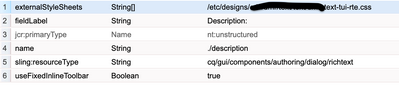
add externalStyleSheets property to RTE node and give css file path as value. Write css targeting cq-dialog class.
Ex:
.cq-dialog .coral-RichText-editable * {
    color: red;
}
View solution in original post
Views
Likes
Replies