
Rollout config with property cq:trigger not working as expected
Hi All,
I have a requirement where we want to rollout the changes and activate the live-copes if we modify and activate the page on blue print.
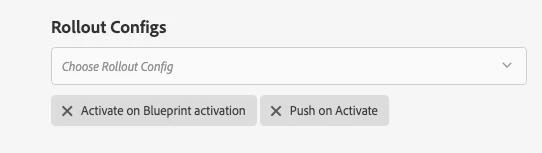
For this to achieve I have followed the adobe documentation. Extending the Multi Site Manager . where I have configured on page properties our custom rollout config which is triggered on activation and added one more OOB activate rollout config. But it doesnt seems to be working as expected.
Using both the Rollout on blueprint is causing the live-copy pages to activate before changes are rolledout on the live-copy from the blueprint. So the changes on blue print is not getting available on publish instance. But it is available on the author instance of live-copy site.
Is there a way we can controll the execution of these action so that activation of live copy should only happen after the content is updated on the rollout config.
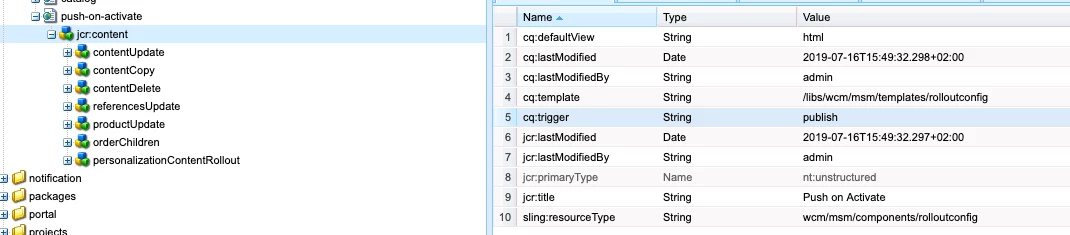
note: the custom rollout config which i am using is just a copy of the default rollout config with cq:trigger=publish property
custom rollout config :
blueprint rollout config:
Please add your views kautuksahni

