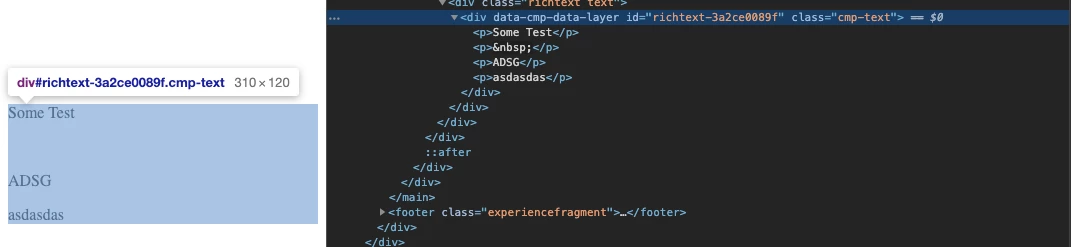
Solved
Richtext takes <div> after the <h3> Headline
There are Paraformats like <p>, <h1>, <h2>, <h3> etc.
We are using the <p> tag as "standart" and the <h3> tag as "Headline" and the rest ist disabled.
When i say a line is "Headline" and then i click "Enter" the new line should be a <p> tag but it is creating a <div> tag.
Also when i want to change this <div> line to the "Standart" paraformat, the button is disabled.
I want that it is creating a <p> and not a <div> but i can't find from where the <div> is coming from and how i fix it ?
Here the HTML value:
<p>some text</p>
<h3>asdf<br>
</h3>
<div>asdf</div>
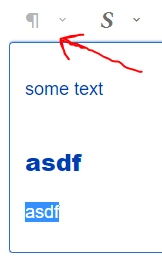
In the Image you can see how the button is grey when i want to change the <div> but when i click somewhere else in the text with no <div> the button can be clicked:
Here is the _cd_dialog file, maybe it helps:
<?xml version="1.0" encoding="UTF-8"?>
<jcr:root xmlns:sling="http://sling.apache.org/jcr/sling/1.0" xmlns:jcr="http://www.jcp.org/jcr/1.0"
xmlns:nt="http://www.jcp.org/jcr/nt/1.0"
jcr:primaryType="nt:unstructured"
jcr:title="Text"
sling:resourceType="cq/gui/components/authoring/dialog">
<content
jcr:primaryType="nt:unstructured">
<items jcr:primaryType="nt:unstructured">
<tabs
jcr:primaryType="nt:unstructured">
<items jcr:primaryType="nt:unstructured">
<properties
jcr:primaryType="nt:unstructured">
<items jcr:primaryType="nt:unstructured">
<columns
jcr:primaryType="nt:unstructured">
<items jcr:primaryType="nt:unstructured">
<column
jcr:primaryType="nt:unstructured">
<items jcr:primaryType="nt:unstructured">
<text
jcr:primaryType="nt:unstructured"
sling:resourceType="cq/gui/components/authoring/dialog/richtext"
name="./text"
useFixedInlineToolbar="{Boolean}true">
<rtePlugins jcr:primaryType="nt:unstructured"
sling:resourceSuperType="/mnt/override/apps/websitename/components/content/text/cq:editConfig/cq:inplaceEditing/inplaceEditingConfig/rtePlugins">
<paraformat
jcr:primaryType="nt:unstructured"
features="*">
<formats jcr:primaryType="nt:unstructured">
<default_p
jcr:primaryType="nt:unstructured"
description="Standard"
tag="p"/>
<default_h1
jcr:primaryType="nt:unstructured"
sling:hideResource="true"/>
<default_h2
jcr:primaryType="nt:unstructured"
sling:hideResource="true"/>
<default_h3
jcr:primaryType="nt:unstructured"
description="Headline"
tag="h3"/>
<default_h4
jcr:primaryType="nt:unstructured"
sling:hideResource="true"/>
<default_h5
jcr:primaryType="nt:unstructured"
sling:hideResource="true"/>
<default_h6
jcr:primaryType="nt:unstructured"
sling:hideResource="true"/>
<default_blockquote
jcr:primaryType="nt:unstructured"
sling:hideResource="true"/>
<default_hr
jcr:primaryType="nt:unstructured"
sling:hideResource="true"/>
<default_pre
jcr:primaryType="nt:unstructured"
sling:hideResource="true"/>
</formats>
</paraformat>
</rtePlugins>
<uiSettings jcr:primaryType="nt:unstructured"
sling:resourceSuperType="/mnt/override/apps/websitename/components/content/text/cq:editConfig/cq:inplaceEditing/inplaceEditingConfig/uiSettings">
<cui jcr:primaryType="nt:unstructured">
<inline
jcr:primaryType="nt:unstructured"
toolbar="[subsuperscript#subscript,subsuperscript#superscript,edit#paste-plaintext,edit#paste-wordhtml,links#modifylink,links#unlink,findreplace#find,findreplace#replace,undo#undo,undo#redo,#lists,table#createoredit,#justify,spellcheck#checktext,misctools#specialchars,misctools#sourceedit,#paraformat,#styles,tooltip#tooltip,telephonelink#telephonelink]">
<popovers jcr:primaryType="nt:unstructured">
<justify
jcr:primaryType="nt:unstructured"
items="[justify#justifyleft,justify#justifycenter,justify#justifyright]"
ref="justify"/>
<lists
jcr:primaryType="nt:unstructured"
items="[lists#unordered,lists#ordered,lists#outdent,lists#indent]"
ref="lists"/>
<paraformat
jcr:primaryType="nt:unstructured"
items="paraformat:getFormats:paraformat-pulldown"
ref="paraformat"/>
<styles
jcr:primaryType="nt:unstructured"
items="styles:getStyles:styles-pulldown"
ref="styles"/>
</popovers>
</inline>
</cui>
</uiSettings>
<htmlRules jcr:primaryType="nt:unstructured"
sling:resourceSuperType="/mnt/override/apps/websitename/components/content/text/cq:editConfig/cq:inplaceEditing/inplaceEditingConfig/htmlRules">
</htmlRules>
</text>
<id
jcr:primaryType="nt:unstructured"
sling:hideResource="true"/>
</items>
</column>
</items>
</columns>
</items>
</properties>
</items>
</tabs>
</items>
</content>
</jcr:root>