Hi @kannanch2 ,
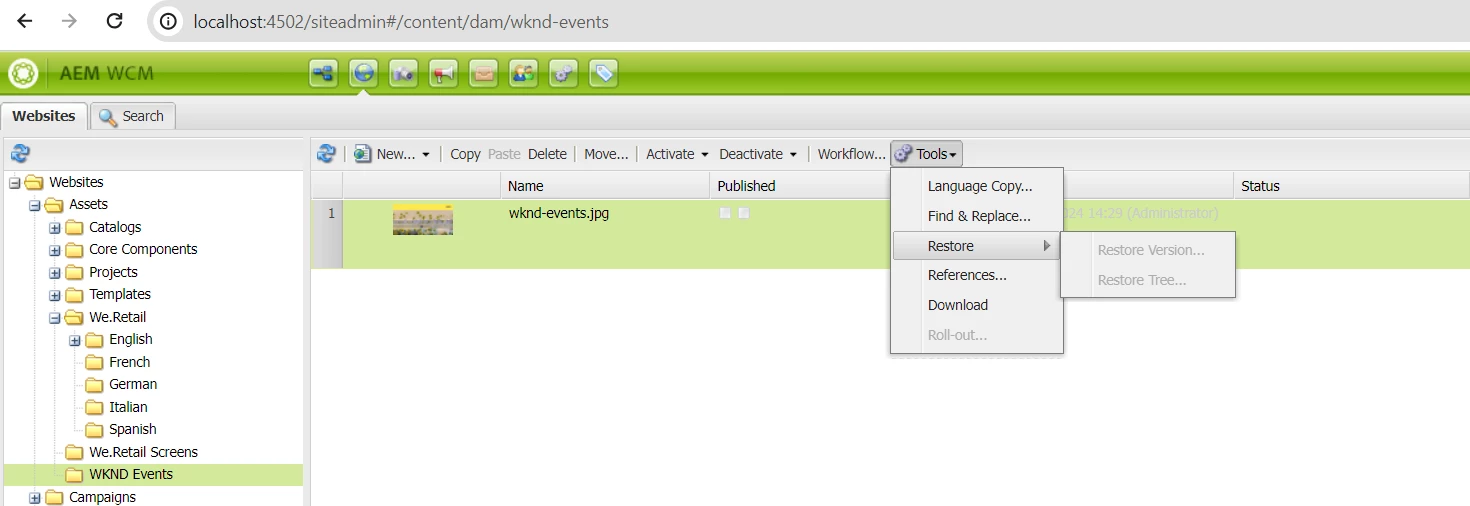
In AEM 6.5.20, the "Restore Tree" and "Restore Version" options in SiteAdmin being disabled typically indicates that there are certain conditions or configurations not met to enable these options. Let's delve into the possible reasons why these options are disabled and how you might enable them.
Possible Reasons for Disabled Options
Permissions and User Privileges:
- Ensure that you have the necessary permissions to perform restore operations. Users need to have specific rights to access versioning and restore functionalities.
Node Versioning Not Enabled:
- The content nodes or assets might not have versioning enabled. AEM must have versions of the assets or content trees to restore to a previous state.
Workflow Lock:
- If the content is locked by a workflow or any process, restore options might be disabled until the lock is released.
Path Configuration:
- The path or the specific node you are trying to restore may not be configured correctly for versioning or may not have any versions created.
Use Cases for "Restore Tree" and "Restore Version"
Restore Tree:
- Use Case: When you need to restore an entire subtree of content to a previous state, which is helpful in cases where multiple changes were made to a section of the site and need to be reverted.
- Example: If multiple pages under a specific section were edited or mistakenly deleted, you can restore the whole section to a previous state.
Restore Version:
- Use Case: When you need to restore a specific version of a content node or asset, useful for rolling back to a previous version after an undesired change.
- Example: If an image asset was replaced or edited incorrectly, you can restore it to a previous version to correct the change.
Steps to Enable "Restore Tree" and "Restore Version"
Check Permissions:
- Ensure your user account has the necessary permissions. Check your user group settings and permissions in AEM.
Enable Versioning:
- Make sure versioning is enabled for the content nodes you wish to restore. This can typically be checked and enabled in the properties of the nodes.
Create Versions:
- Ensure that there are previous versions available to restore. You can manually create versions of nodes or configure workflows to automatically create versions upon changes.
Release Workflow Locks:
- Check if the content is locked by a workflow. If it is, complete or terminate the workflow to release the lock.
Steps to Verify and Enable Versioning
Check Node Type and Mixins:
- Verify that the nodes have mix:versionable or appropriate versioning mixins enabled.
Manual Version Creation:
- In CRXDE Lite, you can manually create versions by right-clicking the node and selecting "Create Version."
Configure Automatic Versioning:
- Configure workflows or event listeners to create versions automatically upon changes.
Example Workflow to Create Versions Automatically
<workflow>
    <step type="participant">
        <process name="Create Version">
            <property name="command" value="createVersion"/>
        </process>
    </step>
</workflow>
To enable the "Restore Tree" and "Restore Version" options in AEM 6.5.20, you need to ensure that:
- You have the necessary permissions.
- Versioning is enabled for the relevant content nodes.
- There are existing versions available to restore.
- The content is not locked by workflows or other processes.
By addressing these areas, you should be able to enable and use these restore functionalities effectively.