Resolved Segments in contexthub toolbar showing blank | Community
Skip to main content
Level 2
October 10, 2018
Solved

Resolved Segments in contexthub toolbar showing blank

  • October 10, 2018
  • 4 replies
  • 2340 views

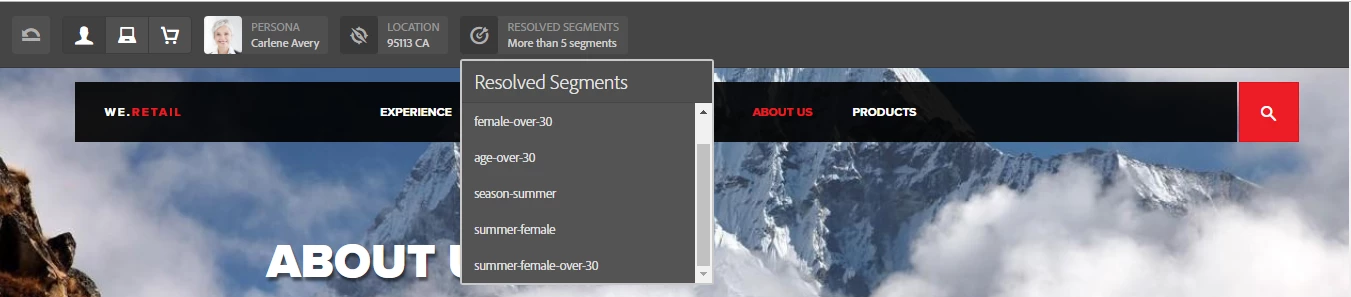
I am trying to achieve personalisation in AEM 6.3. I am not able to see "Resolved Segments" in contexthub toolbar in my project. Whereas if I try in we-retail site, I can see "resolved segments" such as female,age-over-30, season-summer etc.

Can somebody help me why is it happening only in my project whereas it works fine in we-retail site? PFB attached snapshots.

This post is no longer active and is closed to new replies. Need help? Start a new post to ask your question.
Best answer by vinaydkarde

Hi Scott (smacdonald2008),

The above article was very useful. I could debug the issue based on above example. Once I added below dependency, "Resolved segments" section was showing up correctly.

<sly data-sly-use.clientLib="/libs/granite/sightly/templates/clientlib.html"

     data-sly-call="${clientlib.all @ categories='we-retail.dependencies'}"/>

4 replies

smacdonald2008
Level 10
October 18, 2018

Take a look at this ContextHub article - it shows use of segments in an example site.

Using the ContextHub to setup GeoLocation data in the Experience Manager Toy Store site

Another example -- Using the Adobe Experience Manager ContextHub to work with Personal Experiences

In addition - i recommend that you watch this webinar on ContextHub

Hope this helps...

smacdonald2008
Level 10
October 18, 2018

Also - an internal Adobe person asked we post this:

Segments don’t show up as resolved unless they are associated with a test user, location or device by mapping a “trait”.

smacdonald2008
Level 10
October 18, 2018
vinaydkardeAuthorAccepted solution
Level 2
October 19, 2018

Hi Scott (smacdonald2008),

The above article was very useful. I could debug the issue based on above example. Once I added below dependency, "Resolved segments" section was showing up correctly.

<sly data-sly-use.clientLib="/libs/granite/sightly/templates/clientlib.html"

     data-sly-call="${clientlib.all @ categories='we-retail.dependencies'}"/>