Replication issue - /bin/receive.servlet is not in available search paths | Community
Skip to main content
Level 2
June 19, 2024
Solved

Replication issue - /bin/receive.servlet is not in available search paths

  • June 19, 2024
  • 4 replies
  • 2528 views

Good day all,

As of this morning our system is experiencing an issue with the default replication to one of the publishers (the other is fine). No code or configuration changes have been made in the last days that could have caused it.


The status of the replication agent on the author is "blocked". When I test the connection of the agent from the author, it returns an HTTP 403 - Forbidden code.


It's not a network connectivity issue. I've tested this. I also checked out other common causes, but found no solution there (explained here https://experienceleague.adobe.com/en/docs/experience-manager-65/content/implementing/deploying/configuring/troubleshoot-rep).


On the publisher side, I see the following error appear in the log when testing the connection (full error attached):
19.06.2024 09:14:04.776 *DEBUG* [10.40.20.4 [1718788444774] POST /bin/receive HTTP/1.1] com.day.cq.wcm.core.impl.components.ComponentCacheImpl Requested Path /bin/receive.servlet is not in available search paths
com.day.cq.wcm.api.WCMException: Requested Path /bin/receive.servlet is not in available search paths
at com.day.cq.wcm.core.impl.components.ComponentCacheImpl.getAbsPath(ComponentCacheImpl.java:227)
at com.day.cq.wcm.core.impl.components.ComponentCacheImpl.getComponent(ComponentCacheImpl.java:238)
...
 
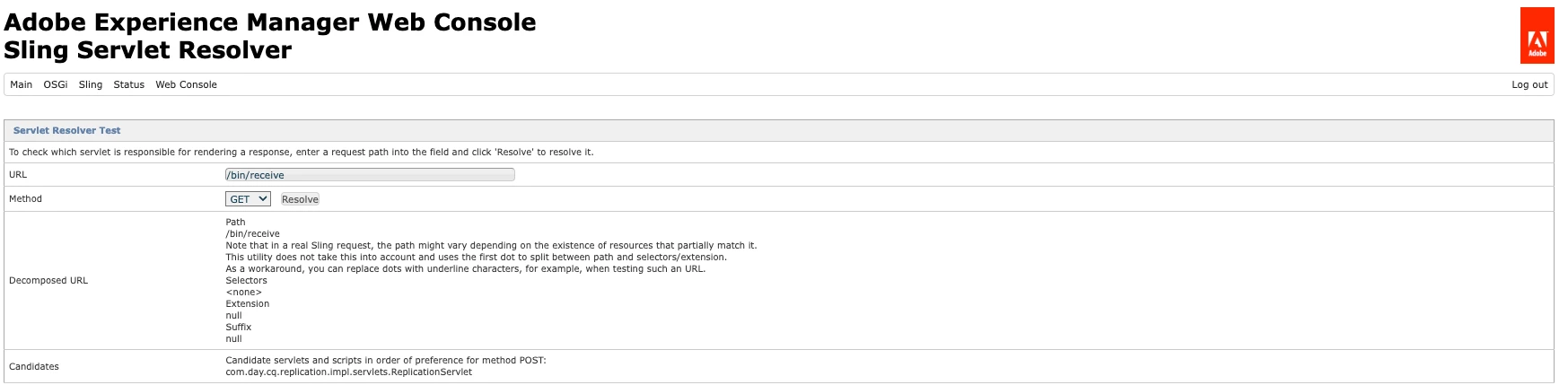
The Sling Servlet Resolver for the /bin/receive POST path seems to resolve normally:


Any help with this issue would be much appreciated.

This post is no longer active and is closed to new replies. Need help? Start a new post to ask your question.
Best answer by SvenDev

I've found the issue and have managed to resolve it. I don't know what caused it yet thought. For completeness I'll post the steps I took and solution that solved it.


So after some more investigating, I found out that POST requests never made it to the ReplicationServlet responsible for handling them. GET requests did though. And authentication through the GET request worked fine. So authentication worked fine.


Then I put the ROOT logger on TRACE for a short while, did another connection test, and found out that the CSRF filter was being triggered and was rejecting the POST request because there was no token.


Then I looked up the current CSRF filter configurations and found out that somehow the configuration for one of the publishers had been changed (see screenshots) to always check for a CSRF token, even on non-browser agents.


After correcting the configuration, replication is now fixed.


The question I have now though is how this could have been changed. Does anyone know how I can find this out?

4 replies

sateaswa94
Level 3
June 19, 2024

Could you check in status of com.day.cq.replication.impl.servlets.ReplicationServlet

/system/console/components in the failing publisher 


SvenDevAuthor
Level 2
June 19, 2024

I see I overlooked this comment earlier. The ReplicationServlet is active and the configuration seems to be correct:

sateaswa94
Level 3
June 19, 2024

Could you also follow the steps mentioned in this article

https://experienceleague.adobe.com/en/docs/experience-cloud-kcs/kbarticles/ka-17467

SvenDevAuthor
Level 2
June 19, 2024

Thanks for your reply and the link. Unfortunately, none of the resolutions there worked in my case. The issue is still present.

h_kataria
Community Advisor
Community Advisor
June 19, 2024

The log which you have posted does not seem like an error, it looks just like a debug statement. And 403 probably just implies that the configured transport user or Agent User ID probably does not have enough permissions. I believe your transport user will also have to be available on the publish instance on which you are trying to replicate. So, just cross check once on that

SvenDevAuthor
Level 2
June 19, 2024

Thanks for you reply. You're right that it's not an error. It's a warning statement and a debug statement that goes into a bit more details about the warning.


The replication user is present on the publish instance and also has the correct access. Just as a test I also tried using the admin user and that yielded the same error. So I don't think it's an issue with access rights.

h_kataria
Community Advisor
Community Advisor
June 19, 2024

Could you post the Test connection log once for both of your publishers (where it is fine and where it is not) ? 

SvenDevAuthorAccepted solution
Level 2
June 20, 2024

I've found the issue and have managed to resolve it. I don't know what caused it yet thought. For completeness I'll post the steps I took and solution that solved it.


So after some more investigating, I found out that POST requests never made it to the ReplicationServlet responsible for handling them. GET requests did though. And authentication through the GET request worked fine. So authentication worked fine.


Then I put the ROOT logger on TRACE for a short while, did another connection test, and found out that the CSRF filter was being triggered and was rejecting the POST request because there was no token.


Then I looked up the current CSRF filter configurations and found out that somehow the configuration for one of the publishers had been changed (see screenshots) to always check for a CSRF token, even on non-browser agents.


After correcting the configuration, replication is now fixed.


The question I have now though is how this could have been changed. Does anyone know how I can find this out?

Rohan_Garg
Community Advisor
Community Advisor
June 21, 2024

Hi @svendev,

You can refer to the article - How to track down unexpected OSGi configuration updates


Hope this helps!