Render dynamic data in a component's sightly | Community
Skip to main content
February 12, 2024
Solved

Render dynamic data in a component's sightly

  • February 12, 2024
  • 4 replies
  • 1350 views

I have a component. Nothing needs to be authored on the dialog for this component. The content is dynamic for different users.

Now, user data is being stored at Java level in a service in an httpSession object.


How can I get that data to be rendered in that component's sightly?

I've written a model but it is not working.
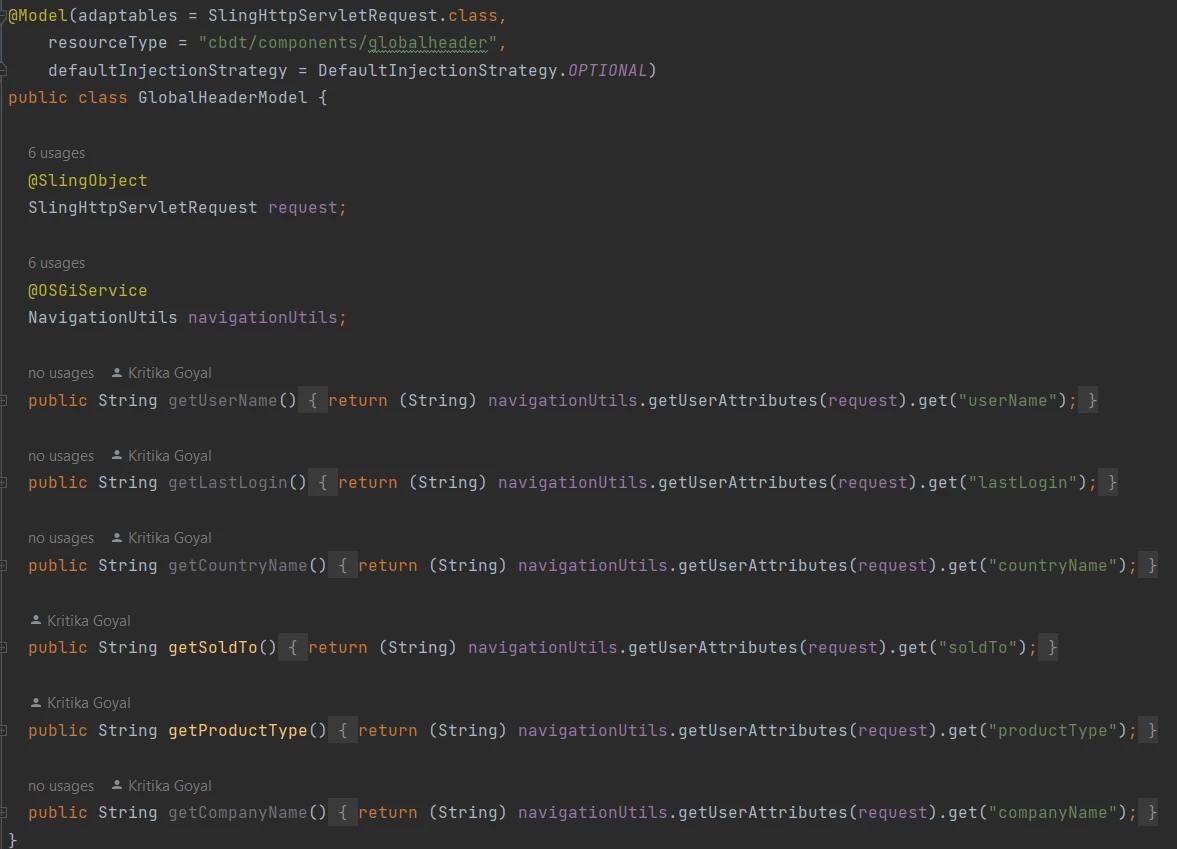
Also, the component's sightly code is like below
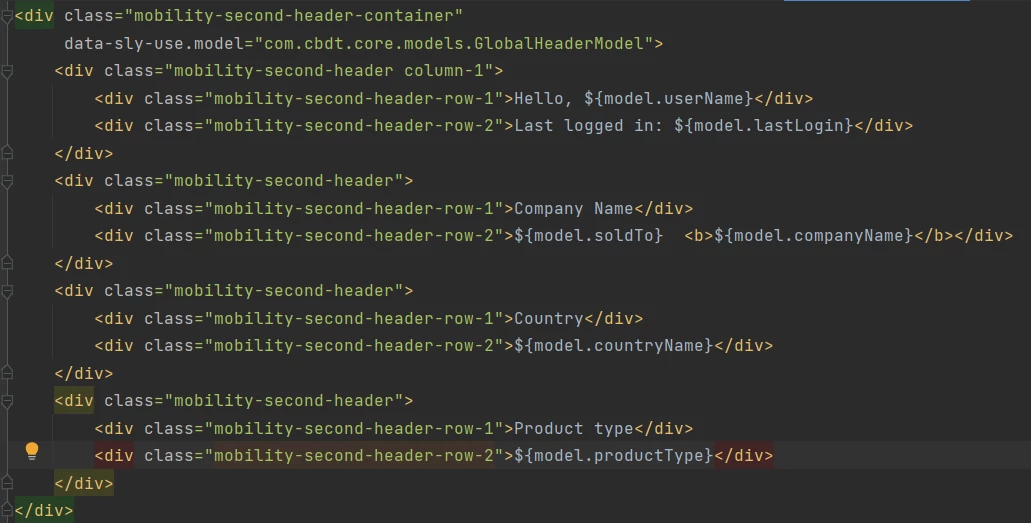
What am I doing wrong here?

 

This post is no longer active and is closed to new replies. Need help? Start a new post to ask your question.
Best answer by Raja_Reddy

Hi @goyalkritika 
Create a Java model class that retrieves the user data from the HttpSession object. Make sure the model class is registered as a Sling Model.


import javax.servlet.http.HttpSession; import org.apache.sling.api.SlingHttpServletRequest; import org.apache.sling.models.annotations.Model; import org.apache.sling.models.annotations.injectorspecific.SlingObject; @Model(adaptables = SlingHttpServletRequest.class) public class UserDataModel { @SlingObject private SlingHttpServletRequest request; public String getUserData() { HttpSession session = request.getSession(); // Retrieve user data from the HttpSession object String userData = (String) session.getAttribute("userData"); return userData; } }


In your Sightly component's HTML file, use the Java model to access the user data.


<sly data-sly-use.userdata="com.example.models.UserDataModel"> <div>User Data: ${userdata.userData}</div> </sly>


  1. we're using the data-sly-use directive to instantiate the UserDataModel and assign it to the userdata variable. Then, we can access the user data using ${userdata.userData}.

  2. Make sure the Java model class is properly registered in the OSGi configuration.

    You can check the OSGi configuration by navigating to the Felix console (http://localhost:4502/system/console/configMgr) and searching for your model class. Make sure it is listed and enabled.

  3. Deploy the updated code to your AEM instance and test the Sightly component. The user data should now be rendered in the component.


4 replies

Imran__Khan
Community Advisor
Community Advisor
February 12, 2024

Direct and Easy Implementation:

Create a Sling model having private variable with getter method. As part of init() method set variable values to render as part of sightly. Call Java class using Sightly.

Sling Model:

import org.apache.sling.api.SlingHttpServletRequest;
import org.apache.sling.api.resource.Resource;
import org.apache.sling.models.annotations.DefaultInjectionStrategy;
import org.apache.sling.models.annotations.Model;

import javax.annotation.PostConstruct;
import java.util.List;

@Model(adaptables = { SlingHttpServletRequest.class,
Resource.class }, defaultInjectionStrategy = DefaultInjectionStrategy.OPTIONAL)
public class TestComponent {

private String text;

@PostConstruct
protected void init() {
this.text = "Rahul";
}

public String getText() {
return text;
}
}


Sightly:

<sly data-sly-use.testComp="com.test.core.models.TestComponent">
${testComp.text}

</sly>


Above is just a direct example, we can create a bean and set user data access through Sling Model.

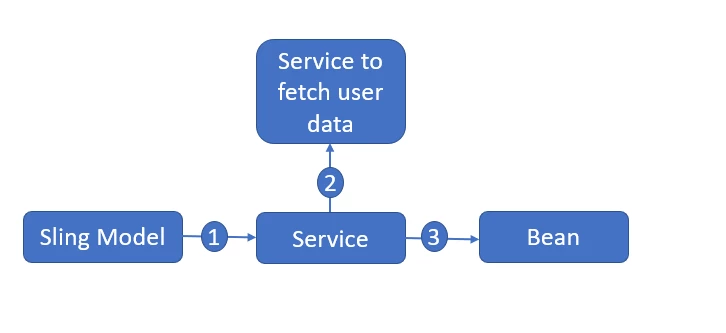
Actual and accepted Implementation
1. Create a sling model having UserBean as private variable and getter.

2. Call User service from Sling Model which helps us to fetch data and set it in to bean.

3. Return bean to sling model

4. Access Sling model and bean in Sightly.


February 13, 2024

Hi @imran__khan I tried what you mentioned. Below is the code.

package com.cbdt.core.models; import com.cbdt.core.utils.NavigationUtils; import org.apache.sling.api.SlingHttpServletRequest; import org.apache.sling.models.annotations.DefaultInjectionStrategy; import org.apache.sling.models.annotations.Model; import org.apache.sling.models.annotations.injectorspecific.OSGiService; import org.apache.sling.models.annotations.injectorspecific.SlingObject; import javax.annotation.PostConstruct; @Model(adaptables = SlingHttpServletRequest.class, defaultInjectionStrategy = DefaultInjectionStrategy.OPTIONAL) public class GlobalHeaderModel { @SlingObject SlingHttpServletRequest request; @OSGiService NavigationUtils navigationUtils; private String userName; @PostConstruct protected void init() { this.userName = (String) navigationUtils.getUserAttributes(request).get("userName"); } public String getUserName() { return userName; } }

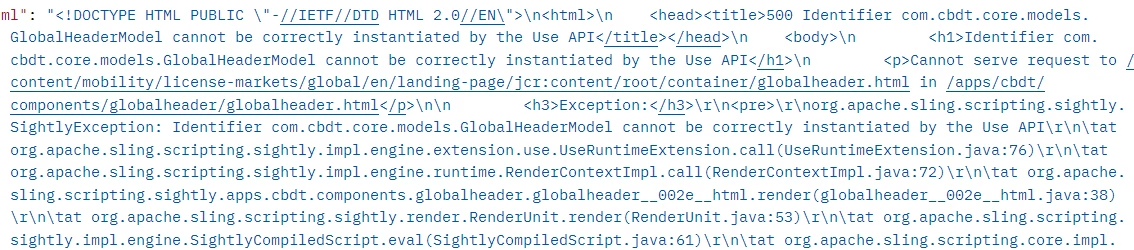
This is giving an error like below - 


arunpatidar
Community Advisor
Community Advisor
February 12, 2024

Hi @goyalkritika 

Please check this as well

https://experienceleaguecommunities.adobe.com/t5/adobe-experience-manager/java-object-data-to-be-used-in-sightly/m-p/651937 


with HTL, you might have issue due to caching, better to use servlet as API to fetch user data and render at client side.

Arun Patidar
Raja_Reddy
Community Advisor
Raja_ReddyCommunity AdvisorAccepted solution
Community Advisor
February 13, 2024

Hi @goyalkritika 
Create a Java model class that retrieves the user data from the HttpSession object. Make sure the model class is registered as a Sling Model.


import javax.servlet.http.HttpSession; import org.apache.sling.api.SlingHttpServletRequest; import org.apache.sling.models.annotations.Model; import org.apache.sling.models.annotations.injectorspecific.SlingObject; @Model(adaptables = SlingHttpServletRequest.class) public class UserDataModel { @SlingObject private SlingHttpServletRequest request; public String getUserData() { HttpSession session = request.getSession(); // Retrieve user data from the HttpSession object String userData = (String) session.getAttribute("userData"); return userData; } }


In your Sightly component's HTML file, use the Java model to access the user data.


<sly data-sly-use.userdata="com.example.models.UserDataModel"> <div>User Data: ${userdata.userData}</div> </sly>


  1. we're using the data-sly-use directive to instantiate the UserDataModel and assign it to the userdata variable. Then, we can access the user data using ${userdata.userData}.

  2. Make sure the Java model class is properly registered in the OSGi configuration.

    You can check the OSGi configuration by navigating to the Felix console (http://localhost:4502/system/console/configMgr) and searching for your model class. Make sure it is listed and enabled.

  3. Deploy the updated code to your AEM instance and test the Sightly component. The user data should now be rendered in the component.


kautuk_sahni
Community Manager
Community Manager
February 16, 2024

@goyalkritika Did you find the suggestions from users helpful? Please let us know if more information is required. Otherwise, please mark the answer as correct for posterity. If you have found out solution yourself, please share it with the community.

Kautuk Sahni