render AEM Component B into HTML of AEM component A | Community
Skip to main content
Level 2
August 30, 2024
Solved

render AEM Component B into HTML of AEM component A

  • August 30, 2024
  • 4 replies
  • 2539 views

Hi,


I ve got a AEM Component B, which I can drag into a page and configure it through Edit Dialog. This configured Values are loaded into SlingModelB, which is used in html code of Component B.

Now, I ve got another use case...
I ve got  a AEM Component A, which needs to dynamically include AEM Component B in html file of Component A.

How to create dynamically a SlingModelB and pass it to some HTL Command to render AEM Component B inside of Component A ?


Hope somebody is able to help me.

Thanks a lot for your support in advance.


Best answer by MukeshYadav_

Hi @vhochsteintef , 

We can add any other component using data-sly-resource

Synatx:-

<div data-sly-resource="${'uniquename' @ resourceType='compoent or resource path'}"></div>
we can wrap it any html tag like div section or even sly if we don't want any wrapper tag

ModelA.java


package com.project-name-folder.core.models; import org.apache.sling.api.SlingHttpServletRequest; import org.apache.sling.models.annotations.DefaultInjectionStrategy; import org.apache.sling.models.annotations.Model; import org.apache.sling.models.annotations.injectorspecific.ValueMapValue; /** * Sling model for the 'SSI requests' component business logic. */ @Model(adaptables = SlingHttpServletRequest.class, defaultInjectionStrategy = DefaultInjectionStrategy.OPTIONAL) public class ModelA { @ValueMapValue private String title; @ValueMapValue private String description; public String getTitle() { return title; } public String getDescription() { return description; } }


ModelB.java


package com.yours-project-package-name.core.models; import org.apache.sling.api.SlingHttpServletRequest; import org.apache.sling.models.annotations.DefaultInjectionStrategy; import org.apache.sling.models.annotations.Model; import org.apache.sling.models.annotations.injectorspecific.ValueMapValue; /** * Sling model for the 'SSI requests' component business logic. */ @Model(adaptables = SlingHttpServletRequest.class, defaultInjectionStrategy = DefaultInjectionStrategy.OPTIONAL) public class ModelB { @ValueMapValue private String section1; @ValueMapValue private String section2; public String getSection1() { return section1; } public String getSection2() { return section2; } }


componenta.html


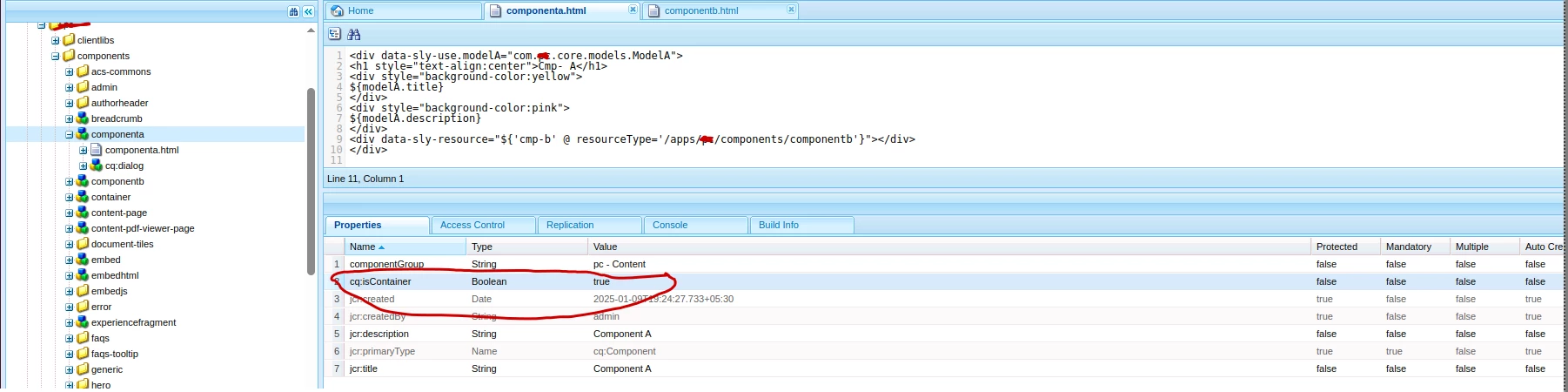
<div data-sly-use.modelA="com.projectpackage-name.core.models.ModelA"> <h1 style="text-align:center">Cmp- A</h1> <div style="background-color:yellow"> ${modelA.title} </div> <div style="background-color:pink"> ${modelA.description} </div> <div data-sly-resource="${'cmp-b' @ resourceType='/apps/pc/components/componentb'}"></div> </div>


cq:dialog


<?xml version="1.0" encoding="UTF-8"?> <jcr:root xmlns:sling="http://sling.apache.org/jcr/sling/1.0" xmlns:cq="http://www.day.com/jcr/cq/1.0" xmlns:jcr="http://www.jcp.org/jcr/1.0" xmlns:nt="http://www.jcp.org/jcr/nt/1.0" jcr:primaryType="nt:unstructured" jcr:title="Component A" sling:resourceType="cq/gui/components/authoring/dialog"> <content jcr:primaryType="nt:unstructured" sling:resourceType="granite/ui/components/coral/foundation/container"> <items jcr:primaryType="nt:unstructured"> <tabs jcr:primaryType="nt:unstructured" sling:resourceType="granite/ui/components/coral/foundation/tabs" maximized="{Boolean}true"> <items jcr:primaryType="nt:unstructured"> <properties jcr:primaryType="nt:unstructured" jcr:title="Properties" sling:resourceType="granite/ui/components/coral/foundation/container" margin="{Boolean}true"> <items jcr:primaryType="nt:unstructured"> <columns jcr:primaryType="nt:unstructured" sling:resourceType="granite/ui/components/coral/foundation/fixedcolumns" margin="{Boolean}true"> <items jcr:primaryType="nt:unstructured"> <column jcr:primaryType="nt:unstructured" sling:resourceType="granite/ui/components/coral/foundation/container"> <items jcr:primaryType="nt:unstructured"> <title jcr:primaryType="nt:unstructured" sling:resourceType="granite/ui/components/coral/foundation/form/textarea" fieldLabel="Title" name="./title"/> <description jcr:primaryType="nt:unstructured" sling:resourceType="granite/ui/components/coral/foundation/form/textarea" fieldLabel="Description" name="./description"/> </items> </column> </items> </columns> </items> </properties> </items> </tabs> </items> </content> </jcr:root>


componentb.html


<div data-sly-use.modelB="com.project-package-name.core.models.ModelB"> <h1 style="text-align:center">Cmp- B</h1> <div style="background-color:green;width:45%;float:left"> ${modelB.section1} </div> <div style="background-color:blue;width:45%;float:right"> ${modelB.section2} </div> </div>


cq:dialog


<?xml version="1.0" encoding="UTF-8"?> <jcr:root xmlns:sling="http://sling.apache.org/jcr/sling/1.0" xmlns:cq="http://www.day.com/jcr/cq/1.0" xmlns:jcr="http://www.jcp.org/jcr/1.0" xmlns:nt="http://www.jcp.org/jcr/nt/1.0" jcr:primaryType="nt:unstructured" jcr:title="Component B" sling:resourceType="cq/gui/components/authoring/dialog"> <content jcr:primaryType="nt:unstructured" sling:resourceType="granite/ui/components/coral/foundation/container"> <items jcr:primaryType="nt:unstructured"> <tabs jcr:primaryType="nt:unstructured" sling:resourceType="granite/ui/components/coral/foundation/tabs" maximized="{Boolean}true"> <items jcr:primaryType="nt:unstructured"> <properties jcr:primaryType="nt:unstructured" jcr:title="Properties" sling:resourceType="granite/ui/components/coral/foundation/container" margin="{Boolean}true"> <items jcr:primaryType="nt:unstructured"> <columns jcr:primaryType="nt:unstructured" sling:resourceType="granite/ui/components/coral/foundation/fixedcolumns" margin="{Boolean}true"> <items jcr:primaryType="nt:unstructured"> <column jcr:primaryType="nt:unstructured" sling:resourceType="granite/ui/components/coral/foundation/container"> <items jcr:primaryType="nt:unstructured"> <section1 jcr:primaryType="nt:unstructured" sling:resourceType="granite/ui/components/coral/foundation/form/textarea" fieldLabel="Section 1" name="./section1"/> <section2 jcr:primaryType="nt:unstructured" sling:resourceType="granite/ui/components/coral/foundation/form/textarea" fieldLabel="Section2 " name="./section2"/> </items> </column> </items> </columns> </items> </properties> </items> </tabs> </items> </content> </jcr:root>


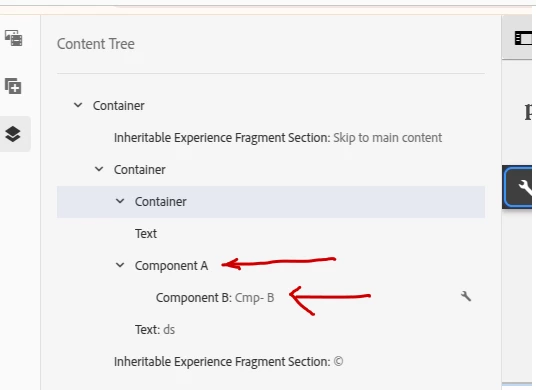
Now if we add component A on page, it will be added with component b inside it 
we can author it from content tree or  directly hovering over component A and component B


Note:- Last but not the list use cq:isContainer property to true in component  A so that component B display just inside Component A in content tree. 

Thanks

4 replies

konstantyn_diachenko
Community Advisor
Community Advisor
August 30, 2024

Hi @vhochsteintef ,

To dynamically include Component B within Component A and pass a custom instance of SlingModelB to it, you can follow these steps:

1. Create Component A’s Sling Model (SlingModelA)
Component A will need a Sling Model to manage the logic of dynamically including Component B.

package com.example.core.models; import com.example.core.models.SlingModelB; import org.apache.sling.api.resource.Resource; import org.apache.sling.models.annotations.DefaultInjectionStrategy; import org.apache.sling.models.annotations.Model; import org.apache.sling.models.annotations.injectorspecific.Self; import javax.inject.Inject; @Model(adaptables = Resource.class, defaultInjectionStrategy = DefaultInjectionStrategy.OPTIONAL) public class SlingModelA { @Self private Resource resource; @Self private SlingModelB slingModelB; public SlingModelB getSlingModelB() { // Logic to initialize and customize SlingModelB return slingModelB; } }

2. Component A HTL (HTML)
In the HTL of Component A, use the data-sly-resource attribute to dynamically include Component B and pass SlingModelB.  There are 2 examples how you can reuse sling models.  

<!-- componentA.html --> <div class="component-a"> <!-- Other HTML --> <!-- How to include component B from A --> <div data-sly-resource="${'path/to/componentB' @ resourceType='example/components/componentB'}"> </div> <sly data-sly-use.slingModelA="com.example.core.models.SlingModelA"></sly> <!-- Example 1 --> <sly data-sly-use.slingModelB="com.example.core.models.SlingModelB"></sly> <!-- Example 2 --> <sly data-sly-set.slingModelBFromA="${slingModelA.slingModelB}"></sly> <!-- Other HTML --> </div>

3. Component B Sling Model (SlingModelB)
Ensure SlingModelB is structured to accept dynamic data, possibly through constructor injection.

package com.example.core.models; import org.apache.sling.api.resource.Resource; import org.apache.sling.models.annotations.Model; import org.apache.sling.models.annotations.DefaultInjectionStrategy; import org.apache.sling.models.annotations.injectorspecific.ValueMapValue; @Model(adaptables = Resource.class, defaultInjectionStrategy = DefaultInjectionStrategy.OPTIONAL) public class SlingModelB { @ValueMapValue private String property1; // Other properties and logic public String getProperty1() { return property1; } // Other getters }

4. Component B HTL (HTML)
Render the data passed from Component A inside Component B.

<!-- componentB.html --> <div class="component-b"> <p>${slingModelB.property1}</p> <!-- Render other properties of SlingModelB --> </div>

 

Kostiantyn Diachenko, Community Advisor, Certified Senior AEM Developer, creator of free AEM VLT Tool, maintainer of AEM Tools plugin.
Level 2
September 2, 2024

Hi Konstantyn,

Thanks a lot for your guidance. Really appreciated.
I think I m still missing the major understanding how that link between data-sly-resource and data-sly-use is actually working.

Let me adjust the java model A code a little bit. It now returns a list of SlingModelBs
how would htl look like to render that list of SlingModelsBs in htl of SlingModelA ?

package com.example.core.models; import com.example.core.models.SlingModelB; import org.apache.sling.api.resource.Resource; import org.apache.sling.models.annotations.DefaultInjectionStrategy; import org.apache.sling.models.annotations.Model; import org.apache.sling.models.annotations.injectorspecific.Self; import javax.inject.Inject; @Model(adaptables = Resource.class, defaultInjectionStrategy = DefaultInjectionStrategy.OPTIONAL) public class SlingModelA { @Self private Resource resource; @Self private List<SlingModelB> slingModelBs; public List<SlingModelB> getSlingModelBs() { // Logic to initialize and customize SlingModelBs return slingModelBs; } }


Thanks a lot for your support in advance.

--
Volker

arunpatidar
Community Advisor
Community Advisor
September 2, 2024

Hi @vhochsteintef 
Please check example here, where Text-and-Image component include text and image components based on condition : 

https://github.com/arunpatidar02/aemaacs-aemlab/blob/master/ui.apps/src/main/content/jcr_root/apps/aemlab/oneweb/components/text-and-image/text-and-image.html 

Arun Patidar
Level 2
September 3, 2024

Hi Arun,

in that example I do not understand how you can pass individual attributes for eg image resource.


--

Volker

arunpatidar
Community Advisor
Community Advisor
September 5, 2024

Hi Arun,


did not work out.. 😞

Model B is not passed to sly resource at least it looks like, cause just empty "html" of Component B is rendered by that call...

<sly data-sly-resource="${link.path @ resourceType='my/resource/type'}"></sly>
<sly data-sly-resource="${link @ resourceType='my/resource/type'}"></sly>


tried both these variations... 😞


Hi @vhochsteintef 
You need to debug this, to make sue the paths are correct.

Please check example here : 

https://github.com/Adobe-Marketing-Cloud/aem-sites-example-custom-template-type/blob/master/src/main/content/jcr_root/apps/my-project/components/page/partials/body.html 

https://github.com/websight-io/kyanite/blob/main/applications/common/backend/src/main/resources/libs/kyanite/common/components/carousel/carousel.html 

Arun Patidar
kautuk_sahni
Community Manager
Community Manager
September 4, 2024

@vhochsteintef Did you find the suggestions helpful? Please let us know if you require more information. Otherwise, please mark the answer as correct for posterity. If you've discovered a solution yourself, we would appreciate it if you could share it with the community. Thank you!

Kautuk Sahni
MukeshYadav_
Community Advisor
MukeshYadav_Community AdvisorAccepted solution
Community Advisor
March 7, 2025

Hi @vhochsteintef , 

We can add any other component using data-sly-resource

Synatx:-

<div data-sly-resource="${'uniquename' @ resourceType='compoent or resource path'}"></div>
we can wrap it any html tag like div section or even sly if we don't want any wrapper tag

ModelA.java


package com.project-name-folder.core.models; import org.apache.sling.api.SlingHttpServletRequest; import org.apache.sling.models.annotations.DefaultInjectionStrategy; import org.apache.sling.models.annotations.Model; import org.apache.sling.models.annotations.injectorspecific.ValueMapValue; /** * Sling model for the 'SSI requests' component business logic. */ @Model(adaptables = SlingHttpServletRequest.class, defaultInjectionStrategy = DefaultInjectionStrategy.OPTIONAL) public class ModelA { @ValueMapValue private String title; @ValueMapValue private String description; public String getTitle() { return title; } public String getDescription() { return description; } }


ModelB.java


package com.yours-project-package-name.core.models; import org.apache.sling.api.SlingHttpServletRequest; import org.apache.sling.models.annotations.DefaultInjectionStrategy; import org.apache.sling.models.annotations.Model; import org.apache.sling.models.annotations.injectorspecific.ValueMapValue; /** * Sling model for the 'SSI requests' component business logic. */ @Model(adaptables = SlingHttpServletRequest.class, defaultInjectionStrategy = DefaultInjectionStrategy.OPTIONAL) public class ModelB { @ValueMapValue private String section1; @ValueMapValue private String section2; public String getSection1() { return section1; } public String getSection2() { return section2; } }


componenta.html


<div data-sly-use.modelA="com.projectpackage-name.core.models.ModelA"> <h1 style="text-align:center">Cmp- A</h1> <div style="background-color:yellow"> ${modelA.title} </div> <div style="background-color:pink"> ${modelA.description} </div> <div data-sly-resource="${'cmp-b' @ resourceType='/apps/pc/components/componentb'}"></div> </div>


cq:dialog


<?xml version="1.0" encoding="UTF-8"?> <jcr:root xmlns:sling="http://sling.apache.org/jcr/sling/1.0" xmlns:cq="http://www.day.com/jcr/cq/1.0" xmlns:jcr="http://www.jcp.org/jcr/1.0" xmlns:nt="http://www.jcp.org/jcr/nt/1.0" jcr:primaryType="nt:unstructured" jcr:title="Component A" sling:resourceType="cq/gui/components/authoring/dialog"> <content jcr:primaryType="nt:unstructured" sling:resourceType="granite/ui/components/coral/foundation/container"> <items jcr:primaryType="nt:unstructured"> <tabs jcr:primaryType="nt:unstructured" sling:resourceType="granite/ui/components/coral/foundation/tabs" maximized="{Boolean}true"> <items jcr:primaryType="nt:unstructured"> <properties jcr:primaryType="nt:unstructured" jcr:title="Properties" sling:resourceType="granite/ui/components/coral/foundation/container" margin="{Boolean}true"> <items jcr:primaryType="nt:unstructured"> <columns jcr:primaryType="nt:unstructured" sling:resourceType="granite/ui/components/coral/foundation/fixedcolumns" margin="{Boolean}true"> <items jcr:primaryType="nt:unstructured"> <column jcr:primaryType="nt:unstructured" sling:resourceType="granite/ui/components/coral/foundation/container"> <items jcr:primaryType="nt:unstructured"> <title jcr:primaryType="nt:unstructured" sling:resourceType="granite/ui/components/coral/foundation/form/textarea" fieldLabel="Title" name="./title"/> <description jcr:primaryType="nt:unstructured" sling:resourceType="granite/ui/components/coral/foundation/form/textarea" fieldLabel="Description" name="./description"/> </items> </column> </items> </columns> </items> </properties> </items> </tabs> </items> </content> </jcr:root>


componentb.html


<div data-sly-use.modelB="com.project-package-name.core.models.ModelB"> <h1 style="text-align:center">Cmp- B</h1> <div style="background-color:green;width:45%;float:left"> ${modelB.section1} </div> <div style="background-color:blue;width:45%;float:right"> ${modelB.section2} </div> </div>


cq:dialog


<?xml version="1.0" encoding="UTF-8"?> <jcr:root xmlns:sling="http://sling.apache.org/jcr/sling/1.0" xmlns:cq="http://www.day.com/jcr/cq/1.0" xmlns:jcr="http://www.jcp.org/jcr/1.0" xmlns:nt="http://www.jcp.org/jcr/nt/1.0" jcr:primaryType="nt:unstructured" jcr:title="Component B" sling:resourceType="cq/gui/components/authoring/dialog"> <content jcr:primaryType="nt:unstructured" sling:resourceType="granite/ui/components/coral/foundation/container"> <items jcr:primaryType="nt:unstructured"> <tabs jcr:primaryType="nt:unstructured" sling:resourceType="granite/ui/components/coral/foundation/tabs" maximized="{Boolean}true"> <items jcr:primaryType="nt:unstructured"> <properties jcr:primaryType="nt:unstructured" jcr:title="Properties" sling:resourceType="granite/ui/components/coral/foundation/container" margin="{Boolean}true"> <items jcr:primaryType="nt:unstructured"> <columns jcr:primaryType="nt:unstructured" sling:resourceType="granite/ui/components/coral/foundation/fixedcolumns" margin="{Boolean}true"> <items jcr:primaryType="nt:unstructured"> <column jcr:primaryType="nt:unstructured" sling:resourceType="granite/ui/components/coral/foundation/container"> <items jcr:primaryType="nt:unstructured"> <section1 jcr:primaryType="nt:unstructured" sling:resourceType="granite/ui/components/coral/foundation/form/textarea" fieldLabel="Section 1" name="./section1"/> <section2 jcr:primaryType="nt:unstructured" sling:resourceType="granite/ui/components/coral/foundation/form/textarea" fieldLabel="Section2 " name="./section2"/> </items> </column> </items> </columns> </items> </properties> </items> </tabs> </items> </content> </jcr:root>


Now if we add component A on page, it will be added with component b inside it 
we can author it from content tree or  directly hovering over component A and component B


Note:- Last but not the list use cq:isContainer property to true in component  A so that component B display just inside Component A in content tree. 

Thanks