Remove old tags and show new tags only in AEM Cloud | Community
Skip to main content
Level 3
February 7, 2023
Solved

Remove old tags and show new tags only in AEM Cloud

  • February 7, 2023
  • 1 reply
  • 949 views

Hi Team,


I am using AEM as Cloud service and I had some old tags then I created new tags with some different structure but the tags names are same as old tags, then I deleted the old tags. 

When I am adding these new tags to DAM assets and searching tags in tags browse field, I can still see the old tags in the searched list. How can I remove that old tags from the searched list? In the below screenshot, the second searched item is old tags and I don't want it to be searched as it doesn't exist.
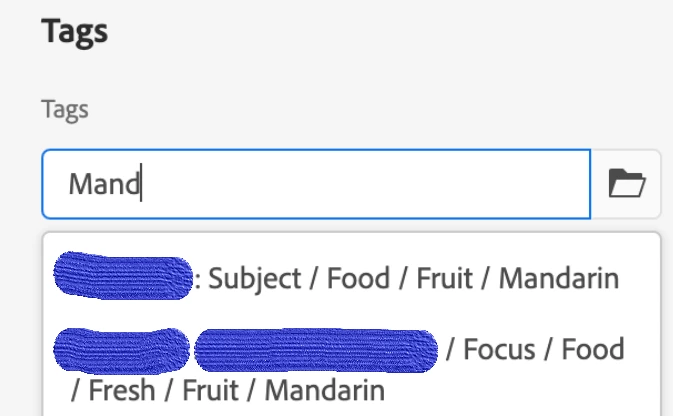


Thanks.

This post is no longer active and is closed to new replies. Need help? Start a new post to ask your question.
Best answer by ChitraMadan

Hi @sdusane ,


Not sure, if you're still facing this issue. Did you try to see the metadata on your DAM assets, does it still have old tags references?


If the reference is still there, I would suggest to try to re-upload the same asset again and see if the reference gets deleted?

By this time, I would also expect Tag Garbage Collection to run and delete the references.


Do update me, what has happened in your case?

Thanks,

Chitra

1 reply

ChitraMadan
Community Advisor
ChitraMadanCommunity AdvisorAccepted solution
Community Advisor
February 10, 2023

Hi @sdusane ,


Not sure, if you're still facing this issue. Did you try to see the metadata on your DAM assets, does it still have old tags references?


If the reference is still there, I would suggest to try to re-upload the same asset again and see if the reference gets deleted?

By this time, I would also expect Tag Garbage Collection to run and delete the references.


Do update me, what has happened in your case?

Thanks,

Chitra

SDusaneAuthor
Level 3
February 23, 2023

Hi @chitramadan ,


Thanks for your help!

I found that some of the assets had old tags assigned, so we have removed all the old tags from the assets, it did worked and now I cant see some of the tags in search.

But, for some of the tags I can still see those in search, I did checked that no assets were tagged to those old tags but then how can I still search them? Can you please help on this.


Thanks,

SD


SDusaneAuthor
Level 3
February 27, 2023

Hi Team,


I found that all the old tags were exist under /content/cq:tags/*, that was the reason they were still searchable, I deleted these tags from this location and it resolved my issue.


Thanks,

SD