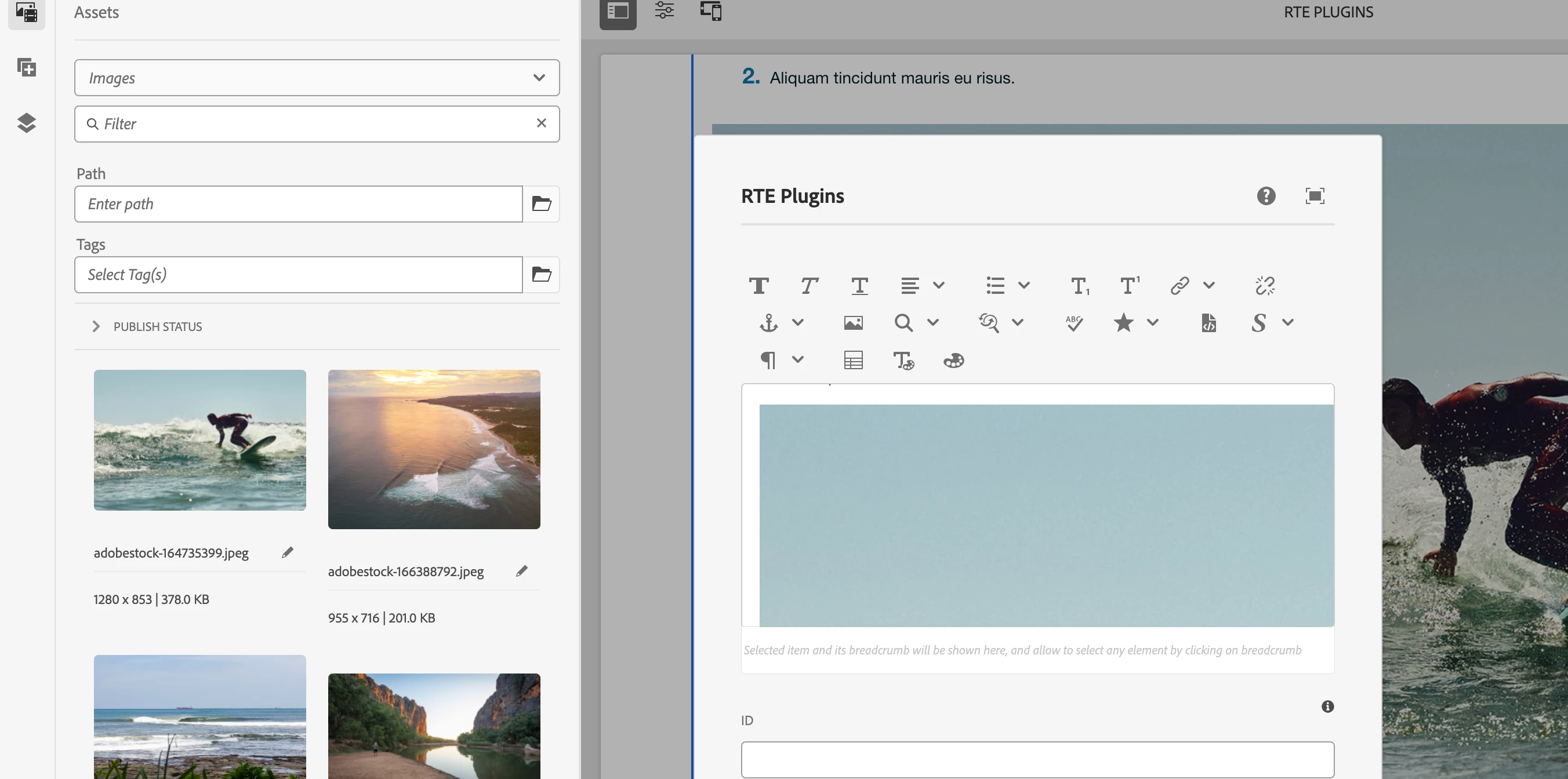
Solved
Questions about text (v2), including pictures, custom color fonts, etc. Please help!
- How to select Insert image from dam, I have configured Image but clicking the icon only shows alt and align?

- How do I disable popup mode? _cq_dialog has been inherited into its own project file, but the changes have no effect. I removed some tags from the paraformat.
- How do I add font color options and select custom fonts and font sizes?
_cq_editConfig
<?xml version="1.0" encoding="UTF-8"?>
<jcr:root xmlns:cq="http://www.day.com/jcr/cq/1.0" xmlns:jcr="http://www.jcp.org/jcr/1.0" xmlns:nt="http://www.jcp.org/jcr/nt/1.0"
    cq:inherit="{Boolean}false"
    jcr:primaryType="cq:EditConfig">
    <cq:inplaceEditing
        jcr:primaryType="cq:InplaceEditingConfig"
        active="{Boolean}true"
        configPath="inplaceEditingConfig"
        editorType="text">
        <inplaceEditingConfig jcr:primaryType="nt:unstructured">
            <rtePlugins jcr:primaryType="nt:unstructured">
                <links
                    jcr:primaryType="nt:unstructured"
                    features="modifylink,unlink,anchor"/>
                <formats
                    jcr:primaryType="nt:unstructured"
                    features="bold,italic,underline,strikethrough,superscript,subscript"/>
                <paraformat
                    jcr:primaryType="nt:unstructured"
                    features="*">
                    <formats jcr:primaryType="nt:unstructured">
                        <default_p
                            jcr:primaryType="nt:unstructured"
                            description="Paragraph"
                            tag="p"/>
                        <default_h3
                            jcr:primaryType="nt:unstructured"
                            description="Heading 3"
                            tag="h3"/>
                        <default_h6
                            jcr:primaryType="nt:unstructured"
                            description="Heading 6"
                            tag="h6"/>
                    </formats>
                </paraformat>
                <image
                    jcr:primaryType="nt:unstructured"
                    features="*"/>
                <findreplace
                    jcr:primaryType="nt:unstructured"
                    features="*"/>
                <subsuperscript
                    jcr:primaryType="nt:unstructured"
                    features="*"/>
                <misctools
                    jcr:primaryType="nt:unstructured"
                    features="sourceedit"/>
                <styles
                    jcr:primaryType="nt:unstructured"
                    externalStyleSheets="[css1]"
                    features="*">
                    <styles jcr:primaryType="cq:WidgetCollection">
                        <subtitle
                            jcr:primaryType="cq:WidgetCollection"
                            cssName="subtitle"
                            text="Subtitle"/>
                        <title
                            jcr:primaryType="cq:WidgetCollection"
                            cssName="title"
                            text="Title"/>
                        <textContent
                            jcr:primaryType="cq:WidgetCollection"
                            cssName="textContent"
                            text="Text Content"/>
                    </styles>
                </styles>
            </rtePlugins>
            <uiSettings jcr:primaryType="nt:unstructured">
                <cui jcr:primaryType="nt:unstructured">
                    <inline
                        jcr:primaryType="nt:unstructured"
                        toolbar="[image#imageProps,format#bold,format#italic,format#underline,subsuperscript#subscript,subsuperscript#superscript,links#modifylink,links#unlink,fullscreen#start,control#close,control#save]">
                        <popovers jcr:primaryType="nt:unstructured">
                            <lists
                                jcr:primaryType="nt:unstructured"
                                items="[lists#unordered,lists#ordered,lists#outdent,lists#indent]"
                                ref="lists"/>
                            <paraformat
                                jcr:primaryType="nt:unstructured"
                                items="paraformat:getFormats:paraformat-pulldown"
                                ref="paraformat"/>
                        </popovers>
                    </inline>

                </cui>
            </uiSettings>
        </inplaceEditingConfig>
    </cq:inplaceEditing>
</jcr:root>
_cq_dialog/.content.xml
<?xml version="1.0" encoding="UTF-8"?>
<jcr:root xmlns:sling="http://sling.apache.org/jcr/sling/1.0" xmlns:granite="http://www.adobe.com/jcr/granite/1.0" xmlns:cq="http://www.day.com/jcr/cq/1.0" xmlns:jcr="http://www.jcp.org/jcr/1.0" xmlns:nt="http://www.jcp.org/jcr/nt/1.0"
jcr:primaryType="nt:unstructured"
jcr:title="richTxt"
sling:resourceType="cq/gui/components/authoring/dialog"
helpPath="https://www.adobe.com/go/aem_cmp_text_v2"
trackingFeature="core-components:text:v2">
<content
jcr:primaryType="nt:unstructured"
sling:resourceType="granite/ui/components/coral/foundation/container">
<items jcr:primaryType="nt:unstructured">
<tabs
jcr:primaryType="nt:unstructured"
sling:resourceType="granite/ui/components/coral/foundation/tabs"
maximized="{Boolean}true">
<items jcr:primaryType="nt:unstructured">
<properties
jcr:primaryType="nt:unstructured"
jcr:title="Properties"
sling:resourceType="granite/ui/components/coral/foundation/container"
margin="{Boolean}true">
<items jcr:primaryType="nt:unstructured">
<columns
jcr:primaryType="nt:unstructured"
sling:resourceType="granite/ui/components/coral/foundation/fixedcolumns"
margin="{Boolean}true">
<items jcr:primaryType="nt:unstructured">
<column
granite:class="cq-RichText-FixedColumn-column"
jcr:primaryType="nt:unstructured"
sling:resourceType="granite/ui/components/coral/foundation/container">
<items jcr:primaryType="nt:unstructured">
<text
jcr:primaryType="nt:unstructured"
sling:resourceType="cq/gui/components/authoring/dialog/richtext"
name="./text"
useFixedInlineToolbar="{Boolean}true">
<rtePlugins jcr:primaryType="nt:unstructured">
<format
jcr:primaryType="nt:unstructured"
features="bold,italic"/>
<justify
jcr:primaryType="nt:unstructured"
features="-"/>
<links
jcr:primaryType="nt:unstructured"
features="modifylink,unlink"/>
<lists
jcr:primaryType="nt:unstructured"
features="*"/>
<misctools jcr:primaryType="nt:unstructured">
<specialCharsConfig jcr:primaryType="nt:unstructured">
<chars jcr:primaryType="nt:unstructured">
<default_copyright
jcr:primaryType="nt:unstructured"
entity="&copy;"
name="copyright"/>
<default_euro
jcr:primaryType="nt:unstructured"
entity="&euro;"
name="euro"/>
<default_registered
jcr:primaryType="nt:unstructured"
entity="&reg;"
name="registered"/>
<default_trademark
jcr:primaryType="nt:unstructured"
entity="&trade;"
name="trademark"/>
</chars>
</specialCharsConfig>
</misctools>
<paraformat
jcr:primaryType="nt:unstructured"
features="*">
<formats jcr:primaryType="nt:unstructured">
<default_p
jcr:primaryType="nt:unstructured"
description="Paragraph"
tag="p"/>
<default_h3
jcr:primaryType="nt:unstructured"
description="Heading 3"
tag="h3"/>
<default_h6
jcr:primaryType="nt:unstructured"
description="Heading 6"
tag="h6"/>
</formats>
</paraformat>
<table
jcr:primaryType="nt:unstructured"
features="-">
<hiddenHeaderConfig
jcr:primaryType="nt:unstructured"
hiddenHeaderClassName="cq-wcm-foundation-aria-visuallyhidden"
hiddenHeaderEditingCSS="cq-RichText-hiddenHeader--editing"/>
</table>
<tracklinks
jcr:primaryType="nt:unstructured"
features="*"/>
</rtePlugins>
<uiSettings jcr:primaryType="nt:unstructured">
<cui jcr:primaryType="nt:unstructured">
<inline
jcr:primaryType="nt:unstructured"
toolbar="[format#bold,format#italic,format#underline,#justify,#lists,links#modifylink,links#unlink,#paraformat]">
<popovers jcr:primaryType="nt:unstructured">
<justify
jcr:primaryType="nt:unstructured"
items="[justify#justifyleft,justify#justifycenter,justify#justifyright,justify#justifyjustify]"
ref="justify"/>
<lists
jcr:primaryType="nt:unstructured"
items="[lists#unordered,lists#ordered,lists#outdent,lists#indent]"
ref="lists"/>
<paraformat
jcr:primaryType="nt:unstructured"
items="paraformat:getFormats:paraformat-pulldown"
ref="paraformat"/>
</popovers>
</inline>
<tableEditOptions
jcr:primaryType="nt:unstructured"
toolbar="[table#insertcolumn-before,table#insertcolumn-after,table#removecolumn,-,table#insertrow-before,table#insertrow-after,table#removerow,-,table#mergecells-right,table#mergecells-down,table#mergecells,table#splitcell-horizontal,table#splitcell-vertical,-,table#selectrow,table#selectcolumn,-,table#ensureparagraph,-,table#modifytableandcell,table#removetable,-,undo#undo,undo#redo,-,table#exitTableEditing,-]"/>
</cui>
</uiSettings>
</text>
<id
jcr:primaryType="nt:unstructured"
sling:resourceType="granite/ui/components/coral/foundation/form/textfield"
fieldDescription="HTML ID attribute to apply to the component."
fieldLabel="ID"
name="./id"/>
</items>
</column>
</items>
</columns>
</items>
</properties>
<styletab
jcr:primaryType="nt:unstructured"
sling:resourceType="granite/ui/components/coral/foundation/include"
path="/mnt/overlay/cq/gui/components/authoring/dialog/style/tab_edit/styletab"/>
</items>
</tabs>
</items>
</content>
</jcr:root>