
Querybuilder Query to list pages with no specific node and is in published state | Community
Skip to main content
BinaryAlchemy11
Level 3
March 19, 2025
Solved

Querybuilder Query to list pages with no specific node and is in published state

  • March 19, 2025
  • 3 replies
  • 743 views

Hi,


I was working on the querybuilder (/libs/cq/search/content/querydebug.html) to find the published cq:page without the node name for "article-content" and "generic-content".

I have tried creating query however was not able to execute it properly.


Query: (Not Working)


path=/content
type=cq:Page
group.p.and=true

# Group 1: Check if the page has been replicated and activated
group.1_p.and=true
group.1_1_property=jcr:content/cq:lastReplicated
group.1_1_property.operation=exists
group.1_2_property=jcr:content/cq:lastReplicationAction
group.1_2_property.value=Activate

# Group 2: Ensure article-content and generic-content do not exist
group.2_p.and=true
group.2_1_property=jcr:content/article-content
group.2_1_property.operation=not
group.2_2_property=jcr:content/generic-content
group.2_2_property.operation=not

p.limit=-1


Note: On executing the Group 1 separately works fine and results the pages which are published:


Working Code for Published Pages:


path=/content
type=cq:Page
group.p.and=true
group.1_property=jcr:content/cq:lastReplicated
group.1_property.operation=exists
group.2_property=jcr:content/cq:lastReplicationAction
group.2_property.value=Activate
p.limit=-1

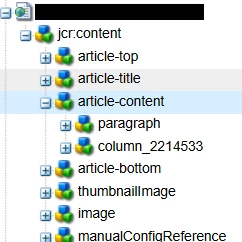
Example of the page that should be excluded from results:
 

Best answer by arunpatidar

Hi @binaryalchemy11 

It is not possible to check node name of deeper relative nodes. Please use SQL2 queries or create custom predicate.


SQL2 Example

SELECT parent.* FROM [cq:Page] AS parent INNER JOIN [nt:unstructured] AS child ON ISCHILDNODE(child,parent) WHERE ISDESCENDANTNODE(parent, '/content/myproj') AND parent.[jcr:content/cq:lastReplicated] IS NOT NULL AND parent.[jcr:content/cq:lastReplicationAction] = 'Activate' AND not(name(child) = 'article-content' OR name(child) = 'generic-content')


3 replies

arunpatidar
Community Advisor
Community Advisor
March 20, 2025

Hi @binaryalchemy11 

In Group2 you are searching for properties rather than nodename.

Please check below for nodename predicate

https://medium.com/@manumathew28.94/query-builder-aem-5869a1850c85 

Example

type=dam:Asset group.p.or=true group.1_group.1_group.p.or=true group.2_group.1_group.p.or=true group.1_group.path=/content/dam/we-retail/en/features group.1_group.1_group.1_nodename=cart.png group.1_group.1_group.2_nodename=tracking.png group.2_group.1_group.p.or=true group.2_group.path=/content/dam/we-retail/en/features group.2_group.1_group.1_nodename=cart.png group.2_group.1_group.2_nodename=tracking.png p.limit=-1


Arun Patidar
BinaryAlchemy11
Level 3
March 24, 2025

Do you happen to have an example for resulting all the published page without any of the the node name (node exists) on it? In my case it is none  of the following nodes:

jcr:content/article-content
jcr:content/generic-content
arunpatidar
Community Advisor
arunpatidarCommunity AdvisorAccepted solution
Community Advisor
March 25, 2025

Hi @binaryalchemy11 

It is not possible to check node name of deeper relative nodes. Please use SQL2 queries or create custom predicate.


SQL2 Example

SELECT parent.* FROM [cq:Page] AS parent INNER JOIN [nt:unstructured] AS child ON ISCHILDNODE(child,parent) WHERE ISDESCENDANTNODE(parent, '/content/myproj') AND parent.[jcr:content/cq:lastReplicated] IS NOT NULL AND parent.[jcr:content/cq:lastReplicationAction] = 'Activate' AND not(name(child) = 'article-content' OR name(child) = 'generic-content')


Arun Patidar
giuseppebaglio
Level 10
March 20, 2025

Hi by leveraging NodeExists QueryBuilder Predicate you can update the query like this

path=/content/project type=cq:Page 1_property=jcr:content/cq:lastReplicationAction 1_property.exists=true 2_property=jcr:content/cq:lastReplicated 2_property.exists=true nodeExists.1_notexists=jcr:content/article-content nodeExists.2_notexists=jcr:content/generic-content

If ACS Commons is out of the discussion, you can look at the suggestion here by @arunpatidar to leverage a custom predicate.

BinaryAlchemy11
Level 3
March 24, 2025

How would I be able to achieve it without ACS Commons support? I do see link on the suggestion without the ACS commons on previous comment by could you go in more detail with example if you have it please?

giuseppebaglio
Level 10
March 25, 2025

If you cannot install ACS Commons, you can simply copy the NodeExists QueryBuilder Predicate class into your repository, which does not have any dependencies on any ACS Commons item.

AmitVishwakarma
Community Advisor
Community Advisor
March 20, 2025

Hi @binaryalchemy11 ,
Please try below:

path=/content type=cq:Page p.limit=-1 1_property=jcr:content/cq:lastReplicated 1_property.exists=true 2_property=jcr:content/cq:lastReplicationAction 2_property.value=Activate # Exclude pages having jcr:content/article-content node nodeExists.1_notexists=jcr:content/article-content # Exclude pages having jcr:content/generic-content node nodeExists.2_notexists=jcr:content/generic-content

Explanation:

     - path=/content → Search under /content.
     - type=cq:Page → Search only cq:Page nodes.
     - lastReplicated & lastReplicationAction → Ensures the page is published.
     - nodeExists.notexists → Ensures the nodes do NOT exist (correct way to filter nodes, not properties).

Your Original Query Issue:
You used:

group.2_1_property=jcr:content/article-content group.2_1_property.operation=not

This checks for property absence, but you want to check for node absence. That’s why it failed.

How It Works Internally:

QueryBuilder’s nodeExists maps to JCR XPath check for node existence.
This is more performant and precise for structural checks (like nodes), compared to property checks.

Regards,
Amit

BinaryAlchemy11
Level 3
March 24, 2025

I have tried this and it doesn't work. It gives all the published content results as the way with the query without nodeExists:


path=/content
type=cq:Page
p.limit=-1
1_property=jcr:content/cq:lastReplicated
1_property.exists=true
2_property=jcr:content/cq:lastReplicationAction
2_property.value=Activate


