
Pushing AEM packages from Dev to QA without installing them in QA via Custom Workflow Process Step | Community
Skip to main content
Shiv_Prakash_Patel
Community Advisor
Community Advisor
June 24, 2022
Solved

Pushing AEM packages from Dev to QA without installing them in QA via Custom Workflow Process Step

  • June 24, 2022
  • 2 replies
  • 1381 views

I am trying to push the AEM package from Dev to QA via a custom workflow process step, and it should not be installed in QA.


When I used Replicator to achieve this, it installed the package in QA.


When I used Curl Command It was giving exit code 26—https://everything.curl.dev/usingcurl/returns 


Kindly help me out.


Thanks in advance !!!


//Curl Command for Uploading the Package
ProcessBuilder processBuilder = new ProcessBuilder("curl", "-u", "admin:admin", "-F", "package=@" + packagePath, " http://localhost:4503/crx/packmgr/service/.json/?cmd=upload");
Process process = processBuilder.start();
process.waitFor();
int exitCode = process.exitValue();
process.destroy();
 

This post is no longer active and is closed to new replies. Need help? Start a new post to ask your question.
Best answer by SantoshSai

@shiv_prakash_patel You are using wrong way of command please check 

package=@/etc/packages/my_packages/sample.zip

It should be 

package=@"/etc/packages/my_packages/sample.zip"

 double quote after @ 
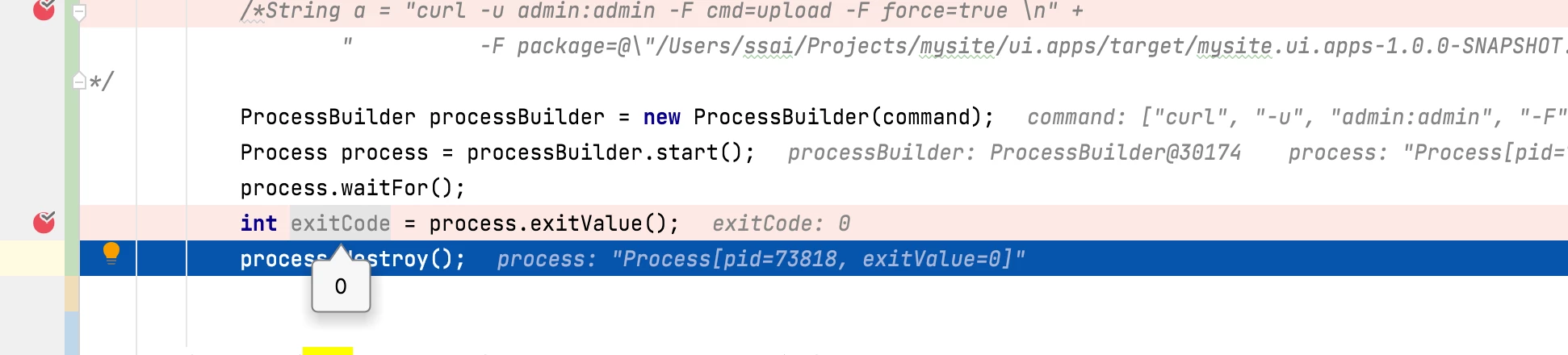
Passing you servlet which I have tested along with result.

@Override
	protected void doGet(SlingHttpServletRequest request, SlingHttpServletResponse response)
			throws ServletException, IOException {
		try {
			//Curl Command for Uploading the Package
			String[] command = {"curl", "-u", "admin:admin", "-F", "cmd=upload", "-F", "force=true", "-F", "package=@\"/Users/ssai/Projects/mysite/ui.apps/target/mysite.ui.apps-1.0.0-SNAPSHOT.zip\"", "http://localhost:4502/crx/packmgr/service/.json"};

			ProcessBuilder processBuilder = new ProcessBuilder(command);
			Process process = processBuilder.start();
			process.waitFor();
			int exitCode = process.exitValue();
			process.destroy();
			
		} catch (JSONException | InterruptedException e) {
			e.printStackTrace();
		}
	}


Why don’t you use Java PackageManager API instead, it’s recommended- please check ready to use solution:https://www.albinsblog.com/2018/01/how-to-upload-and-install-packages-through-java-api-in-aem.html?m=1

2 replies

ShaileshBassi
Community Advisor
Community Advisor
June 24, 2022

@shiv_prakash_patel Try out the below curl command from java.

String[] command = {"curl", "-H", "Accept:application/json", "-u", username+":"+password , "-F", "package=@" + packagePath, "http://localhost:4503/crx/packmgr/service/.json/?cmd=upload"};       

 Thanks

Shiv_Prakash_Patel
Community Advisor
Community Advisor
June 24, 2022

Hi @shaileshbassi ,

I have tried with above curl command but result is same (still getting exit code - 26).

Thanks

Shiv Prakash
SantoshSai
Community Advisor
Community Advisor
June 24, 2022

Hi @shiv_prakash_patel ,

Let's try these two?

curl -u <user>:<password> -F cmd=upload -F force=true 
-F package=@test.zip http://localhost:4503/crx/packmgr/service/.json
curl -u admin:admin -F file=@"name of zip file" -F name="name of package" 
-F force=true -F install=false http://localhost:4503/crx/packmgr/service.jsp
 
I have tried both of them works for me!
 
Regards,
Santosh
Santosh Sai
Shiv_Prakash_Patel
Community Advisor
Community Advisor
June 27, 2022

Hi @santoshsai ,

I have tried both in the AEM servlet. It is not working and giving exit code 26. The same curl command works fine with the terminal.

Have you tried this in a servlet or workflow process step? If so, please correct me.

I am using the below code in a servlet.

Regards!

//Curl Command for Uploading the Package
String[] command = {"curl", "-u", "admin:admin", "-F", "cmd=upload", "-F", "force=true", "-F", "package=@/etc/packages/my_packages/sample.zip", "http://localhost:4503/crx/packmgr/service/.json"};
ProcessBuilder processBuilder = new ProcessBuilder(command);
Process process = processBuilder.start();
process.waitFor();
int exitCode = process.exitValue();
process.destroy();


Shiv Prakash
SantoshSai
Community Advisor
SantoshSaiCommunity AdvisorAccepted solution
Community Advisor
June 27, 2022

@shiv_prakash_patel You are using wrong way of command please check 

package=@/etc/packages/my_packages/sample.zip

It should be 

package=@"/etc/packages/my_packages/sample.zip"

 double quote after @ 
Passing you servlet which I have tested along with result.

@Override
	protected void doGet(SlingHttpServletRequest request, SlingHttpServletResponse response)
			throws ServletException, IOException {
		try {
			//Curl Command for Uploading the Package
			String[] command = {"curl", "-u", "admin:admin", "-F", "cmd=upload", "-F", "force=true", "-F", "package=@\"/Users/ssai/Projects/mysite/ui.apps/target/mysite.ui.apps-1.0.0-SNAPSHOT.zip\"", "http://localhost:4502/crx/packmgr/service/.json"};

			ProcessBuilder processBuilder = new ProcessBuilder(command);
			Process process = processBuilder.start();
			process.waitFor();
			int exitCode = process.exitValue();
			process.destroy();
			
		} catch (JSONException | InterruptedException e) {
			e.printStackTrace();
		}
	}


Why don’t you use Java PackageManager API instead, it’s recommended- please check ready to use solution:https://www.albinsblog.com/2018/01/how-to-upload-and-install-packages-through-java-api-in-aem.html?m=1

Santosh Sai