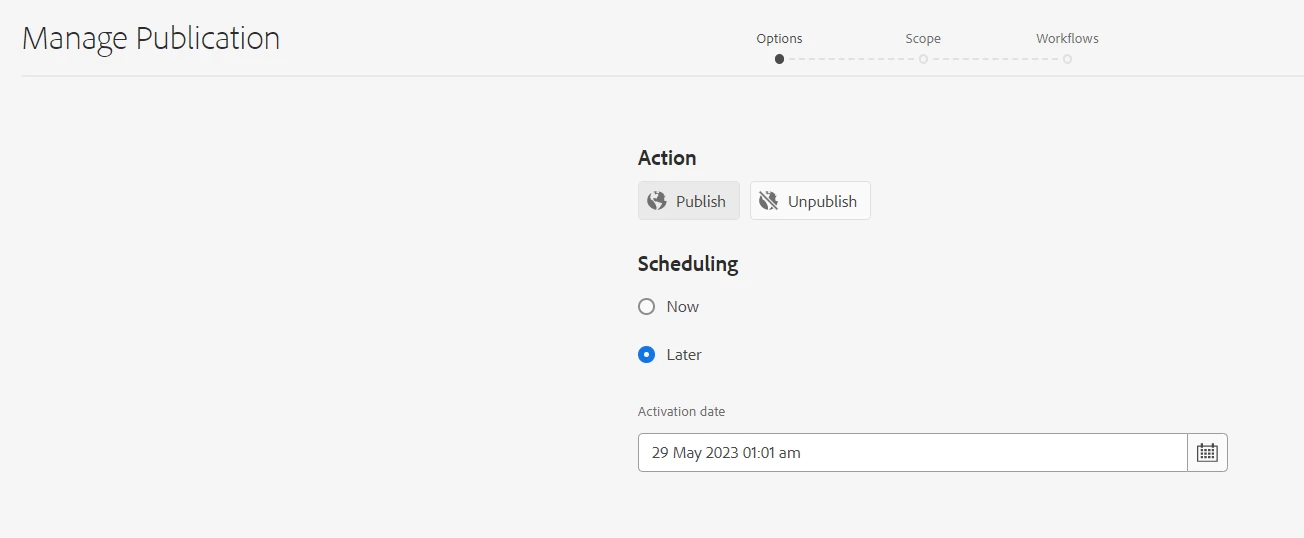
Publish later allows you to select past time | Community
Skip to main content
This post is no longer active and is closed to new replies. Need help? Start a new post to ask your question.
Best answer by ShubhanshuSi2

@shubhanshusi2, the minDate property works as intended. However, it just adds a date constraint. The use case is to prevent them from selecting a time in the past. How can I prevent them from selecting a past time?


You can register the validator to the registry using foundation.validation.validator. and then add it to the validation property of the date picker field https://developer.adobe.com/experience-manager/reference-materials/6-5/granite-ui/api/jcr_root/libs/granite/ui/components/coral/foundation/form/datepicker/index.html

In the validator, you can add the condition to prevent the user from selecting past time.

But this is an overkill from my perspective If the user is selecting past time that means he wants to complete the publishing action immediately or expects the content to be already published. Which can be achieved from publish now action.

4 replies

MayurSatav
Community Advisor and Adobe Champion
May 29, 2023

Hi @sethia_varsha , Could you kindly provide more details and elaborate on your question?


Level 2
May 29, 2023

Hi @mayursatav, when we click on the 'Manage Publication' icon to publish the page from author to publisher, we have the option to select later, where we can select an earlier time. Is there a way to restrict authors from selecting a past time?

Community Advisor
May 29, 2023

Hi @sethia_varsha ,
It works for me on AEM as Cloud Service SDK. I am assuming you are on 6.5.

To restrict users from selecting past date you have to overlay the below mentioned node (Not recommended on Cloud)
 
/libs/cq/gui/content/common/managepublicationwizard/body/items/form/items/wizard/items/optionsstep/items/fixedColumnContainer/items/fixedColumn/items/schedule/items/activationDate

Now add property - minDate = "today"


I would also recommend checking service pack release notes in case this has been updated in any recent releases.

Level 2
May 29, 2023

Hi @shubhanshusi2,

I see that the minDate property is available under:

'/libs/cq/gui/content/common/managepublicationwizard/body/items/form/items/wizard/items/optionsstep/items/fixedColumnContainer/items/fixedColumn/items/schedule/items/activationDate' .


Is it still necessary to overlay it? Furthermore, even if we select the previous time, the page is published immediately. The issue is that content authors can select a previous date in the date box, which might lead to misunderstanding.


Community Advisor
May 29, 2023

@sethia_varsha , the purpose of minDate property is to enforce that user can select dates starting from today and not past date

Without minDate = today

With minDate = today


If I understand correctly this is your use case to not let authors select past dates. You may have to debug why minDate is not working for you if it is already present /libs.

Check if manage publishing wizard already overlaid to /apps and if there are any errors in logs. Also what is the AEM version you are currently on?

Reference: https://developer.adobe.com/experience-manager/reference-materials/6-5/granite-ui/api/jcr_root/libs/granite/ui/components/coral/foundation/form/datepicker/index.html 

ManviSharma
Adobe Employee
Adobe Employee
May 29, 2023

Hi,


I hope the following helps:

To prevent selecting a past time in the "Publish Later" field:

  1. Create a custom validator class.
  2. Implement the validation logic to check if the selected time is in the past.
  3. Register the custom validator using an OSGi configuration.
  4. Apply the validation to the "Publish Later" field in your form or component dialog.
SivakumarKanoori
Community Advisor
Community Advisor
May 31, 2023

@sethia_varsha : May be you can write the Customized java script as below.

create a client lib category with cq.siteadmin.common and write the following js code. <You can customize it if required>


(function($, $document) {
$(document).on("change", "coral-datepicker", function(e) {
debugger;
e.stopPropagation();
e.preventDefault();
var d = new Date();
var selectDate = $('coral-datepicker input[name=activationDate]')[0].value;
if (d.getTime() <= new Date(selectDate).getTime()) {
const list = document.getElementsByTagName('coral-datepicker')[0].parentNode; // Select the list from which you want to delete an element
const ele = document.getElementsByTagName('coral-datepicker')[0].parentNode.getElementsByClassName('coral3-Icon--alert');
list.removeChild(ele[0]);
const ele2 = document.getElementsByTagName('coral-datepicker')[0].parentNode.getElementsByClassName('coral3-Tooltip--error');
list.removeChild(ele2[0]);
$('.foundation-wizard-control.coral3-Button.coral3-Button--primary')[0].setAttribute('style', "display: block;");
} else {
showError();
}

});
})($, $(document));

function showError() {
$('.foundation-wizard-control.coral3-Button.coral3-Button--primary')[0].setAttribute('style', "display: none;");
document.getElementsByTagName('coral-datepicker')[0].getElementsByClassName("coral3-Textfield coral-InputGroup-input")[0].classList.add("is-invalid");
var icon = new Coral.Icon().set({
icon: "alert",
size: "M",
});

icon.classList.add('coral-Form-fielderror');
document.getElementsByTagName('coral-datepicker')[0].parentNode.appendChild(icon);
var tooltip = new Coral.Tooltip().set({
content: {
innerHTML: "Select the future time"
},
open: true,
style: "z-index: 10010; max-width: 894.5px; left: 306px; top: -10px; display: none",
variant: "error"
});
document.getElementsByTagName('coral-datepicker')[0].parentNode.appendChild(tooltip);
}

Thanks,Siva