programmatically advance to next step in absense of user in (Dynamic Participant Step) | Community
Skip to main content
Level 2
November 29, 2022
Solved

programmatically advance to next step in absense of user in (Dynamic Participant Step)

  • November 29, 2022
  • 1 reply
  • 1033 views

For Below Workflow, if there is no user at L3 Level(Dynamic Participant Step), then in that case wokflow should autoAdvance  from L2 Level((Dynamic Participant Step)) to Marketing Team Approval Level((Dynamic Participant Step)).
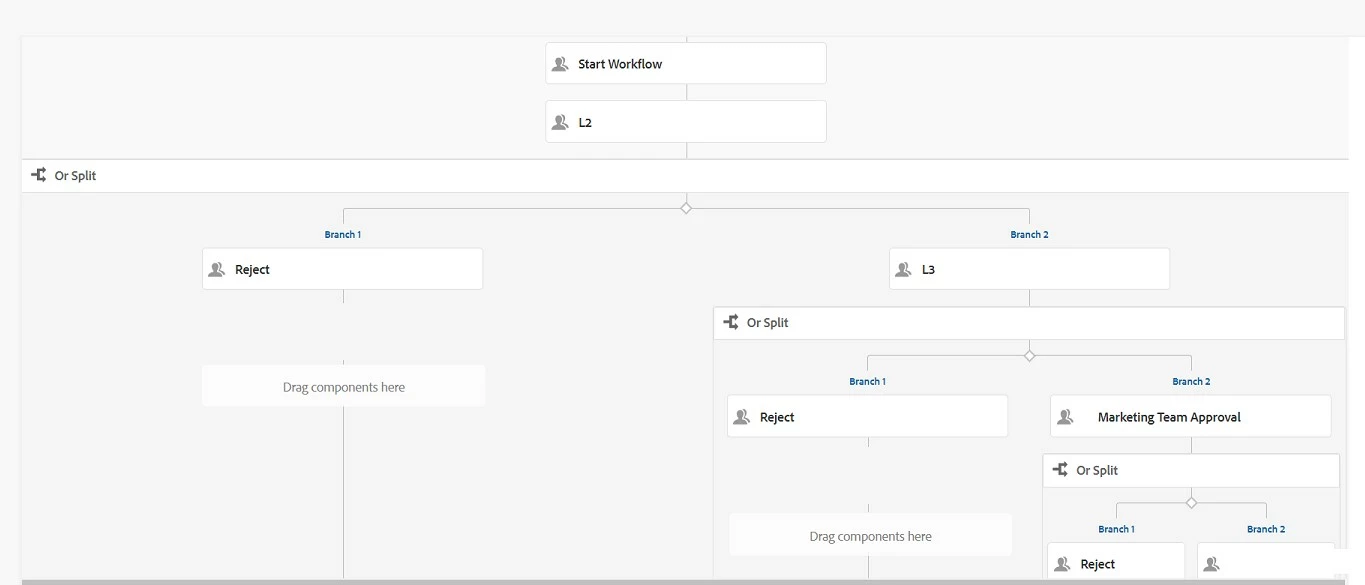
 

Below is the code I am using to programmatically to move to next workflow step in absense of user in the group i.e. auto handler advance programmatically, but it's not working.

if (!users.isEmpty()) {
} else {
WorkItem newWorkItem = workflowSession.getActiveWorkItems()[0];
workflowSession.complete(newWorkItem, workflowSession.getRoutes(newWorkItem,false).get(0));

}

alse tried below one:

if (!users.isEmpty()) {
} else {
List<Route> routes = workflowSession.getRoutes(workItem, false);
workflowSession.complete(workItem, routes.get(0));
}

I tried with true condition also.

This post is no longer active and is closed to new replies. Need help? Start a new post to ask your question.
Best answer by Nikita___Garg

Hi Nikita,

In our scenario, there are multiple Approver Steps, currently in all Dynamic participant Steps for the groups assigned users are present, in case if in future there is no user in the group of any of the Dynamic Participant step in that case we have to skip that Approver Level (similar to Auto Advance) and pass the task to next Level for approval, we are not stoping the flow in absence of user.

Thanks,
Avinash


hi @avinash-ranjan ,

I don't think that is possible directly on the step. You can do one thing, put the process step to check the user and skip the step.

Thanks,

Nikita Garg

1 reply

Adobe Employee
November 29, 2022

hi @avinash-ranjan ,

You can add Process step above L3 participant, which will check whether user is present or not, if present then continue with existing flow i.e., advance the workflow to next step.


Hope this helps.


Thanks,

Nikita Garg

Level 2
November 30, 2022

Hi Nikita,
In our current scenario when task is forwared from L2 Level to L3 Level and if tere is no user at L3 Level, then skip that Level and move to next Level i.e., Marketing Team Approval Level. 

We don't need to stop the flow in absence of user, we just need to skip that level.


Thanks,
Avinash

Adobe Employee
November 30, 2022

hi Avinash,


When you say no user present in L3 level , Does that mean , the group you have provided in the selection of participant doesnt contain any user in it ?


Whether L2 person approves,  then you define process step, which will do the above operation. 


Thanks,

Nikita Garg