Process of Minifying JS and CSS | Community
Skip to main content
Level 2
February 24, 2020
Solved

Process of Minifying JS and CSS

  • February 24, 2020
  • 3 replies
  • 7438 views

AEM with version 6.4

What is the process of minifying the js and css inside the clientlibs folder

This post is no longer active and is closed to new replies. Need help? Start a new post to ask your question.
Best answer by BrianKasingli

Hey @archanava,

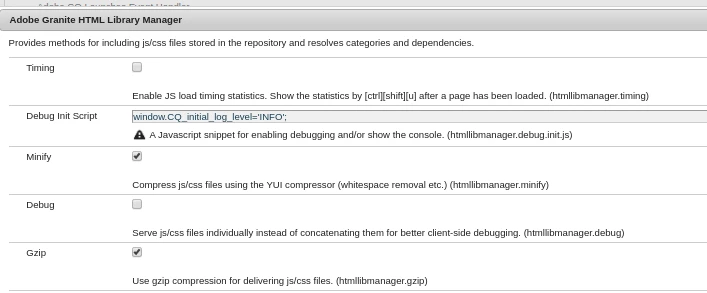
Other than the HTML Library Manager OSGi configuration (video tutorial), where the AEM publish instance will be doing the work to minification to CSS and JS, you can also try minifying your CSS and JS assets in the Apache webserver; utilising the Apache PageSpeed module, (installation documentation).

I hope this helps!

3 replies

ArpitVarshney
Community Advisor
Community Advisor
February 24, 2020

Hi @archanava 


Please do the below steps:

  1. Please go to OSGi configuration console and search for Adobe Granite HTML Library Manager configuration.
  2. Open the configuration and make sure that minify field  is checked for the environment.


Please make sure this configuration has been added via code in your development environments.


ArchanaVAAuthor
Level 2
February 24, 2020

Thanks @arpitvarshney 
 I have enabled the minify and also include jsProcessor in xml file of ClientLibrary

jsProcessor="[default:none,min:gcc;languageIn=ECMASCRIPT_2015;compilationLevel=whitespace]"

When I build in console Im facing JS errors 

sunjot16
Adobe Employee
Adobe Employee
February 24, 2020

The following document may be helpful:

https://helpx.adobe.com/ca/experience-manager/6-4/sites/developing/using/clientlibs.html#UsingPreprocessors


Try rebuilding the clientlibs via File System, as per: https://helpx.adobe.com/ca/experience-manager/kb/How-to-force-a-recompilation-of-all-Sling-scripts-jsps-java-sightly-on-AEM-6-4.html


* Moreover, what kind of errors do you see in the error.log file?

BrianKasingli
Community Advisor and Adobe Champion
BrianKasingliCommunity Advisor and Adobe ChampionAccepted solution
Community Advisor and Adobe Champion
February 24, 2020

Hey @archanava,

Other than the HTML Library Manager OSGi configuration (video tutorial), where the AEM publish instance will be doing the work to minification to CSS and JS, you can also try minifying your CSS and JS assets in the Apache webserver; utilising the Apache PageSpeed module, (installation documentation).

I hope this helps!