
Problem in Page property fields after SP16 upgrade | Community
Skip to main content
samsundar23
Level 4
May 17, 2023

Problem in Page property fields after SP16 upgrade

  • May 17, 2023
  • 3 replies
  • 1345 views

We have recently upgraded SP16 in our AEM 6.5 instance.

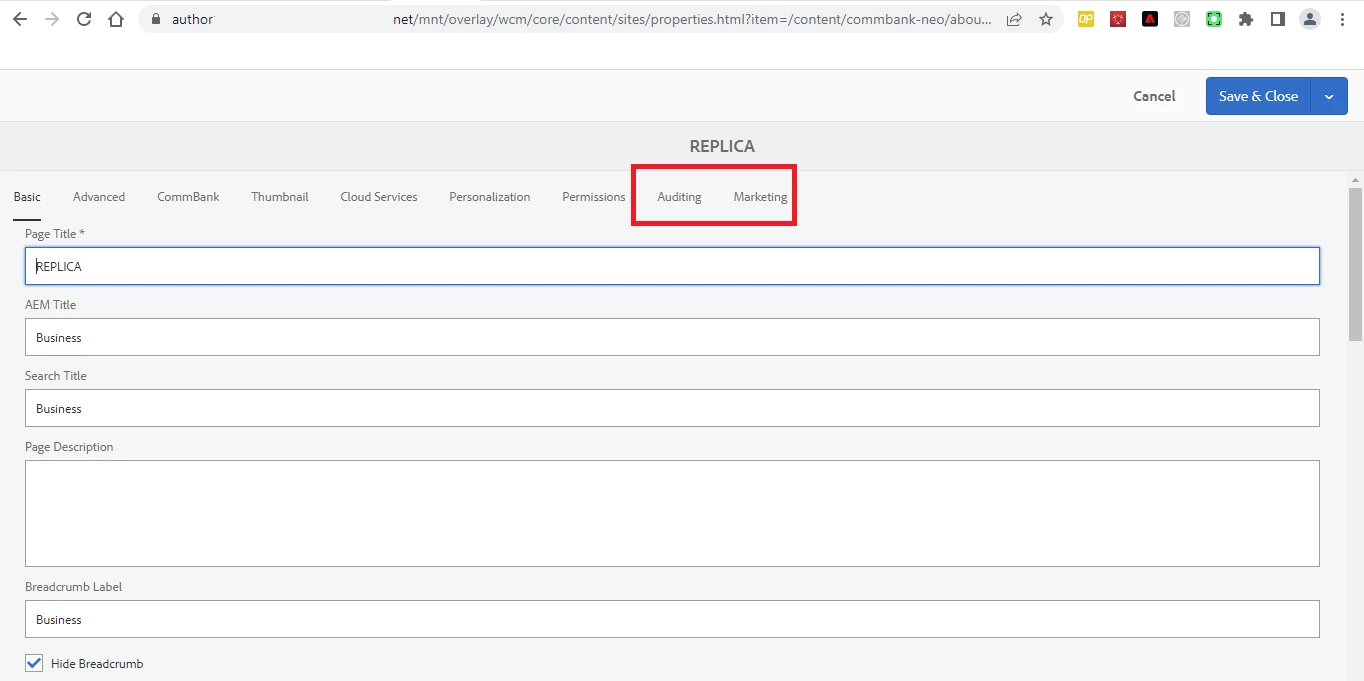
We are facing a very peculiar problem where fields in couple of tabs of page properties are not getting displayed right after the upgrade. (Refer Screenshot-1)

Has anyone experienced this problem. 
If so kindly provide any resolution for the same.


Screenshot-1
 

Thanks
SHYAMSUNDAR TK

This post is no longer active and is closed to new replies. Need help? Start a new post to ask your question.

3 replies

arunpatidar
Community Advisor
Community Advisor
May 17, 2023

This could happened due to page supertype updated with the AEM6.5.

The latest page type, include tabs using path, example

https://github.com/arunpatidar02/aemaacs-aemlab/tree/master/ui.apps/src/main/content/jcr_root/apps/aemlab/oneweb/components/page 


What was the last version you were using?

Arun Patidar
samsundar23
Level 4
May 17, 2023

@arunpatidar 

Thanks for your feedback.
The same problem did not happen during the SP13 upgrade with AEM 6.5

Last version was AEM 6.4 which was used for the application.
Any way to resolve this problem ?

ManviSharma
Adobe Employee
Adobe Employee
May 17, 2023

Hi,


To resolve the issue of missing fields in certain tabs of page properties after upgrading to AEM 6.5 SP16, you can follow these steps:

  1. Clear the browser cache.
  2. Rebuild clientlibs to ensure updated styles and scripts are loaded correctly.
  3. Check for any custom code or overlays and ensure compatibility with the new version.
samsundar23
Level 4
May 18, 2023

Let me try these steps and will keep you post the outcome of it.
Thanks !

samsundar23
Level 4
May 18, 2023

hi @manvisharma 
I followed the requested steps.

I'm experiencing the same problem even now.


Thanks !

samsundar23
Level 4
May 18, 2023

Guys,
Just one more finding for the above issue.
Please find the below screenshot - If I remove the rep:policy of the particular page in crxde, the fields in Auditing and Marketing tabs are visible and could be edited.

But when the rep:policy is available, the problem exists.


- When I created a new page with same template, the problem doesn't exist. It is an issue with existing page only.


Kindly let me know.

Thanks !